Installation guide
 Owner’s manual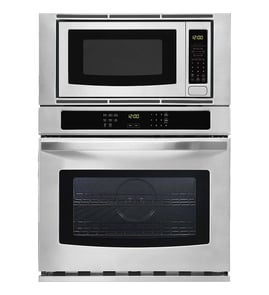

How to reset a GE wall oven?
To reset the electronic controls on your GE PT970SR3SS wall oven/microwave combo, turn the circuit breaker OFF (or remove the fuse) for 1 minute, then restore power. This power-cycle reset clears many control glitches and restores normal operation.
Reset steps (safe, basic reset)
- Set all oven controls to OFF.
- At your home electrical panel, switch the oven breaker OFF (or remove the fuse).
- Wait 1 full minute.
- Switch the breaker ON (or reinstall the fuse).
- Re-set the clock if needed and test Bake or Broil.
For control and feature details specific to this model, use the PT970SR3SS owner’s manual.
If the oven still will not power up
A reset will not fix a loss of incoming power or a failed safety device. Check these common causes next:
- Tripped breaker that will not fully reset (toggle OFF firmly, then ON)
- Loose wiring at the junction box (hard-wired installations)
- Overheat condition that opened a safety device
- Control not responding after power is restored
If you suspect an overheat safety issue on this model, a common component to check is the wall oven safety thermostat WB24T10060.
Quick troubleshooting: what the symptoms suggest
| What you see after reset | Most likely direction | What to do next |
|---|---|---|
| Display is blank | Power supply issue or open safety device | Verify breaker, then inspect safety devices |
| Display works but won’t heat | Heating circuit or sensor issue | Run Bake/Broil test, check error codes |
| Error code appears | Control detected a fault | Use the error code list for diagnosis |
For model-matched fault help, use GE combination wall oven and microwave error codes.
Why it matters
A 1-minute power reset is the fastest way to clear a “locked up” control board without disassembly. If the problem returns quickly, it usually points to an underlying issue (power, overheating, sensor, or control).
Last updated: January 2026
How to disable control lock on GE wall oven?
On the GE PT970SR3SS wall oven/microwave combo, the exact Control Lock key name and press sequence can vary by control panel version, so we can’t confirm the precise button label from the model’s installation information alone. Use the steps below, then verify the correct key on the PT970SR3SS owner’s manual.
Steps that work on most GE wall ovens
- Press Cancel/Off to end any active cooking cycle.
- Look for a key labeled Control Lock, Lock Controls, or a lock icon.
- Press and hold that key for 3 to 5 seconds.
- Watch for the lock indicator (icon, “LOC”, or “Control locked”) to turn off.
- Test a simple function (such as Bake) to confirm the keypad responds.
If you don’t see a “Control Lock” key
Some GE wall ovens use a secondary function instead of a dedicated lock button.
- Check for Lock Controls printed above another key.
- Check the display prompts; some models show “Hold 3 sec” when locked.
- If the microwave and oven share controls, confirm you are unlocking the oven controls (not a microwave child lock).
If Control Lock won’t turn off
Try these safe checks before assuming a failure:
- Hold time: keep steady pressure for the full 5 seconds.
- Power reset: turn the breaker off for 1 minute, then back on.
- Moisture/cleaner residue: let the panel dry completely; wipe with a barely damp cloth, then dry.
- Stuck key behavior: if the panel beeps or acts like a key is held down, the keypad may be stuck.
| What you see | What it usually means | What to do next |
|---|---|---|
| “LOC” stays on after reset | Lock command not being accepted | Confirm correct key sequence in the manual |
| Keys intermittently respond | Touch panel or control input issue | Inspect for moisture; consider service |
Why it matters
Control Lock prevents accidental starts and unwanted keypad input during cleaning. If it won’t clear, you may be unable to use Bake, Broil, or the microwave functions until the lock state is released.
Last updated: January 2026
What does F9 mean on GE oven?
On the GE PT970SR3SS wall oven/microwave combo, an F9 code indicates a fault the control detects during operation, but the exact definition can vary by GE platform and configuration. We recommend confirming the meaning and the reset procedure for your unit in the PT970SR3SS owner’s manual.
What to do first (safe steps)
- Press Clear/Off to stop the cycle.
- Let the oven cool if the code appeared during or after self-clean.
- Turn power off at the breaker for 3 to 5 minutes, then restore power.
- Try a simple Bake cycle and watch for the code to return.
- If the door is locked, do not force it; wait for cooling and retry after the reset.
Common areas that can trigger F9 on many GE ovens
Even though the exact F9 definition is model-dependent, these are frequent categories tied to F9-style faults:
- Door lock or latch sensing (lock motor, lock switches, alignment)
- Wiring/connectors in the related circuit
- Electronic control interpretation of the input signals
- Temperature sensing or safety shutdown conditions (less common, but possible)
Parts you may end up checking (if diagnosis points there)
Use these only after confirming the failure with testing or a technician’s diagnosis.
| If the issue is confirmed in | What you might replace | Example model-compatible part |
|---|---|---|
| Door lock/latch system | Lock assembly | Wall oven door lock assembly WB14T10082 |
| Main control logic | Control board | Wall oven control board WB27T11345 |
Why it matters
F-codes are the oven’s way of preventing unsafe operation or protecting components. Confirming the exact meaning for PT970SR3SS helps you avoid replacing parts based on a generic code list.
Helpful reference
For GE code explanations and troubleshooting flowcharts that apply to combination units, see GE combination wall oven and microwave error codes.
Last updated: January 2026