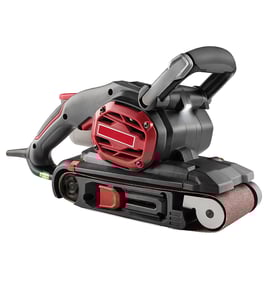

What are the main parts of a belt sander?
For the Craftsman 31511781 4-inch belt sander with dust pickup, the main parts are the abrasive sanding belt, two rollers (drive and idler), the motor and drive system that turns the belt, and the belt-tracking/tension hardware that keeps the belt centered and tight.
Main components you will see on most belt sanders
- Sanding belt: The abrasive loop that does the cutting and smoothing.
- Drive roller (lower roller): Powered by the motor; pulls the belt.
- Idler roller (upper roller): Free-spinning roller that helps guide the belt and maintain tension.
- Motor: Provides the power to rotate the drive roller.
- Drive system: Typically gears and/or a belt inside the housing that transfers motor power to the drive roller.
- Tracking and tension adjuster: Lets you center the belt on the rollers and set proper belt tension.
- Dust pickup system: Dust port, bag, or canister that captures sanding dust.
How the “belt path” works (quick overview)
The sanding belt rides around two rollers:
| Part | What it does | Common symptom if it’s off |
|---|---|---|
| Drive roller | Moves the belt under power | Belt stalls, slips, or surges |
| Idler roller | Guides belt and supports tension | Belt wanders side-to-side |
| Tracking/tension adjuster | Centers and tightens belt | Belt runs off the roller edge |
Why it matters
Knowing these parts helps you troubleshoot fast. For example, a belt that keeps walking off usually points to tracking/tension setup or roller wear, while a belt that stops under light pressure often points to drive issues or a worn belt.
Practical tips before you troubleshoot or replace anything
- Unplug the sander before inspecting rollers, wiring, or the dust pickup.
- Install the belt in the correct direction (if arrows are printed on the belt).
- Set tension fully, then fine-tune tracking with the adjuster while the tool runs.
- Empty the dust bag/canister often; clogged dust pickup can reduce performance.
- If you suspect an electrical issue, use a safe test method like in how to use a multimeter to test electrical parts video.
Last updated: February 2026
Where can I buy Craftsman replacement parts?
For Craftsman model 31511781 (4" belt sander with dust pickup), the most reliable way to buy the correct replacement parts is to shop by your exact model number on Sears PartsDirect, then match the part in the diagram and parts list to what’s on your tool.
Best way to make sure you get the right part
When you shop by model number, you avoid ordering a look-alike part that doesn’t fit your specific Craftsman belt sander.
- Confirm the model number on the tool’s nameplate is 31511781
- Use the model’s parts diagrams to identify the exact part description
- Compare your original part to the diagram (shape, mounting points, wire terminals)
- If multiple versions are listed, match by notes such as serial range or production change
- Order the part that matches your diagram callout
What you’ll typically find for a belt sander like this
For a 4" belt sander with dust pickup, the most commonly replaced items include wear parts and electrical components.
| Part type | Common reason to replace | What you’ll notice |
|---|---|---|
| Drive belt / belt tracking parts | Wear or misalignment | Belt won’t track, wanders, or slips |
| Carbon brushes | Normal wear | Weak power, intermittent running, heavy sparking |
| Switch | Electrical wear | Won’t start, cuts out when bumped |
| Dust pickup / bag parts | Cracks or clogging | Poor dust collection, dust leaks |
Quick checks before ordering
These checks help confirm whether you need a part or just an adjustment or cleaning.
- Unplug the sander and inspect the power cord for cuts or loose strain relief
- Check belt tracking adjustment and platen condition
- Look for brush wear (short brushes or uneven wear)
- Inspect the dust port for packed debris
Why it matters
Using the correct model-specific part helps your Craftsman 31511781 run smoother, track the sanding belt correctly, and reduce downtime from returns or rework.
Last updated: February 2026
Why did my belt sander suddenly stop working?
If your Craftsman 31511781 4-inch belt sander with dust pickup suddenly stopped, the most common causes are a power supply issue, worn brushes, a tripped internal thermal protector, or a jammed belt/roller that stalls the motor. Start with quick external checks, then inspect the drive and electrical components.
Quick checks (fastest fixes first)
- Unplug the sander, then plug it directly into a known-good outlet (skip power strips).
- Check the cord for cuts, kinks, or a loose strain relief at the handle.
- Remove the sanding belt and confirm the front and rear rollers spin freely by hand.
- Clear packed dust from the belt path and dust pickup port; heavy buildup can bind rollers.
- Let the tool cool for 20 to 30 minutes if it stopped under heavy load (possible thermal trip).
Mechanical causes that stop a belt sander
A belt sander can “die” instantly if the belt binds or the drive system slips.
- Belt tracking/tension issue: A loose or mis-tracked belt can climb the roller edge and jam.
- Debris on rollers/pulleys: Resin, dust, or a torn belt edge can lock the roller.
- Worn roller bearings: Bearings that feel gritty or tight can stall the motor.
What to look for
| Symptom | Likely cause | What to do |
|---|---|---|
| Motor hums but belt does not move | Jammed belt/roller, seized bearing | Remove belt; check rollers for free spin; clean and re-test |
| Stops only when you press down | Belt slipping, worn drive surface, excessive load | Reduce pressure; verify tension/tracking; replace worn wear parts |
| No sound, no response | Switch/cord/brush issue, thermal trip | Cool down; inspect cord; check brushes and switch |
Electrical causes (common on older sanders)
- Worn carbon brushes: When brushes wear down, the motor can stop suddenly or run intermittently.
- Damaged cord or switch: Internal breaks can cut power when the tool is moved.
- Overload/thermal protection: Heavy pressure, clogged dust pickup, or a binding belt can overheat the motor.
For safe electrical testing, we use a meter and continuity checks; our guide how to use a multimeter to test electrical parts video walks through the basics.
Why it matters
A sudden stop is often a protection response (overload/heat) or a developing wear issue (brushes, bearings). Fixing the root cause prevents repeat shutdowns and reduces the chance of motor damage.
Last updated: February 2026