 Error Codes





What does F9 mean on GE oven?
On a GE electric wall oven like model JKD5000DV1BB, an F9 error usually points to a door lock or latch problem (often during or after self-clean) or a related control/feedback issue. Clearing the code may be temporary; fixing the latch circuit is the lasting solution.
What to do first (quick checks)
- Press Clear/Off and let the oven cool completely.
- If the code appeared during self-clean, wait 60 to 90 minutes; the lock can stay engaged until temperatures drop.
- Check that the oven door is fully closed and not binding on the gasket.
- Turn off power at the breaker for 2 minutes, then restore power to reset the control.
- If the door is locked and won’t release after cooling, avoid forcing it; the latch mechanism can break.
Common causes and the parts that usually fix it
F9 is most often triggered when the control does not see the door lock switch change state as expected.
| Likely cause | What you’ll notice | Common fix |
|---|---|---|
| Door lock assembly not moving or switch not changing | Door won’t lock/unlock, F9 after self-clean | Replace wall oven door lock assembly WB10X28391 |
| Wiring/connection issue in latch circuit | Intermittent F9, works sometimes | Inspect harness plugs for heat damage, tighten connections |
| Control not reading latch feedback correctly | F9 persists after latch replacement | Professional diagnosis of control and latch feedback circuit |
Why it matters
When the control thinks the door is locked (or can’t confirm it unlocked), it can disable baking for safety and to prevent running self-clean with an unsecured door. Fixing the latch system restores normal operation and prevents repeat lockouts.
If you’re troubleshooting with a meter
- Unplug power or switch off the breaker before accessing wiring.
- Check latch switch continuity while manually moving the latch (if accessible).
- Look for pinched or heat-brittle wires near the door lock area.
For safe testing basics, we recommend how to use a multimeter to test electrical parts video.
Last updated: February 2026
What are the parts of an electric oven?
An electric oven like the GE JKD5000DV1BB is built from heating, sensing, airflow, lighting, and control components that work together to create and regulate temperature safely. The exact mix varies by model, but the core parts are consistent across most electric wall ovens.
Main parts you will commonly find
- Heating system: bake element and broil element (the heat sources)
- Temperature sensing: oven temperature sensor and wiring
- Controls: user interface (control panel) and electronic control boards
- Airflow and cooling: cooling fan, fan blade, and fan control/sensor boards
- Door system: door gasket, door glass/window, hinges, and (on some models) a door lock
- Lighting: oven light bulb and light housing/assembly
- Wiring and connectors: harnesses, conduit, terminals, and mounting hardware
Examples of model-specific parts for GE JKD5000DV1BB
These are some of the key components we commonly see on this model:
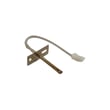
- Wall oven temperature sensor WB21X10165
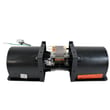
- Wall oven cooling fan assembly WB26X31060
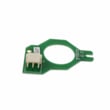
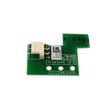
- Wall oven relay control board WB27X33083
- Gasket oven door WB35X34867
- Wall oven light assembly WB25X31221
Quick “what it does” guide
| Part type | What it does | Common symptom when it fails |
|---|---|---|
| Temperature sensor | Tells the control the oven temperature | Oven too hot, too cool, or temperature swings |
| Control board | Switches power to heating circuits | No heat, intermittent heat, error codes |
| Cooling fan system | Protects controls by moving heat out | Fan runs constantly, noisy fan, overheating shutdown |
| Door gasket | Seals heat inside the cavity | Long preheat, uneven baking, hot air leaking |
| Light assembly | Illuminates the oven cavity | Light out or flickering |
Why it matters
Knowing the major oven parts helps you troubleshoot faster and order the right replacement the first time. For example, temperature problems often trace back to the sensor or control board, while overheating issues often involve the cooling fan system.
Last updated: February 2026
How to replace the control panel on a GE oven?
To replace the control panel on your GE JKD5000DV1BB electric wall oven, we shut off power at the breaker, remove the control panel mounting screws, transfer the wiring harness connections one at a time, then reassemble and restore power to test the keypad and display.
Before you start (safety and prep)
Replacing a wall oven control panel involves live-voltage wiring; we always disconnect power first and verify it is off.
- Turn both oven breakers OFF (many wall ovens use a 240V double breaker)
- Confirm the display is dark and the oven will not heat
- Protect the door and trim with a towel to prevent scratches
- Take clear photos of every connector before moving anything
- Label plugs with tape so each harness returns to the same location
Parts and tools we use
If your panel is cracked, unresponsive, or has dead segments, the correct replacement for this model is the control panel-black WB27X48103.
- Phillips and/or Torx screwdriver (varies by screw type)
- Small flat screwdriver (for locking tabs)
- Needle-nose pliers (for stubborn connectors)
- Work gloves
- Camera/phone for wire routing photos
Replacement steps (typical for JKD5000DV1BB)
- Kill power at the breaker.
- Open the oven door and remove the screws securing the control panel or control panel trim (location varies by design).
- Carefully pull the panel forward just enough to access wiring.
- Move connectors one at a time from the old panel to the new panel (match by position and locking tab style).
- Reinstall the panel, ensuring no wires are pinched.
- Restore power and test: clock set, bake start, cancel, oven light, and any Wi-Fi prompts.
Quick connector handling guide
| Connector type | What we do | Common mistake to avoid |
|---|---|---|
| Locking tab plug | Press tab, pull straight | Pulling on wires instead of the plug |
| Ribbon-style cable | Release latch (if present) | Creasing or twisting the ribbon |
| Multi-pin harness | Rock gently side-to-side | Forcing it and bending pins |
Why it matters
A properly installed control panel restores safe, reliable operation of the keypad and display; mis-seated connectors can cause error codes, no-heat symptoms, or intermittent beeping.
Last updated: February 2026
Why is my GE electric oven not heating up?
Your GE JKD5000DV1BB electric wall oven typically won’t heat when it’s missing full 240V power, the temperature sensing circuit is inaccurate, or the control is not energizing the bake/broil circuits. Start with power and settings checks, then move to sensor and control-related causes.
Quick checks we recommend first
- Confirm you selected Bake or Broil (not Delay Start, Sabbath, or Keep Warm).
- Reset the double-pole breaker fully OFF, then ON (a 240V oven can look “on” with only 120V).
- Verify the door closes fully and the gasket is not preventing a tight seal.
- If the display works but preheat never starts, focus on sensor, high-limit, and control checks.
Most common causes and what to do
| Likely cause | What you’ll notice | Next step |
|---|---|---|
| Loss of 240V supply | Lights/display work; little or no heat | Reset breaker; check supply wiring if qualified |
| Bad oven temperature sensor | No preheat, wrong temps, or error codes | Test/replace wall oven temperature sensor WB21X10165 |
| High-limit opened from overheating | Heating stops during/after preheat | Check airflow; inspect range high-limit thermostat WB24X46906 |
| Control not switching heat on | No heat in Bake/Broil | Diagnose/replace wall oven relay control board WB27X33083 |
Why it matters
An electric wall oven needs full 240V and accurate temperature feedback to heat safely. Fixing a power issue or a failed sensor often restores normal preheat without replacing multiple parts.
Last updated: February 2026





