
Are Delta table saws good quality?
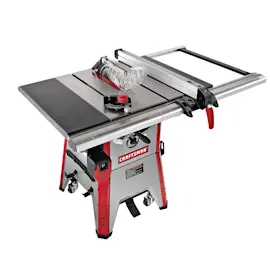
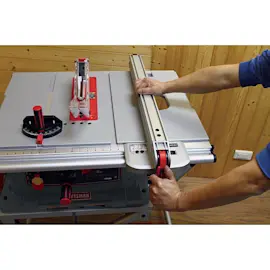
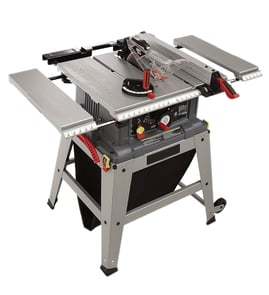
Yes. Delta table saws are widely regarded as solid, long-lasting saws when they’re properly set up and maintained; for your Delta 36-546 10" bench saw, overall quality comes down to fence alignment, arbor and bearing condition, and how smoothly the blade raises, tilts, and holds settings.
What “good quality” looks like on a Delta 36-546
We judge a bench saw’s quality by how accurately it cuts and how consistently it stays in adjustment.
- Fence locks parallel to the blade and doesn’t deflect under light pressure
- Blade raises and tilts smoothly without binding or excessive play
- Arbor has minimal runout (blade does not wobble)
- Motor reaches speed quickly and doesn’t bog down in typical rip cuts
- Table surface is flat enough to support accurate joinery and repeatable cuts
Quick checks you can do in 10 minutes
These checks tell you whether your saw is a “keeper” or needs tune-up parts.
- Unplug the saw; verify the blade is tight and spins freely by hand
- Check fence-to-miter-slot parallelism with a combination square
- Check blade-to-miter-slot parallelism at the front and back of the blade
- Raise and lower the blade fully; feel for rough spots (often dust buildup or worn bushings)
- Tilt to 45 degrees and back to 0; confirm the bevel stop returns accurately
Common wear items that affect cut quality
Even a well-built table saw will cut poorly if these areas are worn or dirty.
| Symptom | Most common cause | What to do first |
|---|---|---|
| Burning, wandering rip cuts | Fence not parallel, dull blade | Align fence; install a sharp blade |
| Vibration or chatter | Worn bearings, bent blade, debris on arbor flange | Clean flange; try a known-straight blade |
| Inaccurate bevels | Bevel stop drift, trunnion dust buildup | Clean and re-set stops |
| Hard to raise/tilt | Pitch and sawdust in gears | Clean and dry-lube mechanisms |
Why it matters
A “good quality” table saw is one that holds alignment and cuts predictably. When the fence, arbor, and height/tilt mechanisms are in good shape, your Delta 36-546 can deliver accurate rips and crosscuts for DIY projects and shop work.
Finding the right replacement parts
We recommend matching parts by the exact model number (36-546) and the diagram location to avoid fit issues. Start with the parts list for this model; if you’re searching across Delta saw diagrams by model number, use Sears PartsDirect.
Last updated: February 2026
How much horsepower does a Delta 36-546 have?
The exact horsepower rating for the Delta 36-546 10" bench saw depends on the specific motor nameplate data used on your saw; we use the motor’s label (HP or amps/volts) as the source of truth for this model. If you’re shopping parts or comparing saw capacity, use your model number and motor label details when searching on Sears PartsDirect.
How to find the horsepower on your Delta 36-546
Check the motor nameplate (usually on the motor housing) and record what it lists.
- Look for HP listed directly (for example, 1 HP, 1.5 HP, etc.)
- If HP is not listed, write down amps (A) and volts (V)
- Note whether the motor is wired for 120V or 240V (if applicable)
- Record the RPM and service factor (SF) if shown
- Match those details when ordering a motor, switch, or capacitor
Quick reference: what the label numbers mean
| Label item | What it tells you | Why you care |
|---|---|---|
| HP | Motor output rating | Helps predict cutting power in hardwood |
| Amps (A) | Electrical draw under load | Helps size extension cords and circuits |
| Volts (V) | Supply voltage | Confirms correct wiring and plug type |
| RPM | Motor speed | Affects blade speed and cut quality |
Typical power range for a 10" bench saw
Most 10" bench saws are commonly in the 1 to 2 HP class (often listed as amps instead of HP). If your Delta 36-546 bogs down, the issue is often blade condition, belt tension (if belt-driven), or power delivery, not just horsepower.
Why it matters
Horsepower is only one part of real cutting performance. A sharp 10" blade, correct fence alignment, proper feed rate, and solid electrical supply often make a bigger difference than a small HP change.
Last updated: February 2026
How do I find the model number on my 36-546?
The model number for your Delta 10-inch bench saw is on the saw’s identification label (nameplate). On the Delta 36-546, this label is typically on the main saw body or base; once you find it, match the full model number exactly when looking up diagrams and parts.
Where to look on a Delta 36-546 table saw
Check these common nameplate locations first:
- The rear of the saw housing (motor side)
- The side of the base or frame (near the stand mounting points)
- Under the table top near the front edge (look along the underside lip)
- Near the power switch box or cord entry point
- On the motor plate (if your saw has a separate motor tag)
What to write down (so parts match)
Record the information exactly as printed on the label.
- Model number (example: 36-546)
- Type number or revision (if listed)
- Serial number (helps confirm production run)
- Electrical rating (volts and amps), if you are troubleshooting power issues
Quick checklist if the label is hard to read
If the tag is painted over, dusty, or scratched, these steps usually make it readable:
- Unplug the saw before cleaning around the label
- Wipe with a damp cloth, then dry
- Use a flashlight at a low angle to highlight stamped text
- Take a close-up photo and zoom in
Model number vs. serial number (what each is for)
| Item | What it identifies | When you need it |
|---|---|---|
| Model number | The saw design (parts diagrams match this) | Ordering parts, finding diagrams |
| Serial number | Your specific unit | Confirming exact version, service history |
Why it matters
Delta table saw parts can vary by model and production run; using the exact model number from the nameplate prevents ordering the wrong switch, arbor parts, guards, or hardware.
For more help confirming where to find the tag and what the numbers mean, use [how to find your appliance model number (and what it means for parts)].
Last updated: March 2026