Owner’s manual
 Error Codes





What are common problems with RF28R6201SR?
Common problems we see with the Samsung RF28R6201SR refrigerator include ice maker issues (no ice or no dispensing), warm fresh food temperatures, water leaks, door closing problems, and unusual noises. Start by checking settings and airflow, then follow the model’s troubleshooting steps in the RF28R6201SR owner's manual.
Most common symptoms and what they usually point to
- Ice maker not making ice: water supply issue, ice room freezing up, or an ice container problem
- Ice not dispensing: jammed ice, frozen chute, or auger drive issue (often tied to the dispenser mechanism)
- Fridge too warm: blocked vents, dirty condenser area, or evaporator fan/defrost airflow problems
- Leaking water: clogged drain path or drain components, or water filter housing connections
- Noisy operation: condenser fan noise, evaporator fan noise, or vibration from leveling
- Door won’t close/open smoothly: hinge alignment, gasket sealing, or bin/shelf interference
Quick checks we recommend first (10 minutes)
- Confirm temperature settings and allow 24 hours after changes.
- Make sure vents inside the fresh food section are not blocked by food containers.
- Check door closure: drawers fully shut, bins seated, nothing preventing the gasket from sealing.
- Listen for where the noise comes from (rear bottom vs. inside back wall).
- Look for water source: under crisper area (drain) vs. near filter area (filter housing).
Parts that commonly relate to these symptoms
| Symptom | Commonly involved part | What it affects |
|---|---|---|
| Ice won’t dispense | Refrigerator auger motor assembly DA97-12540G | Drives ice through the dispenser |
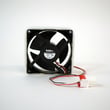
| Warm fridge temps | Refrigerator fresh food evaporator cover and fan assembly DA97-12608B | Circulates cold air in fresh food section |
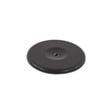
| Leaking inside fridge | Refrigerator drain cap DA67-01301A | Helps manage defrost drain flow |
| Noise from rear bottom | Refrigerator condenser fan motor assembly DA97-15765C | Moves air across condenser coils |
| Temperature swings | Refrigerator temperature sensor DA32-10104V | Feeds temperature data to controls |
Why it matters
These symptoms often share root causes (airflow, defrost drainage, and ice room conditions). Catching them early helps protect food temperatures, reduces ice maker freeze-ups, and prevents recurring leaks.
Helpful DIY references
- Use why your Samsung fridge stopped making ice and how to fix it for step-by-step ice maker diagnostics.
- If the display shows a code, check Samsung rb series bottom freezer refrigerator error codes for common Samsung refrigerator error patterns.
Last updated: February 2026
What are the dimensions of the Samsung model RF28R6201SR?
For the Samsung RF28R6201SR refrigerator, the overall size is typically about 35 3/4 in. wide and about 70 in. tall, with depth varying based on whether handles and hinges are installed. For the exact configuration measurements for your kitchen cutout, confirm the spec table in the RF28R6201SR owner's manual.
Dimensions by configuration (what to measure)
Depth changes the most depending on what is installed. Use the configuration that matches how your refrigerator will sit in the space.
| Configuration | Width | Height | Depth |
|---|---|---|---|
| With hinges, handles, and doors | 35 3/4 in. | 70 in. | 36 1/2 in. |
| Without hinges and door | 35 3/4 in. | 68 7/8 in. | 29 3/8 in. |
| With hinge and door, no handle | 35 3/4 in. | 70 in. | 34 in. |
How we recommend measuring your space
- Measure the opening width at the front and back (walls are often not perfectly square).
- Measure height to the lowest cabinet or soffit above the refrigerator.
- Measure depth to the wall and note baseboards, water line clearance, and outlet location.
- Plan for door swing clearance so bins and drawers can open fully.
- Leave airflow space per the clearances listed in the RF28R6201SR owner's manual.
Why it matters
Using the right “with handles” or “without handles” depth prevents common fit problems like doors hitting an island, drawers not pulling out, or the cabinet face not aligning with the refrigerator doors.
Last updated: February 2026
How do I find the model number on my RF28R6201SR?
The model number label for your Samsung refrigerator is typically on an interior wall of the fresh food (refrigerator) compartment, often along a side wall near the crisper drawers or near the ceiling. Confirm the exact label location and format in the RF28R6201SR owner's manual.
Where to look on the refrigerator
Check these common label locations first:
- Inside the fresh food compartment on the left or right side wall
- On the ceiling area inside the fresh food compartment
- Along the frame just inside the doors (door jamb area)
- Behind the crisper drawers (you may need to slide drawers out)
- On the back exterior panel (less common, but possible)
What you should write down
For parts lookup and ordering, we recommend recording the full ID information exactly as printed.
- Model number (for this unit: RF28R6201SR)
- Version code or revision (often shown after the model)
- Serial number (helps match production changes)
- Any barcode or additional code printed near the model/serial
Model number vs. serial number (quick guide)
| Item | What it’s used for | Example format |
|---|---|---|
| Model number | Matches the correct diagrams and parts list | RF28R6201SR |
| Serial number | Identifies the specific unit build | Letters and numbers |
| Version/revision | Helps match updated parts | Suffix or extra code |
Why it matters
Samsung refrigerators can have small production changes that affect fit. Using the complete model and any version code helps us match the correct parts the first time, whether you are replacing a door gasket, temperature sensor, or dispenser component.
Last updated: March 2026