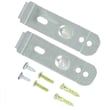
Installation guide
 Owner’s manual
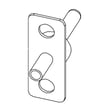


Can you replace parts in a dishwasher?
Yes, you can replace many parts in a Samsung DW80R5061UG dishwasher, but we only recommend DIY replacement for basic, non-wiring repairs. Always shut off power at the breaker and turn off the water supply before you access internal components; follow the safety steps in the DW80R5061UG owner's manual.
What you can usually replace yourself
These are common DIY-friendly repairs when you use the correct part and reassemble everything exactly:
- Lower rack rollers and rack hardware
- Door hardware (cables, hinge links, guides)
- Simple seals and caps that do not require wiring changes
- Some sensors or switches only if you can safely access and reconnect them
Safety steps we follow before any repair
Dishwashers combine electricity, hot water, and moving parts, so safe shutdown matters.
- Switch the circuit breaker OFF (do not rely on the control panel)
- Turn the water supply valve OFF
- Let the unit cool if it just ran a heated cycle
- Wear gloves and eye protection
- Keep the dishwasher installed and stable; do not push down on an open door
Parts that often fix common symptoms
If your dishwasher will not drain, leaks, or will not start, these parts are frequent causes:
| Symptom | Common area to check | Example part for this model |
|---|---|---|
| Not draining | Drain path and pump | Samsung dishwasher drain pump DD81-01527A |
| Leaking into base | Leak detection and seals | Dishwasher leak detector sensor (DD94-01062A), motor shaft seal (DD62-00053A) |
| Dead or unresponsive | Door latch/switch, controls | Door switch (DD81-02132A), electronic control board (DD82-01337B) |
Why it matters
Replacing the right part restores cleaning performance, prevents water damage, and avoids repeat failures caused by running with leaks, poor drainage, or an unsafe electrical connection.
Helpful DIY guidance
For step-by-step troubleshooting by symptom, use these resources:
Last updated: February 2026
Do Samsung dishwashers have a filter that needs to be cleaned?
Yes. The Samsung DW80R5061UG dishwasher uses a removable filter system that should be cleaned periodically to keep wash performance strong and help prevent odors and draining issues. In most cases, you remove the filter by rotating the filter insert (typically a quarter-turn) and rinsing the filter parts under running water.
How to clean the dishwasher filter
We follow the same basic steps Samsung outlines for cleaning removable filters:
- Turn off the dishwasher.
- Remove the lower rack to access the filter area.
- Rotate the filter insert counterclockwise to unlock it, then lift it out.
- Remove the fine filter (flat/rectangular piece, if equipped).
- Rinse filters under running water; use a soft brush for stuck-on debris.
- Reinstall in reverse order; rotate the filter insert clockwise until it is fully closed.
For the exact filter layout and removal method used on your unit, use the DW80R5061UG user manual.
How often should we clean it?
Filter cleaning frequency depends on how you use the dishwasher:
- Every 1 to 2 weeks: heavy use, lots of starchy foods (rice, pasta), or no pre-rinsing
- Monthly: typical family use
- As needed: if you notice grit on dishes, slow draining, or odor
What to check if performance drops after cleaning
If the filter is clean but results are still poor, these are the most common next checks:
- Spray arms are not clogged and can spin freely
- Dishes are loaded so they do not block the spray pattern
- Detergent is fresh and the dispenser can open
- Water is hot enough at the sink before starting the cycle
- The filter insert is fully locked (a loose filter reduces performance)
Quick symptoms guide
| Symptom | Most common cause | First action |
|---|---|---|
| Grit on dishes | Dirty filter or clogged spray holes | Clean filter; rinse spray arms |
| Odor | Food debris trapped in filter area | Clean filter; run a cleaning cycle |
| Slow drain | Debris in filter/sump area | Clean filter; check for standing water |
For deeper cleaning and maintenance routines, use how to clean and maintain your dishwasher.
Why it matters
A clean filter helps the circulation system move water efficiently, which improves cleaning, reduces redepositing food particles, and lowers the chance of odor buildup between cycles.
Last updated: February 2026
How do I manually reset my Samsung dishwasher?
To manually reset your Samsung DW80R5061UG dishwasher, cancel the current cycle by pressing and holding Start for 3 seconds, or power the unit off. If the control is still acting up, do a hard reset by turning the dishwasher’s breaker off, then back on, and run a quick cycle to confirm normal operation (see the DW80R5061UG user manual).
Quick reset options (most common)
- Cancel/Drain reset: Press and hold Start for 3 seconds to cancel the cycle.
- Power reset: Press Power to turn the dishwasher off, then back on.
- Breaker reset (hard reset): Switch the dishwasher circuit breaker OFF, wait about 5 minutes, then switch it ON.
- Restart correctly: Press Start, then close the door within 3 seconds or the cycle will not start.
What to check right after the reset
- Confirm the control panel lights normally and responds to a single-finger touch.
- Start a short cycle and listen for fill and wash sounds.
- Check under the unit for any water leakage during operation.
- If an information code returns, use the code list and next steps in the Samsung dishwasher error codes.
Reset vs. settings mode (what’s different)
| Action | What it does | When to use it |
|---|---|---|
| Hold Start 3 seconds | Cancels the cycle (often drains) | Stuck cycle, won’t advance |
| Power off/on | Reboots the control state | Touchpad glitch, paused cycle |
| Breaker off/on | Full power reset | Repeated errors, frozen control |
| Settings mode (Delay Start + Sanitize 3 seconds) | Changes options like sound/light/Auto Release Dry | Drying or indicator preferences |
Why it matters
A proper reset clears a stalled cycle and restores normal keypad response. It also helps you confirm whether the issue is a one-time control glitch or an ongoing problem such as a drain restriction, door-latch issue, or a pump-related error code.
Last updated: February 2026
Is the DW80R5061UG a good dishwasher?
Yes; the Samsung DW80R5061UG is a solid built-in dishwasher when you want strong everyday cleaning, modern cycle options, and a full-size 15 place-setting capacity. Like most dishwashers, long-term satisfaction depends on correct installation, routine cleaning, and addressing drain or wash issues early using the DW80R5061UG user manual.
What “good” means for this model
From the DW80R5061UG documentation, we can point to several concrete strengths:
- Built-in dishwasher design with 15 place settings capacity
- Multiple wash cycles (Auto, Normal, Heavy, Delicate, Express 60, Rinse only)
- Sanitize option that raises final rinse temperature up to 163°F (73°C) (cycle dependent)
- Standard U.S. electrical requirements: 120 V, 60 Hz, 15 A circuit
- Designed for typical home water pressure: 20 to 120 psi
For cycle details and which options work together (for example, Sanitize not available on Delicate or Rinse only), use the DW80R5061UG user manual.
Quick comparison: when it will feel “great” vs “not so great”
| Situation | What you’ll notice | Best next step |
|---|---|---|
| Normal daily loads | Consistent results on plates and glasses | Use Normal or Auto; load correctly |
| Heavy, baked-on soil | Better results with higher-temp options | Use Heavy; add Sanitize when allowed |
| Long cycle times | Washes can run 2+ hours depending on cycle/soil | Choose Express 60 for light soil |
| Poor cleaning or standing water | Dishes stay dirty or unit won’t drain fully | Clean filters/sump area; check drain path |
If performance is disappointing, check these first
Many “bad dishwasher” complaints come from setup, loading, or maintenance issues we can fix quickly:
- Confirm the unit is installed to spec using the DW80R5061UG installation guide (leveling, drain routing, electrical, water supply)
- Run the right cycle for the soil level (Auto or Normal for daily use; Heavy for tough soil)
- Avoid blocking spray paths (tall pans and cutting boards can stop the spray arm)
- Use fresh detergent and the correct amount for your water hardness
- Clean and maintain the dishwasher regularly (filters, sump area, spray holes)
Why it matters
A dishwasher can have great features on paper, but cleaning and drying results depend heavily on water temperature, correct cycle selection, and unobstructed spray. Keeping the wash system clean also helps protect key components like the pump and motor.
Last updated: February 2026
What are the commonly replaced parts in a dishwasher?
In a Samsung dishwasher like model DW80R5061UG, the most commonly replaced parts are the ones that control water flow, washing action, draining, and door safety. That typically includes the drain pump, circulation pump/sump assembly, spray arms, door switch, and the electronic controls.
Commonly replaced dishwasher parts (and what they do)
- Drain pump: pushes used water out at the end of wash and rinse
- Circulation pump and sump: moves wash water through the spray system
- Spray arms and manifolds: distribute water pressure for cleaning
- Door switch and latch-related parts: confirms the door is closed so the unit can run
- Electronic control board and control panel: runs cycles, reads sensors, powers loads
- Leak detection and turbidity sensors: detect water in the base or measure soil level
- Rack hardware: rollers, clips, and rack assemblies that wear from daily use
Model DW80R5061UG parts we see replaced often
Here are examples of common replacements available for this model:
| Symptom you notice | Likely part area | Example part for DW80R5061UG |
|---|---|---|
| Not draining, standing water | Drain system | Samsung dishwasher drain pump DD81-01527A |
| Poor wash, weak spray | Wash/circulation system | Samsung dishwasher sump and motor assembly DD82-01353A |
| Won’t start or stops when door moves | Door safety circuit | Dishwasher door switch DD81-02132A |
| Random behavior, dead buttons, cycle issues | Controls | Samsung dishwasher electronic control board DD82-01337B |
| Water in base, leak error | Leak protection | Dishwasher leak detector sensor DD94-01062A |
Quick checks before replacing parts
- Confirm the dishwasher is getting hot water; best results are typically with 120 °F to 149 °F supply water.
- Make sure the door closes firmly and nothing is blocking the latch area.
- Clean the filter area and check for debris around the sump.
- Inspect spray arms for clogs and verify they spin freely.
- If you see an error code, match it to the code list before ordering parts.
Why it matters
Replacing the correct part the first time prevents repeat breakdowns and protects key systems like the motor, wiring, and leak protection. Using the correct installation and safety steps also reduces the risk of electric shock or water damage; we recommend following the DW80R5061UG installation guide and the DW80R5061UG owner’s manual.
Last updated: February 2026
What is the life expectancy of a Samsung dishwasher?
A Samsung dishwasher typically lasts 8 to 12 years in normal household use. For your Samsung DW80R5061UG, consistent cleaning, correct loading, and fixing small issues early are what most often determine whether it reaches the high end of that range; see the DW80R5061UG user manual for care guidance.
Typical lifespan and what changes it
Most dishwashers wear based on heat, water quality, and how hard the wash system works each cycle.
- Daily use shortens lifespan compared to light use
- Hard water speeds up mineral buildup and can reduce cleaning performance
- Overloading strains racks and spray coverage
- Skipping filter cleaning increases pump strain and can lead to drain issues
- Leaks (even small ones) can damage components over time
Maintenance that helps you get 10+ years
These steps are the highest-impact habits for DW80R5061UG owners.
- Clean the filter area regularly (monthly is a good target)
- Run a dishwasher cleaner cycle periodically to reduce grease and scale
- Use the right detergent amount; too much can cause residue
- Keep spray arm holes clear of labels, seeds, and debris
- Check the door seal area for buildup and wipe it clean
Quick “symptom to check” guide
| What you notice | What it often points to | What to do next |
|---|---|---|
| Not draining | Drain restriction or pump issue | Clean filter area, check drain path; use dishwasher not draining video |
| Won’t start | Door not latching, power, control issue | Confirm door closes firmly; use dishwasher wont start video |
| Poor cleaning | Clogged spray, low water fill, buildup | Clear spray holes, clean filter, run cleaner cycle |
| Water in base / leak code | Leak detection triggered | Inspect for leaks and correct installation per DW80R5061UG installation guide |
Why it matters
A dishwasher that is maintained and installed correctly runs with less strain on the wash motor, drain system, and sensors. That reduces repeat faults, improves cleaning, and helps the DW80R5061UG reach its expected service life.
Last updated: February 2026
What is the most common leak in a Samsung dishwasher?
In Samsung dishwashers like model DW80R5061UG, the most common leak source is typically the wash circulation area under the tub, especially the sump and motor assembly and its seals. Installation issues (like a dishwasher that is not level) also commonly cause leaks and should be checked first using the DW80R5061UG installation guide.
Most common leak points to check first
We recommend checking these in order because they are the most frequent causes of “leaking from the bottom” symptoms:
- Dishwasher not level: if the unit is tilted more than about 1 degree, it can leak.
- Sump and motor area: cracks, loose clamps, or a failing seal can drip into the base.
- Drain pump and drain path: leaks at the pump body, hose connection, or clamp.
- Water supply connection: slow drip at the inlet fitting or supply line.
- Door sealing surfaces: debris on the gasket or a warped door can let water escape.
If you suspect the circulation system, the model-matched replacement is the Samsung dishwasher sump and motor assembly DD82-01353A.
Quick triage: where is the water showing up?
Use this simple guide to narrow the source before replacing parts.
| Where you see water | Most likely cause | What to do next |
|---|---|---|
| Under the front center (kick plate area) | Door leak or oversudsing | Clean gasket area; reduce detergent; verify loading |
| Under the middle/bottom of tub | Sump, motor, or seal leak | Inspect sump area; check for drips during wash |
| Under the left/right side | Hose connection or pump leak | Check clamps and hose routing |
| Only after install or moving unit | Not level or not secured | Re-level legs; secure to cabinet/countertop |
Why leveling and installation matter for leaks
Samsung’s installation instructions note the dishwasher can leak if it is tilted more than 1 degree. Proper leveling and securing also helps prevent the tub and hoses from shifting during operation. Use the leveling and final leak-check steps in the DW80R5061UG installation guide to confirm the water supply line and drain hose connections are dry while the dishwasher is running.
When a leak code shows up
If the control panel displays a leakage-related information code (such as LC), follow the safety steps in the DW80R5061UG user manual and address any visible connection leaks first (water supply fitting, drain hose connection, and base pan area).
Last updated: February 2026
What is the most common problem with a Samsung dishwasher?
Drain problems are the most common issue we see with Samsung dishwashers like model DW80R5061UG; they usually show up as slow draining, standing water, or a drain-related information code. The fastest wins are cleaning the filter/sump area, checking the drain hose for kinks, and confirming the sink drain or disposer inlet is clear (see the DW80R5061UG user manual).
Most common problems (and what they look like)
- Not draining: water left in the bottom; may show a drain check code (often 5C)
- Leak detection: unit stops and may show LC
- Water supply issues: fills slowly or not at all; may show 4C
- Won’t start or stops mid-cycle: door not fully latched, control lock, or a control/power issue
- Poor cleaning: clogged filter, blocked spray arm holes, loading issues, or low water temperature
Quick checks we recommend first
- Reset power: turn the breaker off for 1 minute, then back on.
- Inspect the drain hose: look for kinks, crushing, or a low loop problem.
- Check the sump drain area: remove debris that can block the drain path.
- Confirm water supply: make sure the shutoff valve is fully open.
- Look for active leaks: check under the unit and at the water supply connection.
Information codes you’ll see most often
| Code | What it points to | What to do first |
|---|---|---|
| 5C | Drain check | Check drain hose for clogs/folds; clear sump drain area |
| LC | Leakage check | Shut off water supply; check for connection leaks |
| 4C | Water supply check | Verify supply valve open; check inlet line for blockage |
| OC | Over-level water check | Shut off water supply; turn breaker off |
When a part is commonly involved
If the dishwasher hums but won’t drain, drains slowly, or leaves water behind after you clear hoses and the sump area, the drain pump is a common next suspect on this model. We typically see replacement needed when the impeller is jammed, the pump is noisy, or it won’t run consistently (see Samsung dishwasher drain pump DD81-01527A).
Why it matters
Drain, leak, and fill problems can stop a cycle early and trigger protection logic, which looks like a “random shutdown” but is often the dishwasher preventing overflow or damage. Using the code table above helps you target the right check quickly.
Last updated: February 2026