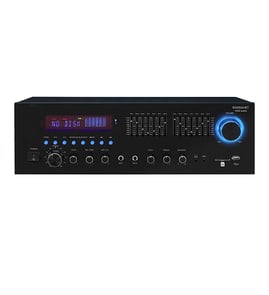

What is the Sony STR-KS380?
The Sony STR-KS380 is a home audio receiver (AV receiver) that acts as the hub for your entertainment system; it takes audio from sources like a TV, cable box, or game console and powers connected speakers. This model is listed under Audio equipment parts for service and repair.
A receiver like the Sony STR-KS380 typically handles these core jobs:
- Switches between multiple input sources (for example, TV, DVD/Blu-ray, or game console)
- Decodes and processes surround sound audio (depending on the source and settings)
- Amplifies audio and sends it to your speaker channels
- Provides volume control, tone adjustments, and listening modes
- Routes audio through speaker terminals and may support a subwoofer output
If you are on the STR-KS380 parts page, these are the most common reasons:
- No power (dead unit, no display)
- No sound from one or more speakers
- Unit turns on then shuts off (protection mode behavior)
- Distorted audio, crackling, or intermittent sound
- Inputs not working or audio cutting in and out
These steps help narrow the problem to wiring, speakers, or the receiver itself:
| Check | What to do | Why it matters |
|---|---|---|
| Speaker wiring | Inspect for loose strands touching other terminals | Shorts can trigger protection shutdown |
| Source/input | Try a different input and a different source device | Confirms whether the issue is upstream |
| Power | Try a known-good outlet and power strip | Rules out a supply problem |
| Reset basics | Power off, unplug for a few minutes, then retry | Clears some temporary faults |
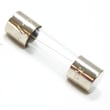
Receivers combine power, signal processing, and multiple connections in one chassis; a single loose wire, blown fuse, or damaged internal connection can cause symptoms that look like a major failure. A structured check saves time and prevents repeat shutdowns.
For electrical troubleshooting steps (like checking a fuse safely), use our DIY guide: how to tell if a fuse is blown.
Last updated: February 2026
Do Sony receivers run hot?
Yes. Sony receivers like the STR-KS380 can feel hot during normal operation because the amplifier and processing circuits generate heat even at low volume. The top or rear vent areas can become noticeably warm, and the unit can run hotter with louder playback or poor ventilation.
A receiver that is working normally often has these traits:
- Warm to hot air coming from the top or rear vents
- The chassis feels hottest near ventilation holes
- Heat increases with higher volume, bass-heavy content, or long listening sessions
- Heat is worse when the receiver is in a tight cabinet or stacked with other gear
If your STR-KS380 is shutting down, smells like hot plastic, or is too hot to touch for more than a second, treat it as overheating and check:
- Vent openings blocked by dust, papers, or décor
- Receiver placed on carpet, inside a closed cabinet, or too close to a wall
- Other components stacked on top (cable box, game console, etc.)
- Speaker wiring issues (stray strands touching, pinched wire, loose terminals)
- Speaker load concerns (very low-impedance speakers can run an amp hotter)
Use these setup basics to reduce heat stress:
- Leave open space above and behind the receiver for airflow
- Keep vents clear and gently dust them regularly
- Avoid stacking components directly on top
- If in a cabinet, keep the door open during use or add ventilation
| Symptom | Common cause | What we recommend |
|---|---|---|
| Runs warm but plays fine | Normal heat from operation | Improve airflow and keep vents clear |
| Gets very hot at low volume | Blocked vents or tight space | Reposition for better ventilation |
| Shuts off after a while | Overheat protection or wiring issue | Check speaker wires and reduce load |
Excess heat shortens the life of internal components (power supply parts, output transistors, solder joints). Good ventilation helps your Sony receiver stay reliable and prevents nuisance shutdowns.
For safe electrical checks (like verifying a fuse or testing continuity), use our guide: how to use a multimeter to test electrical parts video.
Last updated: February 2026
What does STR-KS380 stand for?
For the Sony STR-KS380 receiver, STR-KS380 is the manufacturer’s model number, not an acronym you translate word-for-word. In Sony audio equipment, “STR” commonly identifies an A/V receiver product line, and **“KS380” distinguishes the specific series/package and feature set.
Using the exact model number helps us match the right audio equipment parts, wiring, and compatibility details for your receiver.
- STR: Sony receiver line identifier (used across many Sony receivers)
- KS380: the specific model family or home theater package designation
- STR-KS380: the full identifier you should use when searching parts and diagrams
On most Sony receivers, the model number is printed on the unit and packaging. Check these common spots:
- Rear panel label near the power cord or speaker terminals
- Bottom label (if present)
- Original carton label
- Setup paperwork or purchase receipt
| Item to match | What to look for | Example |
|---|---|---|
| Brand | Manufacturer name | Sony |
| Product type | Component category | Receiver |
| Model number | Exact characters and dashes | STR-KS380 |
Some customers see “STR” used in other industries (real estate, banking, etc.). For this product page, STR-KS380 is strictly the Sony receiver model identifier.
- Don’t drop the dash; search STR-KS380 exactly
- Don’t use only “KS380”; it can pull unrelated results
- If you have a similar Sony model, parts can differ even when the front panel looks the same
If you are confirming the model number for parts lookup, use our guide: how to find your appliance model number (and what it means for parts).
Last updated: February 2026
What are the common problems with Sony AV receivers?
Common problems we see with Sony AV receivers like the Sony STR-KS380 include no power, no sound, intermittent audio, overheating and shutdown, remote control problems, and the receiver going into protection mode. Most issues trace back to power supply problems, wiring or speaker shorts, incorrect input settings, or heat buildup.
- No power: outlet, power cord, internal fuse, or power supply failure
- No sound or low volume: wrong input selected, muted zone, bad source device, or speaker wiring issue
- Cuts out or shuts off: overheating, blocked vents, or protection mode from a shorted speaker wire
- Protection mode: speaker wire strands touching, low-impedance load, or a failing output stage
- Remote not working: dead batteries, blocked sensor, or remote needs re-pairing (if applicable)
- Audio out of sync: TV or source device delay settings, processing modes, or cable path differences
- Power reset: unplug the receiver for 2 minutes, then plug it back in.
- Confirm the basics: volume up, not muted, correct input selected, correct output (speakers vs. headphones).
- Isolate the source: try a different HDMI/optical/analog input and a different source device.
- Check speaker wiring: look for loose connections and stray copper strands touching the chassis or another terminal.
- Ventilation: move the receiver so it has several inches of clearance on top and sides; remove anything stacked on it.
Protection mode is often triggered by a speaker short or an unsafe load. Use this fast isolation method:
- Disconnect all speaker wires from the receiver.
- Power on; if it stays on, reconnect one speaker at a time to find the problem channel or wire.
- If it shuts down with a specific speaker connected, inspect that wire run and speaker terminals.
| Symptom | Most likely cause | Best first action |
|---|---|---|
| Shuts off after a few minutes | Overheating | Improve airflow, lower volume, check vents |
| Shuts off immediately | Speaker short | Disconnect speakers, reconnect one-by-one |
| No sound on one channel | Wiring or speaker issue | Swap speakers left to right to confirm |
Receivers protect themselves to prevent amplifier damage. Fixing a wiring short, improving airflow, or correcting input settings often restores normal audio without replacing major components.
For repair planning and parts lookup by model, use Sears PartsDirect.
Last updated: February 2026
How many watts is the Sony STR-KS380?
The Sony STR-KS380 is rated at 108 watts per channel (stereo) at 3 ohms. In multi-channel specs, it’s commonly listed as 167 watts per channel (front/center/rear) at 3 ohms and 165 watts for the subwoofer at 3 ohms.
These numbers are tied to specific test conditions (impedance and channels driven), so they are not interchangeable.
- 108 W x 2 (stereo) at 3 Ω
- 167 W (front/center/rear channels) at 3 Ω
- 165 W (subwoofer) at 3 Ω
- Power can look different if measured at 6 Ω or 8 Ω, or with more channels driven at once
Most receivers are advertised at 6 Ω or 8 Ω; the STR-KS380’s published figures are at 3 Ω, which makes direct comparisons tricky.
| Spec you’re comparing | What to match | Why it matters |
|---|---|---|
| Watts per channel | Same ohms and same channels driven | Apples-to-apples loudness expectations |
| Subwoofer watts | Powered sub vs. passive sub rating | Prevents mismatch and distortion |
| Speaker impedance | Use speakers within the receiver’s supported range | Avoids protect mode and overheating |
Power issues are often wiring-related, not a lack of wattage.
- Check for stray speaker wire strands shorting at the terminals
- Verify each speaker plays cleanly at low volume, then increase gradually
- Confirm the subwoofer connection type (powered vs. passive) matches your setup
- Test suspect wiring and connections with a meter using how to use a multimeter to test electrical parts video
Using the correct watt rating (with the stated ohms and channels) helps you match speakers correctly and avoid clipping, distortion, or receiver protection shutdowns.
Last updated: February 2026