
How to set speed on drill press?
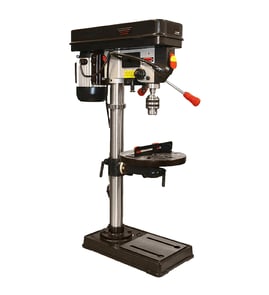
On the Craftsman drill press model 10323620, you set spindle speed by moving the drive belt to different pulley steps; use slower speeds for larger bits and harder materials, and faster speeds for small bits and softer materials.
- Unplug the drill press.
- Open the belt cover on top of the head.
- Loosen the motor mount or tension lever so the belt has slack.
- Move the belt to the pulley steps that match the speed you want:
- Belt on larger motor pulley step and smaller spindle pulley step = higher RPM
- Belt on smaller motor pulley step and larger spindle pulley step = lower RPM
- Re-tension the belt (firm, not overly tight), then close the cover.
- Large drill bits, hole saws, Forstner bits: choose a low speed
- Small twist bits: choose a higher speed
- Hardwood, metal, plastics: start slower
- Softwood: you can run faster
These are common drill press ranges; fine-tune based on cut quality, heat, and chatter.
| Material | Small bits (1/16–1/4 in.) | Medium bits (5/16–1/2 in.) | Large bits (5/8 in. and up) |
|---|---|---|---|
| Softwood | 1500–3000 RPM | 800–1500 RPM | 250–600 RPM |
| Hardwood | 1000–2000 RPM | 500–1000 RPM | 200–500 RPM |
| Mild steel | 500–1000 RPM | 250–500 RPM | 150–300 RPM |
Correct speed helps prevent burning, dull bits, belt slipping, and overheating; it also improves hole accuracy and reduces vibration.
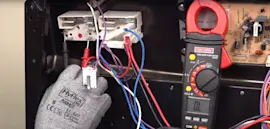
If you are troubleshooting power, switches, or wiring while working under the belt cover, use how to use a multimeter to test electrical parts video.
Last updated: February 2026
What is the 4 inch rule for drill press?
The 4-inch rule for a drill press means we keep our hands and fingers at least 4 inches away from the rotating drill bit and chuck at all times. On a Craftsman drill press like model 10323620, that typically means clamping the workpiece to the table instead of holding it by hand.
- Clamp the workpiece to the drill press table; do not hand-hold small parts.
- Use a drill press vise for short, narrow, or round stock.
- Use a scrap backer board under the workpiece to reduce tear-out and help prevent grabbing.
- Keep sleeves, gloves, jewelry, and long hair away from the spindle area.
- Stop the machine before measuring, clearing chips, or repositioning the work.
| Job type | Best way to keep hands 4 inches away | Why it helps |
|---|---|---|
| Small parts (under a few inches) | Drill press vise | Keeps fingers away from the bit |
| Long boards | Clamps plus table support | Prevents spinning and lifting |
| Round stock (dowel, pipe) | V-block or vise with jaw pads | Stops the work from rolling |
| Thin sheet | Clamp to a backer board | Reduces grabbing and chatter |
A drill press can grab the workpiece and spin it like a propeller if the bit binds. The 4-inch rule forces us to use clamps, a vise, and proper setup so our hands are not in the danger zone if the material shifts.
If you are troubleshooting power, switches, or wiring on a drill press, we use a meter to diagnose safely and accurately; see how to use a multimeter to test electrical parts video.
Last updated: February 2026
How do I find the model number on my 10323620?
The model number for your Craftsman drill press is printed on the tool’s model/serial tag; on model 10323620, it’s typically on the head (motor housing) or on the column/base area. Match the full number on the tag to ensure you get the correct diagrams and parts.
Check these common tag locations first:
- Side or rear of the drill press head (near the motor and belt cover)
- Back of the column (the vertical post)
- Top or side of the base casting
- Underside of the work table (less common)
- Near the power switch or cord entry point
The tag is usually a small sticker or metal plate. Write down:
- Model number (for example, 10323620)
- Serial number (helps identify production run)
- Type or spec number (if shown)
- Electrical rating (volts/amps), useful for switch or motor troubleshooting
| Item | What it’s used for | Example format |
|---|---|---|
| Model number | Selecting correct parts diagrams and assemblies | 10323620 |
| Serial number | Identifying the exact unit/version | Letters and numbers |
Use these practical options to confirm the correct model:
- Compare your drill press features to the diagrams (belt cover shape, table style, base shape)
- Look for a stamped number on the base or head casting (not always the model number)
- Check any original paperwork, receipt, or maintenance notes
- Search by the closest matching model on [Sears PartsDirect] and verify with diagram details
Craftsman drill press parts like the switch, belts, pulleys, chuck, and quill components can vary by production run. Using the exact model number from the tag prevents ordering parts that do not fit.
Last updated: March 2026