How long should a Jenn-Air oven last?
A Jenn-Air wall oven like model JMW2430DP02 typically lasts 15 to 20 years with normal household use and basic care. Heavy daily cooking, frequent self-clean cycles, and heat-related wear on controls can shorten lifespan, while prompt repairs can extend it.
Typical lifespan and what changes it
Most wall ovens fall into a predictable range, but real-world life depends on heat exposure and how often the oven runs at high temperatures.
- Normal use: 15 to 20 years
- Heavy use (daily high-heat cooking): closer to 10 to 15 years
- Light use (occasional baking): often 20 years
- Frequent self-clean use: can reduce control and door component life
- Good ventilation and clean cooling paths: helps electronics last longer
Parts that commonly limit oven life
In a wall oven/microwave combo, the most common “end-of-life” issues are usually repairable parts, not the cabinet itself.
- Heating performance issues (bake element wear)
- Touch/control problems (control board or control panel)
- Overheat protection trips (high-limit thermostat)
- Door heat leakage or poor sealing (door glass and liner components)
Quick examples of model-matched parts
| Symptom | What it often points to | Example part for JMW2430DP02 |
|---|---|---|
| Oven not heating evenly or at all | Failed heating element | Range bake element W11545804 |
| Oven shuts down or overheats | Safety thermostat opening | Range high-limit thermostat WP4449751 |
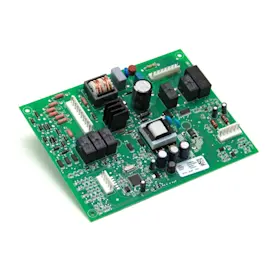
| Display dead or erratic | Control/power supply issue | Control (with power supply) W11179310 |
How to tell whether to repair or replace
We use these practical checkpoints to decide if a repair makes sense.
- The oven is under 15 years and the issue is a single part (element, thermostat, control)
- The cavity and door structure are in good shape (no major warping, door alignment issues)
- The problem is repeatable and diagnosable (not intermittent power loss from the home circuit)
- The repair restores safe operation and stable temperatures
Why it matters
Knowing the expected 15 to 20 year lifespan helps you plan: if your JMW2430DP02 is near that range, investing in a control or heating repair can still be worthwhile, but you will want to prioritize the most failure-prone heat and electronics components first.
Last updated: January 2026
What are common problems with Jenn-Air stoves?
Common problems we see with Jenn-Air cooking appliances include the oven not heating correctly, uneven baking, a dead or glitchy touch control, and (on combo units like model JMW2430DP02) microwave issues such as not heating or not starting. Many symptoms trace back to a failed heating component, a safety switch, or an electronic control.
Quick checks we recommend first
- Reset the circuit breaker for the wall oven (a partial trip can leave the display on but disable heating).
- Confirm the oven is not in a delayed start, Sabbath, or control lock mode.
- For uneven baking, verify racks are level and avoid blocking convection airflow.
- For microwave no-start symptoms, check that the door closes firmly and latches smoothly.
- If the unit is completely dead, stop and check for a blown fuse or power supply issue.
Common symptoms and likely causes
| Symptom | Most common causes | Parts often involved on JMW2430DP02 |
|---|---|---|
| Oven not heating | Failed bake element, control not sending power, overheat protection open | Range bake element W11545804, control (with power supply) W11179310 |
| Oven overheats or shuts down | High-limit thermostat tripped/failed, cooling/airflow issue | Range high-limit thermostat WP4449751 |
| Touch panel unresponsive | Control panel failure, control board issue, power supply problem | Glass cntrl W11236896, electronic control board WPW10260060 |
| Microwave runs but does not heat | Magnetron or inverter problem | Microwave magnetron W11346197, inverter W10217711 |
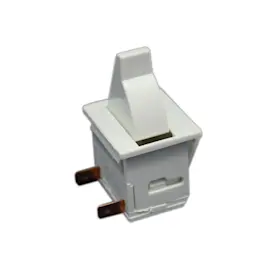
| Microwave will not start | Door interlock switch issue, door not latching | Microwave door switch W10211972 |
Why it matters
Heating and microwave circuits rely on safety devices (door interlocks, high-limit thermostat) and electronic controls to prevent overheating and unsafe operation. Addressing the root cause protects the control board and helps avoid repeat failures.
When to stop and use a technician
- The microwave section trips the breaker, smells like burning, or makes loud buzzing.
- The oven shows signs of overheating (scorching odor, repeated thermal shutdowns).
- You suspect a high-voltage microwave component issue (magnetron/inverter).
Last updated: January 2026
Is there a reset button on a Jenn-Air oven?
Jenn-Air ovens typically do not have a single dedicated “reset” button. On the JMW2430DP02 wall oven/microwave combo, the most common “reset” actions are turning off Control Lock (if enabled) and power-cycling the unit at the breaker to clear a temporary control glitch.
Quick reset steps we recommend
- Check the display for Control Lock or a lock icon; if it’s on, press and hold the Control Lock key area for about 3 seconds.
- Power-cycle the oven: turn OFF the circuit breaker for 1 minute, then turn it back ON.
- If the display is blank after restoring power, confirm the breaker is fully seated (some breakers look on but are tripped).
- If the oven beeps but won’t start cooking, verify the door is fully closed and latching correctly.
- If the microwave side will not run, a door-interlock issue is common; inspect the door alignment and switch operation.
What “reset” fixes (and what it doesn’t)
| Symptom | Reset helps? | What to check next |
|---|---|---|
| Touchscreen frozen or unresponsive | Yes | Power-cycle; if recurring, control issue |
| “Locked” controls | Yes | Disable Control Lock |
| Oven will not heat | Sometimes | Bake element, temperature sensor, control |
| Microwave won’t start | Sometimes | Door switches, fuse, inverter, control |
Parts that commonly relate to “won’t start” or “won’t run”
If a reset does not restore operation, these model-matched parts are common suspects:
- Microwave door switch W10211972 (door interlock; prevents operation with door open)
- Fuse mda 20a W11188752 (opens if there’s an overcurrent condition)
- Control (with power supply) W11179310 (can cause dead display or erratic behavior)
- Range bake element W11545804 (if the oven runs but does not heat)
Why it matters
A “reset” is a safe first step because many no-start issues are caused by Control Lock being enabled or a temporary electronic control error. If the problem returns quickly, it usually points to a door-interlock, power-supply, or control component that needs attention.
Last updated: January 2026