Installation guide
 Owner’s manual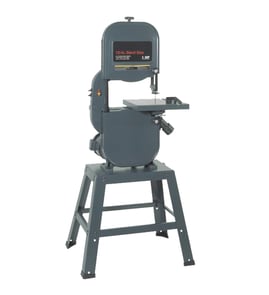

What is the 3-tooth rule for bandsaws?
The 3-tooth rule means your Craftsman band saw model 351214600 should use a blade pitch (TPI) that keeps at least three teeth in contact with the workpiece during the cut. This prevents blade shocking and tooth stripping, and it helps the blade cut smoother and last longer (see the owner's manual).
How to apply the 3-tooth rule (quick method)
- Measure the material thickness at the cut.
- Choose a blade TPI so that, at any moment, 3 or more teeth are engaged.
- If the blade chatters, strips teeth, or grabs, move to a finer pitch (more TPI).
Practical tips we use
- Thin stock (sheet metal, thin wall tubing): use a finer pitch so 3 teeth can engage.
- Thick stock (solid wood blocks, thick plastics): use a coarser pitch for faster chip clearing.
- If you see “hammering” or harsh vibration at the start of the cut, the pitch is usually too coarse.
- If the cut burns, loads up, or slows badly, the pitch can be too fine (gullets pack with debris).
- Keep feed pressure steady; forcing the cut increases tooth damage.
Typical blade pitch guidance (what the manual emphasizes)
The manual explains that pitch is teeth per inch (TPI) and that the material type determines how many teeth should be in contact with the work. It also notes that blade shocking happens when pitch is too large and a tooth hits too much material at once.
| Material and situation | What to prioritize | Common result if wrong |
|---|---|---|
| Soft materials | Moderate pitch and good chip clearing | Too fine: slow cutting, packed gullets |
| Hard materials | More teeth engaged (finer pitch) | Too coarse: shocking, stripped teeth |
| Any cut | 3+ teeth engaged | Fewer than 3: chatter and tooth breakage |
Why it matters
Keeping at least three teeth engaged spreads cutting forces across multiple teeth. That reduces shock loads, improves tracking and cut quality, and helps protect the blade, guides, and wheels.
Related troubleshooting
If your saw still struggles after choosing the right TPI, use our DIY symptom help for common causes like dull blades, guide adjustment, and feed rate: band saw cutting slowly.
Last updated: February 2026
How do I know the size of my bandsaw blade?
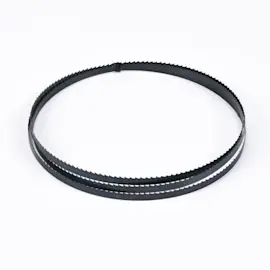
For your Craftsman band saw model 351214600, the blade size is defined by length, width, and tooth pitch (TPI). The manual lists a blade length of 83-5/8 inches and a blade width range of 1/8 to 1/2 inch; you then choose the TPI based on the material and cut quality you want (see the owner's manual).
What to measure (and how)
- Blade length: Use the model spec first (83-5/8 inches for 351214600). If you are measuring an existing blade, mark a starting point (often the weld), then follow the blade edge with a tape measure until you return to the mark.
- Blade width: Measure from the tip of a tooth to the back edge of the blade.
- TPI (teeth per inch): Count how many teeth fall in 1 inch; that number is the pitch.
- Thickness (optional but helpful): Thicker blades are typically more rigid; thinner blades flex more easily for tighter curves.
Quick selection guide for width and TPI
Use this as a practical starting point, then fine-tune for your material and cut type.
| What you are doing | Typical blade width | Typical TPI range | What you will notice |
|---|---|---|---|
| Tight curves/contour cuts | 1/8 to 1/4 inch | 6 to 12 TPI | Smaller turning radius, less straight-line rigidity |
| General purpose cutting | 1/4 to 3/8 inch | 6 to 10 TPI | Balanced curve ability and straight tracking |
| Long straight cuts/resaw-style cuts | 3/8 to 1/2 inch | 3 to 6 TPI (wood) | Straighter cuts, faster feed rate |
Why it matters
Getting the blade size right prevents common problems like the blade wandering, cutting slowly, ragged cuts, and the blade slipping off the wheels. Correct blade size also makes guide and thrust bearing adjustments more stable, which improves accuracy and blade life.
Helpful tip before you buy or install a blade
- Confirm the 83-5/8 inch length for this model.
- Pick the widest blade that still allows the curve radius you need.
- Choose a TPI that keeps at least 3 teeth in the cut to reduce tooth stripping and rough cutting.
Last updated: February 2026
Can you resaw with a 14-inch bandsaw?
Yes, you can resaw on a 14-inch class band saw, but the practical resaw height is limited by the saw’s maximum depth of cut and how well the blade is tensioned, tracked, and guided. On the Craftsman 351214600, proper blade tension, tracking, and guide adjustment are required before operation; use the 351214600 owner's manual for the exact setup steps.
What determines resaw success
Resawing is mostly about blade control and feed technique, not just wheel size.
- Use a sharp blade designed for resawing (typically a wider blade with fewer teeth per inch).
- Set correct blade tension and confirm the blade tracks centered on the wheels.
- Adjust blade guides and thrust bearings so the blade is supported without binding.
- Use a tall, straight fence (or a resaw fence) to keep stock vertical.
- Feed slowly and steadily; forcing the cut causes drift and heat.
- Keep wheels clean to prevent poor tracking and blade slippage.
Setup checklist (Craftsman 351214600)
The manual notes the blade must be tensioned and tracked, and the blade guides adjusted before you operate the saw.
| Setup item | What “good” looks like | What happens if it’s off |
|---|---|---|
| Blade tension | Blade stays stable in the cut | Wandering, flutter, drift |
| Blade tracking | Blade runs consistently on wheels | Blade walks, slips, or derails |
| Blade guides | Close support without rubbing hard | Crooked cuts, overheating |
| Wheel cleanliness | No pitch or sawdust buildup | Slippage, poor tracking |
Why it matters
Resawing puts a long, continuous load on the blade and wheels. If tracking, guides, or wheel cleanliness are off, the blade drifts, cuts slowly, or can slip off the wheel, which ruins accuracy and can damage the workpiece.
When cuts are slow or wander
If you’re seeing slow feed rates or drift, use our DIY symptom help for band saw cutting slowly and band saw not cutting straight.
Last updated: February 2026
What is the 4 inch rule for bandsaw?
The 4-inch rule is a bandsaw safety guideline: we keep our hands and fingers at least 4 inches away from the moving blade at all times. On the Craftsman 351214600 band saw, that means using push tools and proper setup so the work stays controlled and your hands never drift toward the cut line.
How to follow the 4-inch rule on a Craftsman 351214600
- Use a push stick or push block whenever the cut would bring your hands within 4 inches of the blade.
- Keep your hands out of line with the blade path; guide the work from the sides, not directly behind the blade.
- Let the blade reach full speed before feeding the work.
- Use a smooth, steady feed; forcing the cut increases the chance your hands slip forward.
- Never clear scraps near the blade while it is moving; stop the saw first.
- Wear eye protection; do not wear gloves while operating the saw.
Setup checks that make the rule easier to follow
A well-adjusted saw tracks straighter and needs less “hand correction,” which helps you maintain that 4-inch margin.
| Setup item | What “good” looks like | What happens if it is off |
|---|---|---|
| Blade tension | Blade is properly tensioned before use | Blade wanders, binds, or grabs |
| Blade tracking | Wheels are aligned and blade stays centered | Blade can drift or slip |
| Blade guides | Guides are adjusted before operation | Poor control and rough cutting |
| Work support | Workpiece is supported flat and stable | Tipping and sudden hand movement |
For model-specific adjustment steps (tracking, guides, blade changes), use the owner's manual.
Why it matters
Most bandsaw injuries happen when a hand gets too close during a small cut, a bind, or a sudden drift. Keeping a consistent 4-inch buffer, combined with correct blade tracking and guide adjustment, prevents “reflex grabs” near the blade.
Related cutting problems (and what to check)
If you are struggling to keep your hands back because the saw is fighting the cut, these guides help:
Last updated: February 2026
What are the parts of a band saw machine?
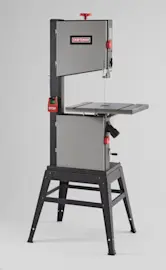
On the Craftsman band saw model 351214600, the main parts are the blade and wheel system (upper and lower wheels), the table and fence/miter setup for guiding cuts, and the adjustment systems that control blade tension, tracking, and guide alignment. For the exact component names and locations, use the owner's manual.
Main parts you will see on most band saws
These are the core assemblies that make the saw cut and keep the blade running true:
- Upper wheel and lower (drive) wheel: the wheels the blade rides on; the lower wheel is typically driven by the motor
- Band saw blade: the cutting loop; tooth style and sharpness strongly affect cut quality and speed
- Table and blade slot: supports the workpiece and allows the blade to pass through
- Blade guides and thrust bearing: keep the blade from wandering and reduce twisting during cuts
- Tension control: tightens the blade so it tracks correctly and does not slip
- Tracking control: centers the blade on the wheels to prevent it from walking off
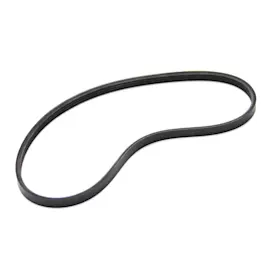
- Motor and drive belt/pulleys (common on many benchtop designs): transfer power to the drive wheel
Model 351214600 parts called out in the manual
Your Craftsman 351214600 documentation also highlights several practical components used for setup and maintenance:
- Miter gauge assembly (for angled crosscuts)
- Crank handle (used for an adjustment mechanism during setup)
- Dust bag (for basic dust collection)
- Blade cleaning brush (keeps debris off the drive wheel and helps reduce tracking and slippage issues)
Quick “what it does” reference
| Part/assembly | What it does | When it needs attention |
|---|---|---|
| Blade tension and tracking controls | Keeps blade tight and centered on wheels | Blade slips, wanders, or won’t stay on wheels |
| Blade guides | Supports blade during cutting | Crooked cuts, rough cuts, blade twisting |
| Wheels and tires | Carry the blade and maintain grip | Poor tracking, vibration, blade slipping |
| Table and miter gauge | Supports and guides the workpiece | Inaccurate straight or angled cuts |
Why it matters
Knowing the major parts helps you diagnose symptoms faster. For example, slow cutting usually points to blade condition or feed technique, while crooked cuts often point to guide adjustment, tracking, or blade selection.
Related DIY help
- Use band saw repair guide landing page to match symptoms (crooked cuts, rough cuts, won’t start) to likely causes.
Last updated: February 2026