Owner’s manual
 View engine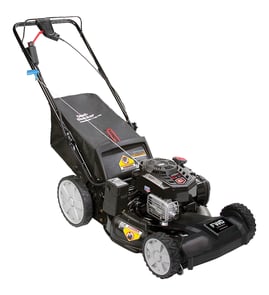



How to find Craftsman model number?
On the Craftsman walk-behind mower model 917388892, the model and serial numbers are printed on a decal on the rear of the mower housing (back of the deck). Use those numbers when ordering parts or checking specifications in the 917388892 owner's manual.
Where to look on the mower
Check these common spots on model 917388892 first:
- Rear of the mower deck (rear housing), on a decal
- Back of the deck between the lower handle mounts
- Near the height-adjuster area on the rear housing (same decal zone)
- On the mower housing where dirt and grass buildup can hide labels
How to read and record the numbers
Once you find the decal:
- Write down the model number and serial number exactly as shown
- Record the date of purchase (helpful for maintenance and parts matching)
- Take a clear photo of the decal for future reference
- If the decal is dirty, wipe it gently so the characters are readable
Model number vs. serial number (quick guide)
| Item | What it’s used for | Example for this mower |
|---|---|---|
| Model number | Identifies the exact mower design and parts list | 917.388892 (often shown as 917388892 online) |
| Serial number | Identifies your specific unit | Varies by mower |
Why it matters
The model number narrows parts down to the correct diagrams and specifications (for example, blade bolt torque and engine tune-up specs). The serial number helps confirm production details when there are running changes.
Last updated: January 2026
What are the most common issues with 917388892?
On the Craftsman 917388892 walk-behind mower, the most common problems are no-start or hard-start, poor cut quality, and drive or control issues caused by normal wear, dirty fuel, or loose hardware. Many fixes are basic maintenance plus replacing a worn blade or control cable.
Most common symptoms and what usually causes them
- Won’t start / starts then dies: old fuel, dirty air filter, fouled spark plug, carburetor varnish, or a misadjusted/binding zone control (operator presence) cable
- Rough running / surging: partially clogged carburetor, restricted fuel cap vent, stale fuel
- Poor cut quality (ragged grass, uneven cut): dull/bent blade, blade adapter wear, deck packed with wet grass
- Vibration: bent blade, loose blade hardware, damaged blade adapter
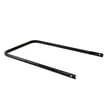
- Handle or control problems: stretched/binding control cable, loose handle bolts/knobs
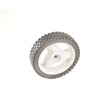
- Wheels not tracking well: worn wheel, loose wheel bracket/axle hardware
Quick checks we recommend first (10 to 20 minutes)
- Drain old fuel and refill with fresh fuel (use the correct fuel type listed in the owner's manual).
- Inspect the blade for bends, cracks, and dull edges; replace if damaged.
- Check for loose fasteners on the handle and wheels.
- Verify the operator presence control moves freely and fully returns.
- Clean grass buildup from the underside of the deck (disconnect the spark plug wire first).
Parts that commonly solve these issues
If you’re seeing vibration or poor cutting, these model-matched parts are frequent fixes:
| Symptom | Likely wear part | What it affects |
|---|---|---|
| Vibration, blade won’t stay tight | Blade adapter 532418373 | Centers the blade and transfers engine rotation |
| Ragged cut, missed grass | Husqvarna lawn mower 21-in deck 3-in-1 blade 532189028 | Cutting performance and airflow under the deck |
| Engine won’t keep running when you release/hold the handle | Lawn mower zone control cable 532183281 | Operator presence control engagement |
Why it matters
Ignoring early symptoms can lead to bigger failures. A loose blade adapter or damaged blade can cause severe vibration, which accelerates wear on the crankshaft, deck hardware, wheels, and handle mounts.
Last updated: March 2026
What is the average lifespan of 917388892?
A Craftsman walk-behind mower like model 917388892 typically lasts 8 to 12 years with normal residential use and routine maintenance. Engine life is strongly affected by cleaning, oil changes, and keeping the cooling fins and air intake clear (maintenance details are in the owner's manual).
Typical lifespan by what wears out first
Most “end of life” mower problems come from a few high-wear areas:
- Engine overheating from grass and debris buildup; the manual notes a clogged engine runs hotter and shortens engine life
- Blade and blade adapter wear from impacts and normal sharpening cycles
- Control cable stretch (engine zone control cable) causing hard starting or stalling
- Wheel and height adjust hardware wear from vibration and corrosion
- Deck corrosion if grass is left packed under the housing
Maintenance that adds years (and why)
Keeping the mower clean and serviced prevents heat, drag, and vibration that shorten component life.
- Scrape the underside of the deck regularly to remove grass buildup
- Keep the engine exterior clean so it can shed heat properly
- Avoid spraying water into the engine area; water intrusion shortens engine life
- Inspect the blade and adapter for wobble after any impact
- Check fasteners on the handle and wheels for looseness
Quick reference: what to do and how often
| Task | Typical interval | Why it matters |
|---|---|---|
| Clean underside of deck | Every 1 to 2 mows | Prevents corrosion and drag |
| Clean engine exterior | Every few mows | Reduces overheating |
| Inspect blade/adapter | Monthly and after impacts | Prevents vibration and crank damage |
| Check cables and handle hardware | Monthly | Keeps controls safe and responsive |
Parts that commonly get replaced on this model
If you are refreshing a high-mileage 917388892, these model-matched parts are common wear items:
- Husqvarna lawn mower 21-in deck 3-in-1 blade 532189028
- Blade adapter 532418373
- Lawn mower zone control cable 532183281
Why it matters
A mower can “run” for years while slowly losing performance; vibration, overheating, and packed grass are what turn small wear into expensive damage. Staying ahead of cleaning and blade condition is the simplest way to reach the 8 to 12 year lifespan.
Last updated: March 2026