 Owner’s manual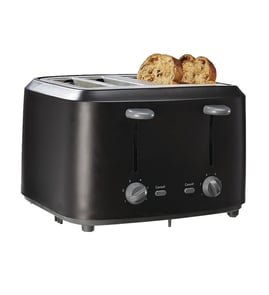



What is KitchenAid's warranty on toasters?
KitchenAid toasters, including model KMT4115CU0, typically come with a 1-year limited warranty starting from the date of purchase or delivery. Warranty terms can vary by product line and region, so we recommend confirming the exact coverage and exclusions in the KMT4115CU0 owner's manual.
What the standard toaster warranty usually covers
Most KitchenAid small-appliance warranties focus on defects in materials and workmanship under normal household use.
Common coverage details to check:
- Length of coverage (often 1 year)
- Proof-of-purchase requirements (receipt, delivery date)
- What counts as normal use (household vs. commercial)
- What parts or conditions are excluded (wear, misuse, accidents)
- Who pays shipping or service costs (varies by program)
What is usually not covered
Even with a valid warranty, these situations are commonly excluded.
- Cosmetic damage (scratches, dents, discoloration)
- Damage from misuse (overloading slots, forcing the lever)
- Damage from power issues (surges, improper outlet, extension cords)
- Normal wear items (for example, a crumb tray that’s bent from handling)
- Unauthorized repairs or modifications
Quick comparison: warranty vs. replacement parts
If the toaster is out of warranty, replacing a broken external part can be the fastest fix.
| Situation | Best next step | Example part for KMT4115CU0 |
|---|---|---|
| Within warranty period | Follow warranty service process | Use manual for service instructions |
| Out of warranty, minor issue | Replace the failed part | Tray W10334176 |
| Control/handling issue | Replace external control piece | Knob W10334179 |
Why it matters
Warranty coverage determines whether a repair is handled as a service claim or a parts replacement. Checking the exact terms up front helps you avoid delays and ensures you use the correct process for KitchenAid support.
Last updated: February 2026
Is the KitchenAid toaster worth the money?
Yes, the KitchenAid KMT4115CU0 toaster is worth the money when you want consistent toasting, sturdy controls, and a longer service life than many budget toasters. The value is highest if you use it often and want replaceable parts support; confirm features and care details in the KMT4115CU0 owner's manual.
What you are paying for
- More durable housing and controls than many entry-level toasters
- More consistent browning across repeated batches
- Better day-to-day usability (lever feel, knob control, crumb handling)
- Ongoing maintainability when wear items break or get lost
When it is not worth it
It is usually not the best buy if you only toast occasionally, want the lowest upfront cost, or prefer a toaster with lots of specialty presets.
Quick decision guide
| If you care most about... | KMT4115CU0 is a good fit? | Why |
|---|---|---|
| Long-term durability | Yes | Premium build tends to hold up better over time |
| Lowest price | No | You pay extra for brand and materials |
| Easy cleanup | Yes | Replaceable crumb tray helps keep performance steady |
| Lots of smart features | Sometimes | Many premium toasters focus on core performance |
Parts that affect long-term value
A toaster feels “worth it” longer when common wear or loss items are replaceable.
- If crumbs are building up or the tray is missing, replace the tray W10334176.
- If the shade control is hard to turn or the knob is missing, replace the knob W10334179.
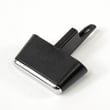
- If the lever is loose or not engaging smoothly, inspect the toaster lever WPW10334178.
Why it matters
A toaster that browns evenly and is easy to maintain saves time, reduces wasted food, and avoids the common “it still heats but it is annoying to use” problem that leads to early replacement.
Last updated: February 2026
What is the best toaster on the market today?
There is no single “best” toaster for everyone; the best choice depends on how many slices you toast, slot width (bagels and artisan bread), browning consistency, and how easy it is to clean. For KitchenAid model KMT4115CU0, we recommend using the KMT4115CU0 owner's manual to match features and care steps to how you actually toast day to day.
How we recommend choosing the “best” toaster
- 2-slice vs 4-slice capacity: 4-slice models save time for families but take more counter space.
- Even browning: look for consistent results across both slots and multiple batches.
- Wide slots and self-centering guides: better for bagels, thick bread, and uneven slices.
- Controls that feel solid: a reliable shade knob and lever reduce frustration over time.
- Easy crumb removal: a removable crumb tray makes cleaning faster and safer.
Quick comparison: what matters most
| If you care most about... | Prioritize these features | Typical tradeoff |
|---|---|---|
| Even browning | consistent heat control, repeatable shade settings | higher price, larger footprint |
| Bagels and thick bread | wide slots, bagel mode, strong lift | may toast thin bread less evenly |
| Speed for groups | 4-slice capacity, dual controls | more counter space |
| Easy cleanup | removable crumb tray, accessible interior | fewer “premium” features |
Tips to get better results from the toaster you already own
- Empty and reinstall the crumb tray after it cools; check fit so it sits flat.
- Use a mid-range shade setting first, then adjust one step at a time.
- Toast similar bread types together (thin sandwich bread vs thick artisan slices).
- Keep the toaster unplugged when cleaning; never use metal tools inside the slots.
Model-specific parts that affect everyday use
If your KMT4115CU0 is messy to clean or crumbs are escaping, replacing the crumb tray often restores normal cleanup and fit. Use the exact part match for your unit: tray W10334176.
Why it matters
The “best toaster” is the one that consistently matches your bread types and routine; choosing the right capacity, slot design, and crumb-tray setup reduces uneven browning, burning, and cleanup hassles.
Last updated: February 2026
Why is my toaster suddenly not working?
If your KitchenAid KMT4115CU0 toaster suddenly won’t run, the most common causes are a power issue, a jammed lever, heavy crumb buildup, or an internal safety/thermal cutoff opening. Start with outlet and cord checks, then clean the crumb tray and test the lever action.
Quick checks (fastest fixes first)
- Plug a different small appliance into the same outlet to confirm power.
- Unplug the toaster for 2 minutes, then try again (simple reset).
- Make sure the carriage/lever moves freely and is not blocked by a stuck slice.
- Empty and clean the crumb tray; reinstall it fully seated.
- Check the browning control knob for damage or looseness.
Cleaning and inspection steps
- Unplug the toaster and let it cool completely.
- Remove and clean the crumb tray(s); shake out crumbs over a trash can.
- Look down into the slots with a flashlight; remove stuck debris only after unplugging.
- Re-test with a normal slice of bread and a mid-range browning setting.
Parts that commonly affect operation
| Symptom | What it usually points to | What to check/replace |
|---|---|---|
| Lever won’t stay down | Carriage not latching, obstruction, worn lever | Inspect linkage; consider toaster lever WPW10334178 |
| Unit seems “dead” | No power, internal cutoff, wiring issue | Outlet/cord first; internal electrical testing next |
| Settings feel loose | Control knob slipping or cracked | Consider knob W10334179 |
| Burning smell, lots of smoke | Heavy crumb buildup | Clean and reinstall tray W10334176 (or the correct tray for your slot) |
Why it matters
A toaster that stops working suddenly is often protecting itself from overheating or a mechanical jam. Cleaning crumbs and confirming the lever and controls move correctly prevents repeat shutdowns and reduces scorching and uneven toasting.
For model-specific operating and care steps, follow the KMT4115CU0 owner’s manual.
Last updated: February 2026
How to clean the inside of a KitchenAid toaster?
To clean the inside of your KitchenAid KMT4115CU0 toaster, we recommend unplugging it, letting it cool completely, emptying and washing the crumb tray, then gently shaking out crumbs and wiping only the exterior. Avoid spraying cleaners or water into the slots.
Safe inside-cleaning steps (KMT4115CU0)
- Unplug the toaster and wait until it is fully cool.
- Remove the crumb tray and dump crumbs into the trash.
- Wash the tray in warm, soapy water; rinse and dry completely.
- Hold the toaster over a sink or trash can and gently turn it upside down to release loose crumbs.
- Use a soft, dry brush (or pastry brush) to loosen crumbs near the slot openings.
- Reinstall the tray only after everything is fully dry.
If your crumb tray is cracked, warped, or missing, replace it with the correct model part such as the tray W10334176.
What not to do (prevents shocks and damage)
- Do not immerse the toaster in water.
- Do not spray cleaner, water, or compressed air into the bread slots.
- Do not insert metal objects (knife, fork) into the slots.
- Do not scrub heating elements; they are fragile.
Quick cleaning checklist
| Task | How often | What you need |
|---|---|---|
| Empty crumb tray | Weekly (or after heavy use) | Sink or trash can |
| Wash crumb tray | Monthly | Warm soapy water, towel |
| Shake out crumbs | Monthly | None |
| Exterior wipe-down | As needed | Damp cloth, dry cloth |
Why it matters
Crumbs and oils can cause burning smells, uneven toasting, and extra smoke. Keeping the crumb tray clean also helps airflow and reduces mess under the toaster.
For model-specific care notes and any cleaning cautions, follow the KMT4115CU0 owner’s manual.
Last updated: February 2026
What is special about a KitchenAid toaster?
A KitchenAid toaster like model KMT4115CU0 stands out for its sturdy metal build, consistent browning control, and convenience features that make everyday toasting more predictable. It is designed to handle a range of breads and settings while keeping operation simple and durable for long-term countertop use.
Features people notice most
- Solid construction: metal housing and controls that hold up well to daily use.
- More even results: consistent heat and timing help reduce under-toasted or over-toasted spots.
- Bread flexibility: wide slots on many KitchenAid designs fit thicker slices and bagels.
- Convenience settings: common modes include bagel and defrost, plus “a little longer” style time extensions on many models.
- Easier cleanup: a removable crumb tray helps keep crumbs from building up inside.
What to check on your exact KMT4115CU0
Because features can vary by series, we recommend confirming the exact controls, cleaning steps, and any special modes in the KMT4115CU0 owner’s manual.
| What you want | Where to look | Why it helps |
|---|---|---|
| Browning levels | Shade dial/knob | Lets you match toast color to your bread type |
| Special cycles | Button labels (bagel/defrost) | Improves results for frozen items or one-sided toasting |
| Cleanup method | Crumb tray instructions | Prevents smoke and burning smells from crumbs |
Parts that support the “easy to live with” design
If your toaster is messy, hard to operate, or not responding smoothly, these common wear items are often involved:
- Tray W10334176 (crumb collection and cleanup)
- Knob W10334179 (browning or function selection control)
- Toaster lever WPW10334178 (engages the carriage and starts the toast cycle)
Why it matters
A toaster’s real value is repeatable results and safe, simple operation. Keeping crumbs managed and controls working smoothly helps prevent scorching, smoke, and inconsistent browning.
Last updated: February 2026