 Owner’s manual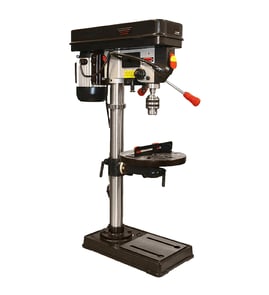
How to determine the size of a drill press?
A drill press is typically “sized” by its throat (also called swing), which is the distance from the spindle centerline to the column; on the Craftsman 137229200 20-inch drill press, the manual lists a 10-1/4 inch throat. For capacity, also check spindle travel and maximum height in the owner's manual.
What “size” usually means (and what it does not)
Most drill press size labels refer to throat/swing, not the maximum drilling height.
- Throat (spindle-to-column distance): tells you how far from an edge you can drill into a workpiece
- Swing (often advertised size): typically about 2x the throat (approximate)
- Spindle travel (quill travel): how deep the bit can feed in one stroke
- Overall height: how tall the machine is, not the drilling capacity by itself
Key specs for Craftsman 137229200 (from the manual)
| Spec | What it affects | Value |
|---|---|---|
| Throat | Max distance from an edge to hole center | 10-1/4 in. |
| Spindle travel | Max feed depth per stroke | 4-3/4 in. |
| Table size | Work support area | 19-1/4 in. x 18-3/8 in. |
| Base size | Footprint | 17-3/4 in. x 24-1/8 in. |
| Height | Overall machine height | 66-3/4 in. |
How we recommend measuring drill press capacity at home
If you do not have the spec sheet handy, you can confirm the “size” with a tape measure:
- Unplug the drill press for safety.
- Measure from the center of the chuck/spindle straight back to the front of the column (that is the throat).
- Double that number to estimate the swing (common marketing size).
- Measure spindle travel by lowering the quill from fully up to fully down.
Why it matters
Choosing the right drill press size prevents frustration and unsafe setups. Throat/swing determines whether you can drill where you need on wide boards, while spindle travel and table setup determine whether you can drill cleanly and consistently.
Last updated: February 2026
What is a good horsepower for a drill press?
A good horsepower for a drill press depends on what you drill most often. For general DIY drilling in wood and light metal, about 1/3 to 1/2 HP is a solid target; for frequent larger bits, hole saws, or tougher metal, 3/4 HP and up performs better. For your Craftsman 137229200 20" drill press, use the owner's manual to match speed and setup to the material.
Quick horsepower guide by typical use
- Woodworking (most hobby use): 1/3 to 1/2 HP
- Light metal (aluminum, thin steel): 1/2 to 3/4 HP
- Heavier metalwork (larger holes in steel): 3/4 to 1-1/2 HP
- Production or industrial drilling: 1-1/2 HP and higher
Why horsepower is only part of the answer
Horsepower helps prevent stalling, belt slip, and overheating, but drilling results also depend on speed selection, bit type, and how securely the work is held.
What matters just as much as HP
- Spindle speed choice: slower for larger bits and harder metals
- Bit sharpness and type: dull bits overload any motor
- Workholding: clamp the workpiece for large holes to prevent grabbing and spinning
- Feed pressure: steady pressure avoids burning and chatter
- Lubrication for metal: a small amount of oil on the bit tip helps prevent overheating
Practical “good HP” recommendations
| If you usually drill... | A good HP range | What you gain |
|---|---|---|
| Small holes, mostly wood | 1/3 to 1/2 HP | Smooth drilling, lower cost |
| Mixed wood and light metal | 1/2 to 3/4 HP | Better torque, less bogging |
| Larger bits in steel | 3/4 HP+ | Less stalling, cleaner holes |
Why it matters
Choosing enough horsepower helps you drill safely and accurately. When a drill press is underpowered for the job, it is more likely to stall or grab, which can damage bits and make the workpiece harder to control.
Last updated: February 2026
What is the 4 inch rule for drill press?
The “4-inch rule” is a drill press safety habit: keep your hands and fingers at least 4 inches away from the spinning bit and the point of operation. On the Craftsman 137229200 20-inch drill press, we recommend clamping the work so your hands never need to get close to the bit.
How to follow the 4-inch rule (practical steps)
- Clamp the workpiece to the table or hold it in a drill press vise; do not hand-hold small stock.
- Use a fence, stop block, or jig to position the work instead of your fingers.
- Lower the quill using the feed handles only; keep your free hand on the handle, not near the bit.
- Remove the chuck key immediately after tightening the bit.
- Clear the table of tools and scraps before turning the drill press on.
- Let the spindle reach full speed before drilling; stop and unplug if you notice unusual vibration.
What the manual emphasizes (and how it ties to the 4-inch rule)
The 137229200 owner's manual stresses keeping hands out of the drill bit’s path and securing the work with clamps or a vise. The 4-inch rule is an easy way to enforce those instructions consistently, especially when drilling larger holes where the bit can grab and spin the work.
Quick safety checklist
| Task | Safer choice | Why it helps |
|---|---|---|
| Holding the work | Clamp or vise | Keeps hands away from the bit |
| Small parts | Use a jig or fixture | Prevents slips into the cutting area |
| Clothing/PPE | Eye protection; no gloves or loose clothing | Reduces entanglement and flying-debris risk |
| Setup | Tighten table/head locks | Prevents shifting during drilling |
Why it matters
Most drill press injuries happen when a workpiece shifts, spins, or a hand slips toward the bit. Keeping a 4-inch buffer, plus clamping and proper setup, prevents “reflex grabs” near the rotating tool.
Last updated: February 2026
What are 5 important rules for a drill press?
For the Craftsman 137229200 20" drill press, five key rules are: bolt the drill press down, wear proper eye protection, secure the work with clamps or a vise, keep hands out of the drill bit path, and set the recommended speed for the bit and material. See the owner's manual for the full safety list.
5 must-follow drill press rules
- Bolt it down: Secure the drill press to a sturdy workbench; if the bench can move, secure the bench to the floor.
- Wear the right PPE: Use safety goggles (not regular glasses); add a face or dust mask for dusty drilling and hearing protection for long runs.
- Clamp the work: Use clamps or a vise; if using a drill press vise, fasten it to the table.
- Keep hands clear: Never place fingers where they could contact the bit; avoid awkward hand positions that can slip into the cutting path.
- Use correct speed and start safely: Use the recommended speed for accessories and materials; jog the switch to check for wobble, then let the spindle reach full speed before drilling.
Quick safety checklist (before you drill)
| Check | What to do | Why |
|---|---|---|
| Table and head locks | Tighten table, head, and support locks | Prevents shifting during drilling |
| Clear the table | Remove tools and scraps | Prevents thrown objects and snags |
| Bit condition and setup | Use a straight bit, seated correctly in the chuck | Reduces wobble and breakage |
| Workholding | Clamp or vise the workpiece | Prevents spinning and kickback |
Why it matters
Most drill press injuries come from the workpiece spinning, a hand slipping into the bit path, or debris striking your eyes. Following these rules keeps the work stable, the tool running smoothly, and your hands and face protected.
Last updated: February 2026
Can you replace the chuck on a drill press?
Yes. On the Craftsman 137229200 20" drill press, you can replace the chuck (and arbor) by ejecting it from the spindle using the built-in wedge/keyhole method, then installing the replacement chuck/arbor cleanly and fully seated. Follow the safety and chuck-handling steps in the owner's manual.
How chuck removal works on model 137229200
Our manual describes a straightforward removal process using the spindle and quill keyholes:
- Turn the switch OFF and unplug the drill press before any adjustment or accessory change.
- Set the depth stop to hold the quill at about 3 inches down.
- Rotate the chuck by hand to align the keyholes in the spindle and quill.
- Insert the key wedge into the aligned keyholes.
- Tap the wedge lightly with a plastic-tipped hammer until the chuck and arbor drop free (catch it with your other hand).
Installing the replacement chuck: best practices
A replacement chuck only runs true when the tapers are clean and fully seated.
- Clean the tapered surfaces (chuck and spindle/arbor) to remove dirt, grease, and oil.
- Seat the chuck/arbor straight; avoid cocking it at an angle.
- Do not strike the chuck body with a steel hammer.
- After installation, run the drill press briefly and check for wobble.
- Always remove the chuck key before turning power on; this model specifies using the self-ejecting chuck key.
Quick troubleshooting after replacement
| Symptom | Most common cause | What to do |
|---|---|---|
| Bit wobbles (runout) | Taper not fully seated or dirty | Clean tapers; reseat chuck firmly |
| Chuck falls out | Oil/grease on taper or poor seating | Degrease; reinstall and seat fully |
| Vibration/noise | Bent bit or bearing issue | Try a straight bit; inspect bearings |
Why it matters
A worn or poorly seated chuck can cause runout, oversized holes, broken bits, and unsafe workpiece grabbing. A correct chuck swap restores accuracy and helps the spindle and bearings last longer.
Last updated: February 2026