 Installation guide
 Owner’s manual



How to clean a Bosch built-in microwave?
For the Bosch HMC80252UC built-in microwave, we recommend wiping the cavity and exterior with a soft cloth and warm mild detergent, then rinsing and drying completely; avoid abrasive pads and powders to protect the finish and door surfaces. See the HMC80252UC owner's manual for the full cleaning chart.
Weekly cleaning checklist (safe for most messes)
- Let the microwave cool completely before cleaning.
- Remove the tray and wash it with warm, soapy water (many trays are also dishwasher-safe).
- Wipe the inside walls, ceiling, and floor with a soft cloth and warm mild detergent solution.
- Clean the inner door panel and front frame carefully; grease buildup here can affect door closing.
- Wipe spatters immediately after cooking, especially greasy foods.
- Dry all surfaces fully to prevent streaks and odors.
What to use (and what to avoid)
| Area | Use | Avoid |
|---|---|---|
| Ceramic tray | Warm, soapy water; dishwasher (if allowed for your tray) | Abrasive pads, scouring powders |
| Door seal | Damp cloth | Soaking the seal; harsh chemicals |
| Door glass | Soap and water; glass cleaner on a towel | Steel wool; oven cleaners |
| Stainless exterior | Soapy sponge; rinse and dry; wipe with the grain | Powder cleaners; abrasive pads |
| Controls and plastic | Soapy water; rinse and dry | Petroleum-based solvents; abrasives |
Steam on the door: what it means
If you see steam or moisture inside or outside the door, wipe it with a soft cloth. Steam buildup during high-humidity cooking is normal and does not indicate a leak.
Why it matters
Regular cleaning helps the door seal close properly, reduces odors and smoke, and prevents grease from baking onto surfaces, which can lead to arcing and poor performance over time.
Last updated: February 2026
Can you put metal in a Bosch microwave?
In a Bosch HMC80252UC microwave, we do not recommend putting metal cookware, metal utensils, or dishes with metallic trim in standard microwave mode because metal can cause arcing (sparks) and damage. Use only the metal accessories Bosch designed for this unit, as described in the HMC80252UC owner’s manual.
What metal is OK (and what is not)
Typically OK in this model (when used exactly as intended)
- The metal tray turntable that comes with the unit; it is designed to rotate during cooking.
- The wire rack when it sits on the four plastic supports and does not touch the cavity walls.
- Small pieces of aluminum foil used only as a shield (for example, on poultry tips), kept away from the oven walls and door.
Not OK for microwave cooking
- Metal bowls, pans, or baking sheets used like regular cookware
- Metal utensils (forks, spoons), metal skewers, and foil trays
- Plates or cups with metallic trim or decoration
- Large sheets of aluminum foil
Quick decision table
| Item | Use in microwave mode? | Notes |
|---|---|---|
| Wire rack | Yes, if positioned correctly | Must sit on plastic supports; do not let it touch metal walls. |
| Metal tray turntable | Yes | Must be installed and able to turn. |
| Aluminum foil | Limited | Use small pieces only; keep clearance from walls and door. |
| Metallic-trim dishes | No | Common cause of arcing and uneven cooking. |
Why it matters
Metal can reflect microwave energy and create arcing. Arcing can pit the cavity surface, damage components, and lead to uneven heating. Using the Bosch-provided rack and tray correctly helps you get safe, consistent results.
Helpful tips to prevent sparks
- If you see sparks, stop the cycle and remove the metal item immediately.
- Use microwave-safe glass or ceramic for everyday reheating.
- Keep foil small and away from the sides and door.
- Follow cookware and accessory guidance in the HMC80252UC owner’s manual.
Last updated: February 2026
Where is the model number on a Bosch microwave?
On a Bosch microwave like model HMC80252UC, the model number is printed on the appliance rating plate (type plate), which is typically located around the door opening area. We use that model number to match the correct parts, installation specs, and wiring information.
Where to look first (fast checks)
- Open the microwave door and inspect the frame around the opening (especially the side trim area).
- Check the inner edge of the door itself for a label.
- Look for a rating plate that lists Model No. and often an FD-No. (factory date code).
- If your unit is installed in a wall cabinet, use a flashlight and look along the front frame.
- If the label is hard to read, take a clear photo and zoom in.
What the rating plate usually shows
The rating plate is the best identifier because it ties your Bosch microwave to the correct parts list and electrical requirements.
| Label item | What it means | Why we need it |
|---|---|---|
| Model No. | Your exact model (example: HMC80252UC) | Ensures correct part fit and diagrams |
| FD-No. | Production code | Helps confirm version changes |
| Electrical ratings | Voltage, amps, Hz | Helps verify proper power supply |
Why it matters for parts and troubleshooting
Bosch microwaves can have multiple versions that look similar. Using the exact model number prevents ordering the wrong door switch, fuse, control board, or turntable components.
If you are troubleshooting a no-power symptom after finding the model number, the HMC80252UC owner’s manual includes steps such as checking the household breaker or fuses and resetting the clock.
Common parts that depend on the exact model match
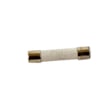
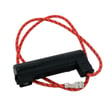
- Microwave fuse 00631510 (no power, dead display)
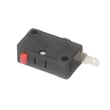
- Microwave door interlock switch (door won’t start, intermittent running)
- Microwave electronic control board (display issues, keypad problems)
Last updated: February 2026
What are common problems with Bosch microwaves?
Common problems we see with the Bosch HMC80252UC microwave include no power, the display works but it will not start, no heat, sparking or arcing, and turntable noise or sticking. Many of these trace back to power supply issues, door interlock problems, or a failed internal safety part.
Most common symptoms and what they usually mean
- Dead display and no operation: outlet, breaker, or an internal fuse issue
- Display on but will not run: door not closing fully, door seal obstruction, or interlock switch problem
- Runs but does not heat: high-voltage component failure (service-level repair)
- Sparks or arcing: metal in the cavity, foil too close to walls, or damaged interior surface
- Turntable noise or sticking: tray/coupler alignment, debris under the tray, or drive component wear
Quick checks you can do first (no tools)
Use the steps in the HMC80252UC owner’s manual to confirm normal operation and rule out simple causes.
- Verify the plug is fully seated and the outlet has power
- Reset the household circuit breaker (or replace a blown house fuse)
- Close the door firmly; remove any packaging or debris from the door seal area
- Press Clear/Off twice, then re-enter the cook time
- Remove any metal ties, utensils, or oversized foil; keep foil at least 1 inch from the walls
Parts that commonly fix “won’t start” or “no power”
If basic checks do not help, these model-matched parts are common culprits:
| Symptom | Common part involved | Example model-matched part |
|---|---|---|
| No power at all | Internal fuse | Microwave fuse 00631510 |
| Won’t start, door-related behavior | Door interlock switch or mount | Microwave door interlock switch 00614767 |
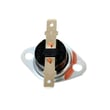
| Shuts off during cooking | Overheat protection opening | Microwave thermostat (model-matched) |
Why it matters
Microwaves rely on door interlocks and thermal protection to prevent unsafe operation. When an interlock switch, fuse, or thermostat trips or fails, the unit may appear “dead” or refuse to run even though the display works.
Last updated: February 2026


