 Owner’s manual




What is the most common problem with a LG dishwasher?
For the LG LDP6810BD dishwasher, the most common issues we see are water-related: not draining (often showing an OE-style drain error) or not filling (often showing an IE-style inlet error). Many times, the fix is basic maintenance like cleaning filters and checking hoses; see the troubleshooting section in the LDP6810BD owner’s manual.
Most common symptoms and what they usually point to
- Standing water in the tub after the cycle: drain restriction, clogged filters, or a failing drain pump
- Dishes not getting clean: blocked spray arm holes, clogged filters, or weak circulation
- Dishwasher won’t start: door not fully latched, Control Lock enabled, or start sequence not completed
- Long cycle times: incoming water too cool or heating delays
- Leaks at the front: unit not level, oversudsing from wrong detergent, or a worn door seal
Quick checks you can do first (no parts needed)
- Clean the filtration system (food debris in the filter can cause odor and drainage problems).
- Inspect the drain hose routing: look for kinks, pinches, or a clogged air gap/disposal connection.
- Check spray arms: clear blocked jet holes so water can reach dishes.
- Confirm proper detergent: only use automatic dishwasher detergent (hand dish soap can cause oversudsing and leaks).
- Verify the door is latching and you are starting the cycle correctly.
When a part is the likely culprit
If cleaning and hose checks don’t help, these parts are common next suspects on LDP6810BD:
| Symptom | Common suspect | Example compatible part for this model |
|---|---|---|
| Won’t drain / water left in tub | Drain pump | Dishwasher drain pump ABQ75742505 |
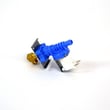
| Won’t fill / inlet error | Water inlet valve | Dishwasher water inlet valve 5221DD1001E |
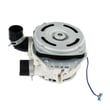
| Poor wash performance / weak spray | Circulation pump and motor | LG dishwasher pump and motor assembly AGM30016301 |
Why it matters
Drain and fill problems can stop the cycle, leave dirty water in the tub, and lead to poor cleaning. Catching clogs early (filters, spray arms, drain hose) often prevents bigger repairs like pump or valve replacement.
Helpful related DIY info
For code-based troubleshooting, we recommend using our LG dishwasher error codes guide alongside the manual.
Last updated: January 2026
How to clear LG dishwasher error code?
On the LG LDP6810BD dishwasher, you can often clear an error by canceling the cycle (press and hold Start for 3 seconds to drain) and then restarting. If the code returns, it is detecting an active issue (drain, fill, leak, etc.) that needs troubleshooting using the LDP6810BD user manual.
Quick reset steps (safe first)
- Press and hold Start for 3 seconds to cancel and drain.
- Wait 1 minute, then press Power to turn the dishwasher back on.
- Start a short cycle (like Rinse or Express) to see if the code returns.
- If Control Lock is on (CL), press and hold Half Load + Energy Saver for 3 seconds to toggle it off.
- If the dishwasher is unresponsive, turn off power at the breaker for 5 minutes, then restore power.
Match the code to the most likely fix
The LDP6810BD manual groups error codes by the system that is failing. Use this as a fast starting point.
| What you see | What it usually means | What to check first |
|---|---|---|
| OE | Drain problem | Kinked/clogged drain hose, disposal knockout plug, filters clogged |
| IE | Water inlet problem | Water supply valve on, inlet hose kinked/frozen |
| AE | Leak detected | Dishwasher not level, water in base, oversudsing |
Targeted checks that solve most repeat errors
- Clean the filters and check the sump area for debris (common cause of OE).
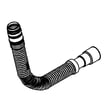
- Inspect the drain path for kinks or restrictions; if the hose is damaged or soft, replace the dishwasher drain hose AEM74333104.
- If the unit will not fill and IE keeps returning, confirm the house shutoff is open; if the valve is faulty, the dishwasher water inlet valve 5221DD1001E is the compatible replacement.
- If draining is weak or intermittent and OE persists after cleaning, the drain pump may be the issue; check the dishwasher drain pump ABQ75742505.
- Avoid using hand dish soap; oversudsing can trigger leak-related behavior and error codes.
Why it matters
An error code that comes back after a cancel/reset is usually protecting the dishwasher from flooding, overheating, or running with poor water flow. Clearing the code without fixing the cause can lead to repeat shutdowns and incomplete cleaning.
Last updated: January 2026
How do I force my LG dishwasher to drain?
On the LG LDP6810BD dishwasher, we force a drain by using the Cancel function: press and hold Start for 3 seconds. The drain pump will run, and when draining is finished the dishwasher powers off. See the LDP6810BD manual.
Steps to force a drain (Cancel)
- Press Power to turn the dishwasher on.
- Press and hold Start for 3 seconds to activate Cancel.
- Listen for the drain pump to start.
- Wait until draining stops and the unit turns off.
- If water remains, repeat once after doing the checks below.
If it still will not drain
Most drain problems on the LG LDP6810BD come from a restriction in the drain path or a drain component issue.
Quick checks (no parts required)
- Check the drain hose for kinks or pinches behind the dishwasher.
- If connected to a garbage disposal, confirm the disposal knockout plug was removed.
- Clean the filters and remove debris from the sump opening.
- Clean the air gap (if your installation uses one).
- Verify the drain hose has a proper high loop to help prevent backflow.
Parts to consider if draining is weak or stops
If you hear the motor running but water does not move out, inspect the drain hose and the drain pump area for blockage.
| Symptom | Most likely cause | What we recommend |
|---|---|---|
| Pump runs but little or no water exits | Clog in hose, air gap, disposal, or filters | Clear restrictions; re-test Cancel |
| No drain sound, or only a hum | Drain pump problem or obstruction | Inspect/replace dishwasher drain pump ABQ75742505 only if it matches your model’s parts list; otherwise check LG dishwasher pump and motor assembly AGM30016301 |
| Slow or intermittent draining | Partial restriction or backflow | Inspect drain routing and hose condition; replace hose if damaged |
Why it matters
Standing water can trigger drain errors, cause odor, and leave soil redeposited on dishes. Forcing a drain empties the tub so you can safely check the filters, drain hose, and pump area.
Last updated: January 2026





