Installation guide
 Owner’s manual


How do I do a hard reset on my Samsung dishwasher?
To hard reset your Samsung DW80K7050US dishwasher, we recommend doing a full power reset: turn the dishwasher off at the circuit breaker (or unplug it) for 5 to 10 minutes, then restore power and start a new cycle. This clears many control glitches.
- Press Power to turn the dishwasher off.
- Turn OFF the dishwasher circuit breaker (preferred) or unplug the power cord.
- Wait 5 to 10 minutes.
- Restore power (breaker ON or plug back in).
- Turn the dishwasher on and run a quick test cycle.
These checks solve the most common “has power but won’t start” situations:
- Confirm the door is fully closed and latched; a misread latch can prevent starting.
- Cancel the current cycle (if the control responds), then reselect a cycle.
- Turn off Control Lock/Child Lock if it is enabled.
- Check your home breaker again; a tripped breaker can look like a dishwasher problem.
- If you see an error code, use it to guide the next repair step.
If your DW80K7050US displays an error code after resetting, match the code to the likely system (drain, fill, leak, heater, or motor) and troubleshoot from there. The fastest path is to follow the code-specific steps in the Samsung dishwasher error codes guide.
| Symptom after reset | Most likely cause | Best next step |
|---|---|---|
| No lights, no response | Power supply issue | Check breaker, outlet, wiring junction |
| Powers on, won’t start | Door not sensed closed | Re-close door; inspect latch area |
| Stops and beeps with code | Detected fault | Follow error code troubleshooting |
| Runs but acts “glitchy” | Control needs reset | Repeat power reset; then try a different cycle |
A hard reset is the safest first step because it clears a stuck control state without replacing parts. If the problem returns immediately, the dishwasher is usually reacting to a real condition (door sensing, draining, filling, or a leak signal) rather than a one-time glitch.
For model-specific control behavior and button functions, follow the DW80K7050US manual.
Last updated: February 2026
How long do Samsung dishwashers usually last?
Samsung dishwashers (including model DW80K7050US) typically last 10 years with normal household use. You can often extend service life by keeping the filter and spray arms clean, using the right detergent, and fixing small issues early using the DW80K7050US owner's manual.
Most dishwashers wear out from heat, moisture, and moving parts over time. These factors make the biggest difference:
- Usage frequency (daily cycles wear parts faster than a few loads per week)
- Water quality (hard water increases mineral buildup)
- Loading habits (blocked spray arms reduce cleaning and strain the circulation system)
- Maintenance (filter cleaning and periodic tub cleaning prevent clogs and odors)
- Early repairs (replacing a small part can prevent bigger failures)
We recommend these habits for Samsung dishwashers:
- Clean the filter area regularly; remove trapped food and debris
- Inspect and rinse spray arms; clear clogged jet holes
- Run a monthly cleaning cycle (dishwasher cleaner or approved method)
- Use rinse aid to improve drying and reduce spotting
- Avoid overloading; keep tall items from blocking the upper spray arm
- Check the door seal area for residue; wipe it clean to prevent leaks
Some parts are more likely to need attention as the dishwasher ages:
| Symptom | Common cause | What to check first |
|---|---|---|
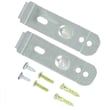
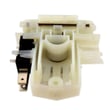
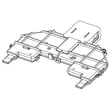
| Won’t start or stops mid-cycle | Door not sensing closed | Latch alignment, then dishwasher door switch DD81-02132A |
| Not cleaning well | Poor water circulation or blocked spray | Spray arm clogs, then circulation pump performance |
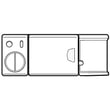
| Water in base or leak error | Leak detection triggered | Look for drips, then dishwasher leak detector sensor DD94-01062A |
| Rack won’t roll smoothly | Worn rack wheels | Inspect and replace dishwasher dishrack roller, lower DD66-00023A |
A dishwasher that is maintained and repaired early usually costs less to own over its lifetime. Simple steps like keeping the filter and spray arms clear help protect high-wear components such as the circulation pump motor and sensors.
Last updated: February 2026
What is the most common problem with Samsung dishwashers?
The most common Samsung dishwasher complaint (including the Samsung DW80K7050US) is poor cleaning, usually caused by spray issues, clogged filtration, or loading and detergent problems. The next most common issues are not draining and leaking, which often trace back to a blockage or a sensor detecting water.
- Not cleaning well: check spray arms for clogs and confirm strong water spray
- Not draining: check the filter area and drain path for debris
- Leaking: check for standing water in the base and inspect door sealing surfaces
- Won’t start or stops mid-cycle: confirm the door fully latches and the controls respond
- Error codes or flashing lights: use the code to narrow the failure quickly
| Symptom | Most likely cause | What we do first |
|---|---|---|
| Dishes still dirty | Clogged spray arm or filter, poor loading | Clean spray holes; clean filter; reload correctly |
| Water left in tub | Drain blockage or drain pump issue | Clear filter sump; check drain hose routing |
| Water on floor | Door sealing issue or leak detection triggered | Inspect door area; check for water in base |
| Won’t run | Door not sensed as closed | Check latch action and door switch |
If your DW80K7050US won’t start, stops, or acts like the door is open, the door sensing parts are a common place to focus:
If you’re seeing leak-related behavior (draining constantly, beeping, or stopping), a leak detection component can be involved:
Cleaning, draining, and leaking problems often share the same root causes: restricted water flow, blocked drainage, or a safety sensor response. Fixing the basic maintenance and loading issues first prevents unnecessary part replacement and repeat failures.
For cycle options, cleaning steps, and error code behavior on the Samsung DW80K7050US, follow the troubleshooting and care instructions in the DW80K7050US manual. For installation-related leak and drain-hose routing checks, use the DW80K7050US installation guide. You can also match any displayed code to the right checks using the Samsung dishwasher error codes guide.
Last updated: February 2026
Is the DW80K7050US a good dishwasher?
Yes. The Samsung DW80K7050US is a solid choice if you want a quiet, everyday dishwasher with strong overall cleaning performance. Most owners who like this model point to low noise and good results, with the main tradeoffs being feature preferences (like auto door release) and cycle/option selection for tougher loads.
A dishwasher is “good” when it consistently cleans, drains, and dries with minimal noise and few interruptions. For the DW80K7050US, focus on these practical factors:
- Noise level: Many users describe it as very quiet during normal operation.
- Cleaning consistency: Heavily soiled items often need the right cycle and options (for example, intensive wash zones or higher-temp options).
- Drying style: Auto door release can improve drying but may be inconvenient with small kids or tight walkways.
- Reliability signals: Fewer error codes, no leaks, and stable fill and drain performance.
- Rack usability: Smooth rack rolling and spray arm clearance matter as much as raw “power.”
| If you care most about... | DW80K7050US is a good fit when... | Consider adjusting when... |
|---|---|---|
| Quiet operation | You run it at night or in an open kitchen | You hear grinding or loud wash noise (check spray arms and filters) |
| Cleaning | You match cycle to soil level | You use light cycles for baked-on messes |
| Drying | You use rinse aid and proper loading | Plastics stay wet or door release is undesirable |
| Kid-friendly use | You can manage the door behavior after cycles | Auto door opening creates safety or access concerns |
Use these setup and usage steps first; they solve most “not cleaning” complaints without replacing parts:
- Scrape, do not pre-wash; remove bones, seeds, and heavy debris.
- Load so spray arms spin freely; avoid tall pans blocking the upper arm.
- Use fresh detergent and rinse aid; switch brands if you see residue.
- Clean the filter area regularly and check for glass or labels.
- Choose a heavier cycle or targeted wash option for stuck-on food.
For cycle and feature specifics (including door behavior and recommended options), follow the DW80K7050US user manual.
“Good dishwasher” ratings usually come down to matching features to your household. If you want quiet operation and strong day-to-day cleaning, this model fits well. If auto door release or occasional tough-load performance is a dealbreaker, adjusting settings and loading habits makes the biggest difference.
Last updated: February 2026