Owner’s manual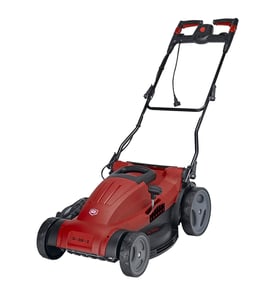

How to remove blade from black and decker electric lawn mower?
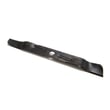
To remove the blade on a Black & Decker MM675 electric walk-behind mower, unplug the mower, wait for the blade to stop completely, block the blade with a 2x4, then remove the blade nut and slide off the spacer, insulator washer, and blade in order (wear gloves). See the MM675 owner's manual for the exact stack-up and blade orientation.
Safety first (do this every time)
- Unplug the mower from the power supply
- Wait for the blade to come to a complete stop
- Wear work gloves and eye protection
- Work on a flat surface so the mower cannot roll
- Keep hands clear of sharp blade edges
Blade removal steps (MM675)
- Power off and unplug. Release the switch lever, then unplug the cord.
- Tip and stabilize the mower. Carefully lay the mower on its side so you can access the blade area.
- Lock the blade. Place a piece of 2x4 wood (about 2 feet long) against the blade to keep it from turning.
- Remove the blade nut. Turn the nut off while the blade is blocked.
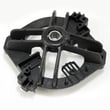
- Remove parts in order. Slide off the lower blade spacer, lower insulator washer, then the blade.
What goes back on (order and orientation)
Use this as a quick reference when reinstalling:
| Step | Part | Notes |
|---|---|---|
| 1 | Blade | Install on the fan shoulder; “GRASS SIDE” faces the ground |
| 2 | Lower insulator washer | Align flats with the shaft flats |
| 3 | Lower blade spacer | Sits above the insulator washer |
| 4 | Blade nut | Tighten securely; recheck before mowing |
Why it matters
Correct blade orientation and the right spacer and insulator washer order keeps the blade seated properly, reduces vibration, and helps the MM675 cut cleanly without stressing the motor or blade fastening system.
Parts help
If you are matching a replacement blade or hardware, search by model number MM675 on the parts list for this mower, or use Sears PartsDirect to look up additional diagrams and part listings by model.
Last updated: February 2026
What is the Black and Decker MM675?
The Black & Decker MM675 is an 18-inch electric mulching mower designed for home lawn care. It features a 3-in-1 deck for mulching, discharging, and optional bagging, and it is intended for non-commercial use; see the MM675 owner's manual for operating and safety details.
Key features and what they mean
- 18-inch cutting deck: A good fit for small to medium yards.
- 3-in-1 deck: Mulch, discharge, or bag (bagging is optional).
- Electric power: No gas or oil; you use an extension cord and standard household power.
- Home-use design: Built for typical residential mowing, not commercial workloads.
Basic operating reminders (important for performance)
For the MM675, we recommend these habits from the manual to keep cutting quality consistent:
- Lock the handle into position before operating.
- Keep the blade sharpened and balanced.
- Clean the deck after each use; caked grass reduces performance.
- Clear the mowing area of people and pets before starting.
Quick troubleshooting guide (when it struggles in grass)
If the mower bogs down or leaves clumps, these manual-based checks usually fix it:
| Symptom | Most common cause | What to do first |
|---|---|---|
| Motor slows in thick grass | Cutting too much at once | Unplug mower; raise cutting height |
| Poor mulching, clumping | Grass is too wet or too tall | Wait for grass to dry; raise height |
| Uneven cut | Dull blade or buildup under deck | Unplug mower; clean deck; inspect blade |
Why it matters
Knowing the MM675 is an 18-inch, corded electric 3-in-1 mower helps you choose the right mowing approach (shorter passes in tall grass, dry conditions for mulching) and identify the right replacement parts by model number when needed.
For parts lookup by model number, start with the parts list for MM675, or search our catalog on Sears PartsDirect.
What is the average lifespan of MM675?
The average lifespan of a Black & Decker MM675 electric walk-behind mower is 8 to 12 years with normal homeowner use. Regular deck cleaning, correct blade care, and basic electrical cord safety are the biggest factors that keep the motor and cutting performance strong.
What affects lifespan most
- Deck cleanliness: a caked deck reduces performance and increases strain
- Blade condition: a sharp, balanced blade cuts faster and loads the motor less
- Electrical supply: a good outlet, fuse/circuit breaker, and extension cord prevent low-voltage issues
- Grass conditions: very tall or wet grass increases load and heat
- Storage and corrosion: fertilizer and chemicals accelerate metal corrosion if not cleaned off
Maintenance that extends MM675 life
We follow the care steps outlined in the [MM675 owner’s manual]:
- Unplug before cleaning or servicing; wait for the blade to stop
- Clean the underside after mowing (rag, paper towels, or crumpled newspaper)
- Check nuts, bolts, and screws for tightness before each mowing session
- Keep the blade sharpened and balanced
- Wipe exposed metal parts; use light petroleum-based oil only on metal (do not oil wheels)
Quick troubleshooting that prevents premature wear
| Symptom | What to check first | Typical fix |
|---|---|---|
| Motor will not start | Outlet power, fuse/circuit breaker | Restore power, reset breaker |
| Motor slows down | Deck packed with clippings | Unplug, clean underside |
| Motor slows in tall grass | Cutting height and pace | Raise cut height, slow down |
Why it matters
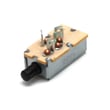
Electric mowers like the MM675 rely on steady airflow and reasonable cutting load. Keeping the deck clear and the blade in good shape reduces current draw and heat, which directly protects the motor and switch components.
Last updated: March 2026