


How to replace the blade on an edger?
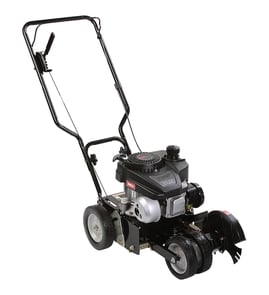
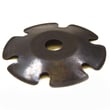
To replace the blade on your Craftsman 358796470 lawn edger, disconnect the spark plug wire, lock the blade from turning, then remove the blade nut and hardware. Many edgers use a reverse-thread blade nut, so you loosen it by turning clockwise; install the new blade and tighten securely.
Safety first (before you touch the blade)
- Shut the engine off and let all moving parts stop.
- Disconnect the spark plug wire and secure it away from the plug.
- Wear heavy gloves; edger blades are sharp even when worn.
- Work on a flat surface; block the wheels so the edger cannot roll.
Blade replacement steps (typical Craftsman edger setup)
- Tip the edger as needed to access the blade area (keep the air filter and carburetor side up to reduce fuel leakage).
- Wedge a block of wood against the blade to keep it from rotating.
- Remove the blade nut, washer(s), and any spacer(s).
- Slide the old blade off the shaft.
- Install the new blade in the same orientation as the old one.
- Reinstall spacer(s), washer(s), and nut; tighten firmly.
- Reconnect the spark plug wire and test run briefly.
Which way do I turn the nut?
Many edgers use a left-hand (reverse) thread on the blade nut.
| Nut type | Loosen direction | Tighten direction |
|---|---|---|
| Standard thread | Counterclockwise | Clockwise |
| Reverse (left-hand) thread | Clockwise | Counterclockwise |
Common mistakes to avoid
- Installing the blade backwards (can cut poorly and vibrate).
- Forgetting a spacer/washer (can cause wobble or shaft damage).
- Overtightening with an impact tool (can strip threads).
- Reusing damaged hardware; replace worn fasteners such as the screw 530015814 when needed.
Why it matters
A correctly installed blade reduces vibration, improves edging performance, and helps protect the spindle/shaft and bearings from premature wear.
Last updated: February 2026
Is an edger blade reverse thread?
Most edger blade nuts are not reverse-thread; on a Craftsman edger like model 358796470, the blade fastener typically loosens by turning counterclockwise and tightens clockwise. If the nut keeps “self-loosening,” the issue is usually the direction of rotation, missing hardware, or a worn blade mount.
Quick way to tell (without guessing)
- Lock the blade from turning (block it with a wood scrap, not your hand).
- Put a wrench on the blade nut.
- Apply steady force counterclockwise first.
- If it does not budge, try clockwise with controlled pressure.
- Once it breaks free, note the direction it moved to loosen.
What commonly makes it seem like a reverse thread
- Normal thread, but the blade spins the opposite direction than you expect.
- Washer/spacer installed wrong so the nut never clamps the blade tightly.
- Debris or rust on the arbor threads causing binding.
- Rounded nut or damaged threads that slip instead of loosening.
- Blade not seated/centered on the arbor so it wobbles.
Before you reinstall the blade
| Check | What “good” looks like | What to do if it is not good |
|---|---|---|
| Arbor threads | Clean, sharp threads | Brush clean; replace damaged hardware |
| Washer/spacer | Flat, not cupped or cracked | Replace if bent or missing |
| Blade seating | Centered and flush | Reseat blade; remove packed grass |
Why it matters
If the blade nut is tightened the wrong way or the blade is not clamped correctly, the blade can wobble, wear the arbor, and loosen during use. Correct thread direction and proper clamping hardware keep the blade secure and the cut consistent.
If you need replacement mounting hardware for your Craftsman 358796470, match the fastener to the parts list; a common item on this model is the screw 530015814.
Last updated: February 2026
Should you sharpen edger blades?
For a Craftsman lawn edger model 358796470, we recommend not sharpening the edger blade. Most edger blades are designed to wear down in use; sharpening can change the cutting edge geometry, increase vibration, and reduce edging quality.
When sharpening is a bad idea
Sharpening often creates problems that look like “engine issues” but are really blade-related.
- It can alter the blade’s profile so it no longer tracks cleanly along the edge
- It can create imbalance that causes vibration and faster wear on bearings and hardware
- It can remove protective coating and accelerate rust
- It can leave the edge too thin, increasing the chance of chipping on rocks or concrete
- It can mask the real fix, which is usually blade replacement and hardware inspection
What to do instead (best practice)
Focus on inspection, cleaning, and replacement when the blade is worn.
- Disconnect the spark plug wire before servicing
- Clean packed dirt and grass from the blade area
- Check for cracks, chips, or a bent blade (replace if found)
- Verify the blade is tight and the mounting hardware is not stripped
- Replace missing or damaged fasteners with the correct hardware, such as the screw 530015814
Quick decision guide
| Blade condition | What we recommend | Why |
|---|---|---|
| Slightly dull but not damaged | Keep using it | Normal wear still cuts a clean edge |
| Rounded edge and poor cut | Replace blade | Restores proper edge geometry |
| Bent, cracked, heavily chipped | Replace immediately | Prevents vibration and unsafe operation |
Why it matters
A lawn edger cuts best when the blade shape and mounting stay true. Keeping the blade balanced and securely fastened helps your Craftsman 358796470 edge straighter, vibrate less, and avoid premature wear on nearby components.
Last updated: February 2026
What size blade is a Craftsman 358796470 edger?
The Craftsman 358796470 lawn edger uses a 7-3/4 inch edger blade. When you replace it, match both the blade diameter and the center mounting pattern so the blade clamps securely and clears the guard.
How we recommend confirming fit before you buy
Use these checks on your existing blade so you get the correct replacement:
- Measure the blade diameter straight across (this model is 7-3/4 inches).
- Check whether your blade is reversible (many are double-edged).
- Confirm the center mount style (hole/slot pattern) matches your original.
- Inspect the blade bolt, washers, and spacers for wear or damage.
- Make sure the blade spins freely by hand with the spark plug wire disconnected.
Common edger blade sizes (for comparison)
| Edger blade diameter | Where it’s commonly used | What it affects |
|---|---|---|
| 7-3/4 inch | Many older Craftsman walk-behind edgers | Guard clearance and cut line |
| 8 inch | Some mid-size edgers | Slightly wider cut path |
| 9 inch | Many newer heavy-duty edgers | Potentially deeper edge capability |
Why it matters
Using the correct blade size prevents rubbing on the guard, reduces vibration, and helps the edger track straight. A blade that is too large or has the wrong mount can loosen during operation.
Hardware tip while you’re in the blade area
If you find stripped or missing fasteners while servicing the blade guard or related assemblies, replace them with the correct OEM hardware for this model, such as the screw 530015814.
Last updated: February 2026