
How to remove collet from Craftsman router?
On the Craftsman 31517550 router, you remove the collet by loosening the collet nut, then using the nut’s “self-release” action to pop the collet free from the shaft taper. Once it releases, the collet slides out so you can swap sizes or clean it.
Safe removal steps
- Unplug the router (never work on the collet with power connected).
- Remove the bit if one is installed.
- Hold the spindle lock (or use the correct wrench setup for your router).
- Loosen the collet nut until it feels free, then keep turning; the collet typically “pops” loose from the taper.
- Pull the collet straight out of the nut and off the shaft.
- Wipe dust and resin from the collet and taper before reinstalling.
If the collet is stuck
A stuck collet is usually caused by pitch buildup, overtightening, or fine dust packed into the taper.
- Loosen the nut fully, then tighten slightly and loosen again to trigger the release.
- Tap the wrench handle lightly while the nut is loosened (light taps only).
- Clean the taper and collet slots; avoid heavy oil that can attract dust.
Reinstall tips (to prevent future sticking)
| What to do | Why it helps |
|---|---|
| Insert the collet into the nut first, then thread the nut on | Seats the collet correctly in the nut’s retaining ring (common on many routers) |
| Tighten firmly, not excessively | Prevents taper lock and makes removal easier |
| Keep the collet clean and dry | Reduces binding and improves bit grip |
Why it matters
A properly seated, clean collet grips the router bit evenly. That reduces bit slippage, vibration, and burning, and it makes bit changes faster and safer.
For more DIY safety guidance before working on power tool wiring or switches, use our are diy appliance repairs safe.
Last updated: February 2026
How to replace a Craftsman router bit?
To replace a router bit on your Craftsman 31517550 router, unplug the tool, loosen the collet nut, remove the old bit, then insert the new bit and tighten the collet securely. A properly seated bit helps prevent slipping, chatter, and poor cut quality.
Safety first (do this every time)
- Unplug the router before touching the collet, bit, or base
- Remove the bit only after the motor fully stops
- Wear eye protection; carbide edges are sharp
- Keep the wrench(es) fully seated on the nut to avoid rounding
- Never tighten or loosen the collet with the router powered
Step-by-step: changing the bit
- Unplug the router.
- Access the collet: remove the router from the table (if mounted) or set it on its side on a stable surface.
- Lock the spindle (if your router has a spindle-lock button) or use two wrenches (one on the shaft, one on the collet nut).
- Turn the collet nut counterclockwise to loosen.
- Remove the old bit.
- Insert the new bit shank into the collet, then pull it back out slightly before tightening.
- Tighten the collet nut firmly (snug plus a bit more); do not overtighten.
- Spin the bit by hand to confirm it clears the base opening, then plug in and test at low load.
How far should the bit shank go in?
Most routers grip best when the shank is inserted deeply but not bottomed out.
| What you do | What it prevents | Result |
|---|---|---|
| Insert shank, then pull back slightly | Bottoming out in the collet | Better clamping force |
| Tighten with correct wrench engagement | Rounded nuts, slipping | Safer, steadier cuts |
| Use the correct shank size (1/4 in vs 1/2 in) | Runout, poor grip | Cleaner routing |
Common problems after a bit change
- Bit slips downward while cutting: shank may be bottomed out, collet dirty, or nut not tight enough
- Excess vibration: bent bit, dirty collet, or wrong shank size/adapter
- Bit stuck in collet: loosen nut a few turns, then tap the wrench lightly to free the collet taper
Why it matters
A router bit spins at very high RPM; correct collet tightening and proper shank seating reduce the chance of bit movement, burning, and rough edges, and they help protect the collet and motor bearings.
For more DIY technique and tool know-how, see must have tools for appliance repair.
Last updated: February 2026
What is a Sears Craftsman router?
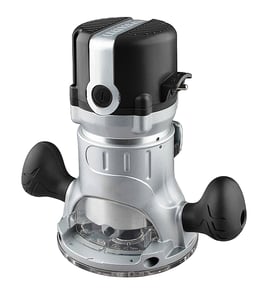
A Sears Craftsman router (like model 31517550) is a handheld or table-mounted power tool used to shape wood by spinning a cutting bit at high speed. We use it for edging, trimming, cutting grooves (dados), and making decorative profiles in woodworking.
What you can do with a Craftsman router
Common router jobs are all about controlled material removal and repeatable cuts:
- Round over or bevel edges on boards
- Cut grooves, rabbets, and dadoes for joinery
- Flush-trim laminate or wood to a template
- Cut hinge mortises and recesses
- Make decorative profiles with molding bits
Key features to expect (typical for corded routers)
For Craftsman corded routers in this class, these are the specs and features that matter most when comparing or troubleshooting:
| Feature | What it affects | What to look for |
|---|---|---|
| Amp rating | Cutting power under load | Higher amps handle larger bits better |
| Variable speed | Bit control and finish quality | Slower speeds for larger diameter bits |
| Collet size | Which bits fit | Commonly 1/4 in; some accept 1/2 in |
| Depth adjustment | Accuracy and repeatability | Smooth micro-adjust and solid lock |
Safe setup basics (before you cut)
Routers are powerful tools; a few setup steps prevent most kickback, burning, and rough cuts:
- Unplug the router before changing bits or adjusting depth
- Fully seat the bit, then back it out slightly before tightening the collet
- Use the correct speed for the bit size (large bits need slower speed)
- Make multiple shallow passes instead of one deep pass
- Keep the base flat and move steadily to avoid chatter and burn marks
Why it matters
Knowing what a router is designed to do helps you pick the right bit, speed, and depth of cut. That directly improves cut quality and reduces common problems like tear-out, burning, and bit slippage.
For help identifying the exact model number on the tool so you can match parts correctly, use our guide: how to find your appliance model number (and what it means for parts).
Last updated: February 2026
What size shank bit will fit in a Craftsman router?
For Craftsman router model 31517550, the shank size that fits is the shank size that matches the collet currently installed on your router. Most handheld routers use either a 1/4-inch or 1/2-inch collet; the correct choice is the one your collet is made for.
How to confirm the correct shank size on your 31517550
- Unplug the router before checking the collet.
- Remove any installed bit, then loosen and remove the collet nut.
- Look for a size marking on the collet (commonly stamped 1/4 or 1/2).
- If it is not marked, measure the inside diameter of the collet opening.
- Use only bits that match that measurement exactly.
Quick fit rules (what works and what does not)
- 1/4-inch shank bit: fits only a 1/4-inch collet.
- 1/2-inch shank bit: fits only a 1/2-inch collet.
- Never force a larger shank into a smaller collet.
- Never use tape, sleeves, or makeshift shims to adapt shank size.
- If the bit will not tighten evenly, stop and inspect the collet and collet nut.
Common measurements
| Collet size | Inside diameter (approx.) | Metric equivalent |
|---|---|---|
| 1/4 inch | 0.250 in | 6.35 mm |
| 1/2 inch | 0.500 in | 12.7 mm |
Why it matters
Matching the bit shank to the collet prevents slippage and vibration, improves cut quality, and protects the collet, collet nut, and motor shaft.
For general DIY safety practices before working on power tools, use are diy appliance repairs safe.
Last updated: February 2026