 Owner’s manual
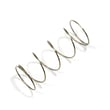


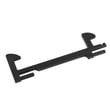

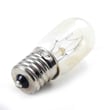
How to change microwave light bulb on Panasonic?
To change the light bulb on your Panasonic NN-SD277WR microwave/hood combo, unplug the microwave (or shut off power), remove the light cover, swap in the correct 115-125 V bulb, then reinstall the cover securely. Follow the steps in the NN-SD277WR owner's manual to match the correct light location and bulb type.
This model typically has two different bulbs, and the steps are slightly different depending on which one is out.
- Cooktop/night light: shines down onto the range
- Oven/cavity light: lights the inside of the microwave
- Both: use a 115-125 V, 30 W bulb (per the manual)
- Unplug the microwave or disconnect power at the breaker.
- Let the bulb and cover cool; they can be hot.
- Loosen the screw to open the cooktop light cover (do not lose the screw).
- Replace the bulb with a 115-125 V, 30 W bulb.
- Reinstall the cover and tighten the screw.
- Unplug the microwave or disconnect power.
- Remove the oven light cover by lifting the tab, pushing back, then lifting the cover off.
- Replace the bulb with a 115-125 V, 30 W bulb.
- Reinstall the oven light cover securely, aligning it on the detent.
- Clean the cover area with a soft damp cloth only (no abrasives).
| Light location | What you remove | Fastener type | Common mistake to avoid |
|---|---|---|---|
| Cooktop/night | Cooktop light cover | Screw | Stripping the screw or reinstalling cover crooked |
| Oven/cavity | Oven light cover | Tab/detent | Not seating the cover fully on the detent |
A loose or misaligned light cover can rattle, trap grease, or expose the bulb to heat and moisture. Reinstalling the cover correctly also helps keep airflow and venting working as designed.
Last updated: February 2026
How to find Panasonic microwave model number?
For your Panasonic NN-SD277WR microwave/hood combo, we find the model number on the rating label inside the door area; the serial number is typically on the left side of the control panel. Use that exact model number when ordering parts or checking the correct operating instructions in the NN-SD277WR owner's manual.
Check these common label locations first:
- Inside the microwave door opening, along the door frame or inner panel strip
- On the left side of the control panel area (often where the serial number is listed)
- Behind the vent grille area (less common, but possible on over-the-range units)
- On the cabinet body near the top or side edge when the door is open
Record the information exactly as shown on the label:
- Model number (example for this unit: NN-SD277WR)
- Serial number
- Date of purchase (helpful for service history)
The model number narrows your parts match to the correct Panasonic design. Even small model variations can change door parts, filters, or internal components like the inverter.
Use this table to avoid mix-ups when you are searching parts or troubleshooting.
| Item | What it tells you | Used for |
|---|---|---|
| Model number | Exact product version | Correct parts diagrams and manuals |
| Serial number | Production identifier | Service records and warranty reference |
| Product type | Microwave/hood combo | Correct installation and venting guidance |
Try these steps to make the characters clearer:
- Wipe the label gently with a damp cloth, then dry it
- Use a flashlight at an angle to reduce glare
- Take a close-up photo and zoom in
- Copy letters and numbers carefully; avoid guessing similar characters (0/O, 1/I)
Last updated: February 2026
Can I repair my Panasonic microwave myself?
Yes, you can handle some basic maintenance and a few external part replacements on your Panasonic NN-SD277WR microwave/hood combo, but we do not recommend DIY internal electrical repairs. The manual specifies the oven should not be adjusted or repaired except by properly qualified service personnel; especially if the door, hinges, latches, or seals are involved.
These tasks are typical homeowner-level work when you follow the safety steps in the NN-SD277WR owner's manual.
- Clean the door and sealing surfaces to help prevent heating issues and reduce TV/radio interference
- Remove and reinstall grease filters (never run the vent fan without them installed)
- Replace cooktop or oven light bulbs (use the specified bulb type and unplug power first)
- Replace simple, non-electrical exterior pieces (for example, a damaged door handle trim or grille, if applicable)
- Verify the microwave is on a dedicated 20-amp, 120-volt grounded circuit
Microwaves contain high-voltage components that can store a dangerous charge even when unplugged. For the NN-SD277WR, avoid DIY work involving these areas:
- Door alignment, hinges, latches, and sealing surfaces (risk of improper door closure)
- High-voltage components (magnetron, inverter, capacitor, diode)
- Internal wiring, control board, or interlock switch adjustments
- Any repair after physical damage (bent door, broken latch, damaged seal)
If your door is physically damaged, replacing the door assembly is a parts-level repair, but correct fit and sealing are critical. A model-matched option is the Panasonic door F30855H00AP.
| Task | DIY-friendly | Why |
|---|---|---|
| Clean seals, filters | Yes | Routine maintenance, low risk |
| Replace light bulb | Yes | Straightforward with power disconnected |
| Replace door/latch parts | Sometimes | Must close and seal perfectly |
| Inverter or magnetron work | No | High voltage safety risk |
A microwave that does not close and seal properly can be unsafe to operate and can also cause poor cooking performance. Keeping filters clean also protects the automatic fan feature and helps prevent grease buildup.
Last updated: February 2026
How long is the warranty on a Panasonic microwave?
For the Panasonic NN-SD277WR over-the-range microwave/hood combo, the limited warranty is 1 year on parts and 1 year on labor for all parts except the magnetron tube, and 5 years on the magnetron tube (part only) with 1 year labor. See the warranty chart in the NN-SD277WR owner's manual.
Here is the standard coverage shown for this model’s over-the-range microwave warranty:
| Component group | Parts coverage | Labor coverage |
|---|---|---|
| All parts (except magnetron tube) | 1 year | 1 year |
| Magnetron tube | 5 years | 1 year |
To avoid delays, we recommend gathering these details first:
- Model number and serial number from the rating label (match to NN-SD277WR)
- Proof of purchase date (receipt or other dated record)
- A short description of the symptom (no heat, no power, sparking, fan issue)
- Whether the unit is installed over the range and accessible for service
- Any recent power outage or tripped breaker event
Microwave “no heat” problems often involve high-voltage components; knowing that the magnetron tube has longer parts coverage helps you decide whether to troubleshoot further or move straight to service planning.
If your microwave is not heating, follow the safe checks and symptom guidance in why is my microwave not heating before replacing parts.
Last updated: February 2026
What is the life expectancy of a Panasonic microwave?
A Panasonic microwave typically lasts 8 to 10 years with normal household use and basic care. For your Panasonic NN-SD277WR microwave/hood combo, following the cleaning and safe-operation guidance in the NN-SD277WR owner's manual helps you get the longest service life.
- Keeping the door, hinges, and latches in good shape so the door closes properly
- Cleaning the door seals and sealing surfaces regularly
- Using the correct power supply (a dedicated 20-amp, 120-volt, grounded outlet)
- Avoiding overheating from blocked airflow or heavy, repeated high-power cooking
- Addressing heating or arcing symptoms early instead of continuing to run the unit
| Component | Typical lifespan impact | What you notice when it is failing |
|---|---|---|
| Magnetron | Major driver of overall lifespan | Weak or no heating, longer cook times |
| Inverter board | Major driver of heating performance | Intermittent heating, shuts off mid-cycle |
| Door latches/switches | Safety and operation critical | Won’t start, runs only when door is pressed |
| Vent fan motor | Hood performance and cooling | Loud fan, weak venting, fan not running |
- Wipe the cavity after spills; keep grease and food residue from baking on.
- Clean the door edges and sealing surfaces; a clean seal helps the door close correctly.
- Use microwave-safe cookware; avoid metal and foil to prevent arcing.
- If the unit is not heating, stop using it and troubleshoot before more damage occurs.
Microwaves often fail from heat stress, electrical strain, or door-related safety interlocks. Good cleaning habits and correct electrical supply reduce nuisance shutdowns and help protect high-cost parts like the inverter and magnetron.
Last updated: February 2026
How old is my Panasonic microwave?
Your Panasonic NN-SD277WR microwave’s exact age is determined by its serial number and purchase date; the most reliable way is to record both from the rating label and compare them to your receipt. We also recommend checking the NN-SD277WR owner's manual for where Panasonic lists the model and serial fields.
Use these quick checks to gather what you need to date the unit:
- Locate the rating label (often inside the door opening, on the oven frame, or behind the vent grille area).
- Write down the model number (NN-SD277WR) and the serial number exactly as shown.
- Check your receipt or installation paperwork for the date of purchase.
- If the label is hard to read, take a clear photo and zoom in to confirm characters.
- Keep the information with your manual for future parts lookups and service.
Panasonic serial formats vary by product line and production run. Many Panasonic products encode date information in the serial number, but the exact pattern is not universal across all models.
Here is a practical way to interpret what you find:
| What you have | What it tells you | Best next step |
|---|---|---|
| Purchase date | When the unit was sold | Use as your “age” baseline |
| Serial number | Often includes factory and build info | Compare against Panasonic format clues |
| Model number | Confirms the correct parts list | Use NN-SD277WR when ordering parts |
Knowing the approximate build date helps us match the right Panasonic microwave/hood combo parts (door components, filters, motors, and electronic controls) and can speed up troubleshooting when symptoms point to age-related wear.
If your question about age is tied to performance issues, these resources help narrow the cause:
- Why is my microwave not heating (common heating failures and what to check first)
- Confirm the door closes and latches correctly; door alignment issues can prevent operation.
- If the unit is completely dead, a fuse or power supply issue is common.
Last updated: February 2026
Why is my Panasonic microwave running but not heating up?
If your Panasonic NN-SD277WR microwave/hood combo runs (light, fan, turntable) but does not heat, the most common causes are a failed high-voltage heating component (magnetron/inverter circuit), a door-latch or door-switch problem, or a power issue that prevents the high-voltage system from energizing. Use the safety and operating checks in the NN-SD277WR owner's manual first.
Microwaves contain high-voltage components that can retain a dangerous charge even when unplugged. If the unit is damaged or the door is not closing correctly, do not operate it; service should be performed by properly qualified personnel.
- Confirm the microwave is on a dedicated 20-amp, 120-volt, 60 Hz grounded outlet (sharing a circuit can blow a fuse or trip a breaker).
- Try a simple heat test: 1 cup of water for 1 to 2 minutes; if it stays cool, stop troubleshooting and unplug.
- Check the door closes firmly and evenly; look for bent door, loose hinges, or damaged sealing surfaces.
- If the display shows “HOT”, wait for the unit to cool; heating can be temporarily disabled until “HOT” clears.
- If the hood fan keeps running after cooking, that can be normal cooling behavior and is not, by itself, a heating failure.
| What you notice | Most likely area | What to do next |
|---|---|---|
| Runs normally but never warms food | High-voltage heating system (inverter/magnetron circuit) | Have a technician diagnose; replace the failed component if confirmed |
| Intermittent heating, door feels “off” | Door latch or door switches | Inspect latch alignment; replace latch if worn or broken |
| Unit goes dead or trips breaker during cook | Power supply, fuse, wiring | Verify outlet/circuit; have fuse and wiring checked |
- Door-latch issues can prevent the high-voltage system from turning on; see microwave door latch F30186P40CP.
- In inverter-style designs, a failed inverter can stop heating even when the turntable still turns; see Panasonic inverter F606Y8X00AP.
- If the door is physically damaged, heating can be unsafe and unreliable; see Panasonic door F30855H00AP.
A microwave can appear to “work” while the high-voltage heating circuit is disabled for safety (door-switch/latch) or has failed (inverter/magnetron circuit). Correct diagnosis prevents repeat failures and avoids unsafe operation with a door that does not seal properly.
Related help: why is my microwave not heating
Last updated: February 2026


