 Owner’s manual





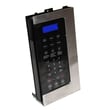
How to hard reset a Samsung microwave?
For the Samsung SMH8165ST microwave/hood combo, the most reliable “hard reset” is a power reset: unplug the microwave (or switch the breaker off) for 60 seconds, then restore power. This clears many control glitches after a freeze or power interruption; use the owner's manual for model-specific button functions.
Hard reset steps (power reset)
- Press PAUSE/CANCEL once to stop cooking.
- Unplug the microwave from the outlet (or turn the circuit breaker OFF).
- Wait 60 seconds.
- Restore power.
- Set the clock again if needed (the manual notes the clock should be set after a power failure).
If the control panel is still acting up
These steps do not “factory reset” cooking presets, but they often restore normal operation.
- Wipe the control panel with a slightly damp cloth, then dry it (grease and moisture can cause missed key presses).
- Make sure the door closes firmly; a door that is not fully latched can prevent operation.
- Try a simple test cook: place a cup of water in the center and run 1 minute.
- If the unit runs but does not heat, focus troubleshooting on the heating circuit.
- If the unit is completely dead, check the home outlet and breaker first.
What a “reset” can and cannot fix
| Symptom | Reset usually helps? | What to check next |
|---|---|---|
| Display frozen or keys unresponsive | Yes | Clean keypad; power reset |
| Clock wrong after outage | Yes | Re-set clock in the manual |
| Runs but does not heat | No | Heating components and diagnostics |
| Light or vent fan behavior odd | Sometimes | Normal settings; automatic cooling fan behavior |
Why it matters
A power reset is the safest first step because it clears temporary control-board errors without disassembly. If the microwave still will not heat after a reset, the issue is typically in the high-voltage heating system; our why is my microwave not heating guide walks through the most common causes and next checks.
Last updated: February 2026
Is a 1.6 cu ft microwave big?
Yes. A 1.6 cu. ft. microwave is a standard-to-large size, and for the Samsung SMH8165ST over-the-range microwave/hood combo it is the full oven cavity capacity, so it comfortably handles most dinner plates, medium casserole dishes, and everyday family reheating.
What “1.6 cu. ft.” means for real-world use
A 1.6 cu. ft. cavity is designed for typical family cooking and reheating, not just snacks. It is a common capacity for over-the-range models because it balances interior space with a standard 30-inch-wide installation footprint.
- Fits most full-size dinner plates and microwave-safe bowls
- Works well for 2 to 4 people day-to-day
- Handles medium baking dishes (check dish dimensions against the cavity)
- Leaves enough room for steam to vent when covering food
- Still compact enough to mount over a range
SMH8165ST cavity and exterior dimensions (from the manual)
Use these measurements to confirm your cookware will fit and to compare “capacity” to actual usable space.
| Spec | Measurement |
|---|---|
| Oven cavity capacity | 1.6 cu. ft. |
| Oven cavity dimensions (W x H x D) | 20 1/4 in. x 9 1/4 in. x 14 13/32 in. |
| Outside dimensions (W x H x D) | 29 7/8 in. x 16 1/2 in. x 15 1/16 in. |
For the exact specs and feature details (power levels, turntable use, sensor cooking guidance), use the owner's manual.
Quick size comparison (typical microwave categories)
This helps translate “1.6 cu. ft.” into what you see in stores and kitchens.
| Category | Typical capacity | Best for |
|---|---|---|
| Compact | 0.7 to 1.1 cu. ft. | Dorms, small kitchens, light use |
| Mid-size | 1.2 to 1.6 cu. ft. | Most households, everyday cooking |
| Large | 1.7 to 2.2+ cu. ft. | Larger dishes, frequent family cooking |
Why it matters
Capacity alone does not guarantee a dish will fit; interior width, height, and depth do. For SMH8165ST, the cavity dimensions are the best way to avoid buying cookware that is too tall or too wide to rotate properly on the turntable.
Last updated: February 2026
What are common Samsung microwave problems?
Common problems on the Samsung SMH8165ST microwave/hood combo include not heating, not powering on, turntable issues, unusual noises, and door or keypad problems. Many are caused by power supply or door-interlock faults, dirty turntable components, or failed high-voltage parts; our owner's manual covers model-specific checks.
Most common symptoms and what they usually mean
- Runs but does not heat: often a high-voltage circuit issue (diode, capacitor, transformer) or a door-interlock problem.
- Dead, no display: outlet/circuit issue, blown fuse, or control problem.
- Turntable not rotating or noisy: roller ring/tray misaligned or dirty; sometimes the turntable motor.
- Buzzing, rattling, or vibration: fan/airflow obstruction, loose mounting, or turntable parts needing cleaning.
- Door won’t close or won’t start when door is shut: latch or interlock switch issue.
Quick checks we recommend first (safe, no disassembly)
- Confirm the microwave is on its own 120 VAC, 60 Hz, 20 amp circuit (shared circuits can cause voltage drop).
- Remove any metal ties/utensils; if using foil, use narrow strips and keep clearance from the walls.
- Clean and reseat the glass tray and roller ring; a dirty or mispositioned turntable commonly causes noise or sticking.
- Open/close the door firmly and try a simple cook cycle with a cup of water.
- If the hood fan or lights act odd, check for grease buildup and airflow blockage.
Parts that commonly fix these issues (when troubleshooting points to a failure)
Microwaves contain high-voltage components; if testing or internal repair is needed, we recommend using a qualified technician.
| Symptom | Common suspect parts | Example part on this model page |
|---|---|---|
| No heat | High-voltage diode, capacitor, transformer | Microwave high-voltage diode DE91-70063D |
| Won’t start with door closed | Door interlock switch, latch/switch assembly | Microwave door interlock switch 3405-001034 |
| Turntable not turning | Turntable motor | Microwave turntable motor DE31-10172C |
Why it matters
A microwave that will not heat or that has door-interlock problems can be unsafe to keep using. Starting with power and turntable checks helps rule out simple causes before you consider electrical diagnosis or part replacement.
Last updated: February 2026





