Owner’s manual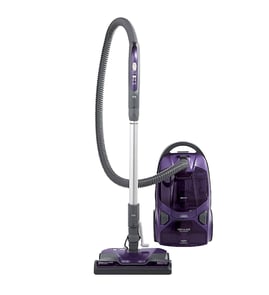






Where to find model number on Kenmore canister vacuum?
On your Kenmore canister vacuum model 11629229210, the model and serial numbers are printed on the Model and Serial Number Plate. We use that plate information to match the correct parts list, diagrams, and repair instructions for your exact vacuum.
Where to look on the vacuum
Check these common spots first (the plate is usually a small sticker or metal tag):
- On the back or bottom of the canister body (near the wheels)
- Under the tool cover or accessory lid area
- Near the cord rewind pedal area on the canister
- On the underside of the canister, close to where the hose plugs in
- Inside a rear panel recess on the canister housing
What to write down (and why)
Record both numbers exactly as shown on the plate.
| Item on the plate | What it’s used for | Why it matters |
|---|---|---|
| Model number | Identifies the exact vacuum design | Ensures parts like hoses, filters, and PowerMate components match |
| Serial number | Identifies the production run | Helps confirm version differences within the same model family |
Tips to avoid common mix-ups
- Copy the model number character-for-character (including dashes if shown).
- If the label is worn, use a flashlight and take a photo, then zoom in.
- Use the model number to confirm maintenance steps in the owner's manual.
Why it matters
Kenmore canister vacuums often share similar styling across multiple models, but internal parts (like the power head belt path, brush roll setup, or filters) can differ. Using the Model and Serial Number Plate prevents ordering the wrong replacement part.
Last updated: February 2026
How long do Kenmore canister vacuums last?
Most Kenmore canister vacuums typically last 10 to 15 years with normal household use and routine maintenance; heavy use, frequent clogs, and skipped filter or bag changes can shorten lifespan. For your Kenmore 11629229210, follow the care and maintenance schedule in the owner's manual.
Typical lifespan and what affects it
A canister vacuum’s life is mostly determined by airflow and motor protection. When airflow is restricted, the suction motor runs hotter and wears faster.
Common factors that change lifespan:
- Bag and filter maintenance (full bags and dirty filters reduce airflow)
- Clog frequency in the hose, wand, or PowerMate nozzle
- Belt and brush roll condition (drag and slippage increase load)
- Home environment (pet hair, fine dust, long carpet pile)
- How it’s stored and handled (cord care, hose kinks, drops)
Maintenance that extends life (high impact)
Use these habits to keep your Kenmore canister vacuum running cooler and stronger:
- Change the vacuum bag before it becomes tightly packed
- Clean or replace the motor safety filter on schedule
- Replace the exhaust filter when airflow drops
- Clear clogs promptly (hose, wands, nozzle air path)
- Inspect the PowerMate belt and brush roll; replace worn parts as needed
Quick “replace or repair” guide
| Symptom | Most common cause | What to do first |
|---|---|---|
| Weak suction | Full bag, clogged airflow, dirty filters | Change bag; check filters; remove clogs |
| Shuts off during use | Overheating from restricted airflow | Let it cool; restore airflow; check filters |
| Brush roll not spinning | Belt issue or jammed brush roll | Clean brush roll; check belt |
Why it matters
A canister vacuum is an airflow machine; keeping bags, filters, and air passages clean protects the suction motor and helps the vacuum maintain strong pickup over its full service life.
Last updated: February 2026
What are the disadvantages of a canister vacuum?
Canister vacuums like the Kenmore 11629229210 clean bare floors and stairs very well, but the tradeoffs are storage and handling: you manage a separate canister plus hose and wand, and the canister can bump into furniture or walls if you pull it carelessly (especially on stairs).
Common disadvantages (what most owners notice)
- Bulkier to store: the canister body, hose, and wands take more space than a single-piece upright.
- More “towing” and maneuvering: you pull the canister behind you; it can snag on corners or bang into baseboards.
- Stairs require extra care: the canister can fall if placed unsafely; we recommend moving it by the carry handle, not by pulling the hose.
- More bending and setup: switching tools (crevice tool, dusting brush, floor brush) can mean more stops and starts.
- Carpet performance varies by power nozzle and settings: some setups feel less aggressive on thick, deep-pile carpet compared to certain uprights.
- Ongoing consumables (bagged models): you will replace dust bags and filters; reusing a dust bag can reduce suction and strain the motor.
How to reduce the downsides on this Kenmore canister
Use these habits to make the 11629229210 easier to live with:
- Keep the hose from twisting before you pull the canister; the hose swivel is designed to help in tight areas.
- Use slow, gliding strokes with the PowerMate for better cleaning (fast, jerky strokes clean less completely).
- On carpeted stairs, close the suction control for best pickup.
- If suction drops, check the bag and filters first, then check the hose, wand, and PowerMate swivel for clogs.
- If the PowerMate brush stops, clear the jam and press the belt reset button (the canister motor can keep running while the PowerMate shuts off).
| Issue | What it feels like | What usually helps |
|---|---|---|
| Canister bumps into things | Tugging, tipping, scuffing | Move by handle; avoid pulling by hose |
| Weak suction | Dust left behind | Replace bag, clean/replace filters, clear clogs |
| Brush roll stops | No agitation on carpet | Clear debris; use belt reset |
Why it matters
Most “canister vacuum disadvantages” come down to handling and airflow. When the bag, filters, or airflow path clog, cleaning performance drops quickly, and the extra hose and wand length makes troubleshooting more step-by-step.
For model-specific operating and safety details (especially stairs, suction control, and clog checks), follow the owner's manual.
Last updated: February 2026
Who makes Kenmore canister vacuum cleaners?
Kenmore is a house brand; Kenmore canister vacuum cleaners (including model 11629229210) are manufactured for Kenmore by third-party manufacturers rather than by Kenmore itself. The exact maker can vary by model series and production run, so the most reliable identifier is the model and serial number information in the owner's manual.
How to identify the manufacturer for your specific Kenmore 11629229210
We use the model number format and the identification plate to match the correct parts and documentation.
- Check the model and serial number plate on the vacuum (the manual notes it is on the unit)
- Record the model number 11629229210 and the serial number before ordering parts
- Use the prefix (the first three digits, such as 116) to help identify the manufacturing source used for that series
- Match parts by model number first to avoid fit issues with hoses, wands, and PowerMate components
Why the manufacturer can change (and why it matters)
Kenmore-branded vacuums are produced by different manufacturers over time. That is why two Kenmore canisters can look similar but use different filters, belts, or PowerMate parts.
What can vary between manufacturers
| Item that can differ | What you may notice | Why it matters |
|---|---|---|
| Power head design | Brush roll or belt style differs | Impacts belt and agitator servicing |
| Hose and wand connections | Different latch/button shapes | Affects fit and electrical connections |
| Filtration layout | Different filter shapes/locations | Impacts suction and motor protection |
Parts and service tips for this model
If you are troubleshooting or ordering parts for Kenmore 11629229210, match by model number and diagram callouts.
- Use the manual’s parts and features section to confirm component names
- Follow the manual’s safety guidance: do not plug in until assembly is complete
- If you are servicing the power head, follow the belt and agitator cleaning steps in the manual
- For small mechanical issues (covers, latches, tension points), a replacement spring KC23DDGBZ000 may be used where the parts diagram calls for it
Helpful DIY guidance
For step-by-step repair help by symptom and repair type, use the vacuum repair-guides landing page.
Last updated: February 2026
How to tell if a vacuum motor is bad?
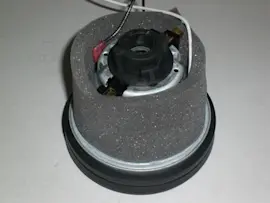
If your Kenmore 11629229210 canister vacuum motor is failing, you’ll usually notice it through performance and heat: the vacuum may shut off, lose suction, run unusually loud (whine or grind), smell hot or “burnt,” or refuse to start even after you clear airflow problems and let the thermal protector reset.
Quick signs the motor is failing
- Strong burning smell or hot electrical odor during use
- Vacuum shuts off and won’t stay running after a cool-down
- Loud whining, grinding, or rattling that wasn’t there before
- Weak or no suction even with a new bag and clean filters
- Excessive heat at the canister housing during normal cleaning
- Visible sparking through motor vents (more than a brief, small brush spark)
Rule out the common “not a bad motor” causes first
This model has a thermal protector that turns the motor off automatically if airflow is restricted (for example, a clog, a full dust bag, or clogged filters). After you correct the airflow issue, the protector typically resets after about 30 minutes. Details are in the owner's manual.
Airflow checks (fast and high-impact)
- Replace the dust bag if it’s full (never reuse a dust bag)
- Check and clean or replace the motor safety filter
- Check and replace the exhaust filter if it’s dirty
- Check the hose, wand, and PowerMate path for clogs and debris
Simple diagnosis table
| What you observe | Most likely cause | What to do next |
|---|---|---|
| Motor shuts off, then runs again after cooling | Thermal protector tripping from restricted airflow | Clear clogs, replace bag, clean/replace filters, wait 30 minutes |
| Motor runs but suction is poor | Clog, bag, filter restriction, or air leak | Follow the manual’s clog checks; verify suction at hose end |
| Motor won’t start at all (with power confirmed) | Switch/cord issue or motor failure | Check for obvious cord damage; if airflow is clear and it still won’t run, plan a motor-level repair |
| Loud grinding/whining plus overheating | Internal motor wear (bearings/brushes) | Stop using to prevent further damage; service/replace motor |
Why it matters
Running the vacuum with restricted airflow can repeatedly trip the thermal protector and overheat the motor. Keeping the bag, hose, and filters clear protects suction performance and helps prevent motor failure.
Last updated: February 2026