Owner’s manual
 Error Codes




How to reset LG stove top?
On the LG LSEL6331F slide-in electric range, a “stove top reset” usually means power-cycling the range to clear a control glitch, then rechecking burner operation. If a burner still will not heat or won’t regulate, the issue is typically the surface element, its wiring, or the control switch.
Quick reset (power cycle)
- Turn all surface knobs to OFF.
- Turn the range power OFF at the circuit breaker for 1 minute.
- Turn the breaker ON.
- Test each burner on HI; the element should glow red and cycle on and off (cycling is normal on HI). See the LSEL6331F owner's manual.
If the burner still does not heat
Check these common causes (in order):
- Incorrect cookware: warped pans or very small pans can reduce heat transfer.
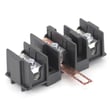
- Loose/burnt wire connection at the element or switch (power off first).
- Failed radiant element (burner does not glow or heats unevenly).
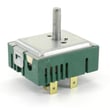
- Failed infinite switch (burner stuck on high, won’t change heat, or won’t turn on).
- Control or wiring issue if multiple burners act up.
Parts that commonly fix cooktop heating problems
| Symptom | Most likely part | Example part for LSEL6331F |
|---|---|---|
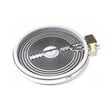
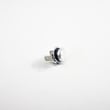
| Burner will not heat | Radiant surface element | LG range dual radiant element MEE62385201 |
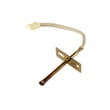
| Burner won’t regulate heat or won’t turn on | Surface element control switch | LG range surface element control switch EBF62174907 |
Safe testing tips (before replacing parts)
- Shut off power at the breaker before removing the back panel or cooktop.
- Look for overheated terminals (darkened, melted, or brittle insulation).
- If you use a meter, test for continuity only with power disconnected; use our how to use a multimeter to test electrical parts video as a guide.
Why it matters
A simple power cycle clears many electronic control glitches, but a burner that still will not heat after reset usually points to a failed radiant element, a bad control switch, or a damaged wire connection. Fixing the root cause prevents repeat failures and overheating.
Last updated: February 2026
What are the common problems with LSEL6331F?
Common problems on the LG LSEL6331F slide-in electric range include little or no bake heat, uneven oven temperatures, a cooktop element that will not heat, and control or display issues. We use the LSEL6331F owner's manual to confirm basic operation checks like preheat behavior and cooktop element cycling.
Most common symptoms and what they usually point to
- Little to no heat in Bake: failed bake element, temperature sensor issue, or a control problem
- Oven not heating evenly: normal hot spots, rack placement, convection fan not running during preheat, or a weak element
- Oven too hot: temperature sensor drifting, calibration/settings issue, or control problem
- Surface element will not heat: failed radiant element, failed infinite switch, or wiring connection issue
- Won’t turn on / will not start: power supply problem (breaker, cord, terminal block), control not set correctly, or control board issue
- Door won’t open after self-clean: latch/door switch issue or the oven is still too hot
Quick checks we recommend first (no parts swapping)
- Confirm the range has proper power (electric ranges typically need 240 VAC; a half-tripped breaker can leave you with lights but no heat).
- Start a Bake cycle at 350°F and verify the oven preheats in about 15 minutes; the convection fan should run while preheating.
- For cooktop issues, turn the knob to HI and watch for the element to glow and cycle on and off (cycling is normal).
- Make sure control panel buttons are pressed in the center so they register correctly.
- If the clock is flashing, set the time; some functions behave oddly until the control is fully set up.
Parts that commonly fix these problems
| Symptom | Likely part to check | Example part for LSEL6331F |
|---|---|---|
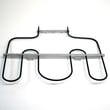
| No/weak bake heat | Bake element | Range bake element MEE62306405 |
| Oven too hot/erratic temps | Oven temperature sensor | Range oven temperature sensor EBG61305805 |
| One surface element dead | Element switch or radiant element | LG range surface element control switch EBF62174907 or LG range dual radiant element MEE62385201 |
Why it matters
Heating problems on an LG electric range can look similar, but the fix changes depending on whether the issue is in the heating circuit (element, sensor, switch) or in power/control (breaker, wiring, control board). A few quick operation checks help you target the right repair.
Last updated: February 2026
How do I find the model number on my LSEL6331F?
On your LG LSEL6331F slide-in electric range, the model number is printed on the model and serial number plate. In the product overview, LG identifies this plate location as part of the range’s exterior and interior labeling; use it to match the correct parts and manual.
Where to look on the range
Check these common spots first (they are the most likely locations for this model family):
- Open the oven door and look around the oven frame (front edge of the cavity).
- Look along the door frame area near the gasket.
- Check the storage drawer area; pull the drawer out and look on the frame.
- Look on the side trim just inside the door opening.
For a diagram showing the model and serial number plate location, use the LSEL6331F owner's manual.
What the label looks like and what to copy
The plate typically includes multiple identifiers. Copy them exactly as shown.
- Model number (example format: LSEL6331F)
- Serial number
- Electrical ratings (useful for installation and troubleshooting)
Quick checklist
| Item | Why you need it |
|---|---|
| Model number | Ensures parts fit your exact range configuration |
| Serial number | Helps confirm production details for service and documentation |
| Electrical rating | Helps verify correct power requirements and circuit setup |
Why it matters
LG range parts can vary by revision, even within the same model family. Using the model number from the plate helps us match the correct diagrams and replacement parts (like a bake element, surface element, or control switch) for your LSEL6331F.
Last updated: March 2026