 Owner’s manual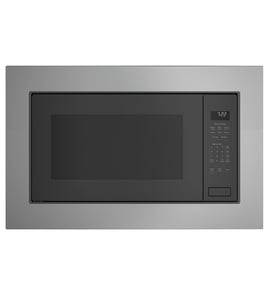
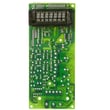



How do I reset my GE microwave touchpad?
To reset the touchpad on your GE ZEB1226SH1SS microwave, disconnect power for about 30 seconds (unplug it or switch the breaker off), then restore power and try the keypad again. Also check whether the control lock is turned on in the owner's manual.
Quick reset steps
- Press Cancel/Off once to clear any active selection.
- Unplug the microwave (or turn the circuit breaker off).
- Wait 30 seconds.
- Restore power.
- Test the touchpad with a simple cook time (for example, 0:30) and press Start/Pause.
If the keypad still will not respond
1) Make sure the controls are not locked
On this model, the control lock can make the touchpad seem “dead.”
- Press and hold Cancel/Off for about 3 seconds.
- Look for LOCKED to appear or disappear on the display.
2) Confirm the microwave is ready to start
- Close the door firmly (a slightly open door can prevent starting).
- After choosing a cooking option, press Start/Pause.
- If you accidentally pressed Cancel/Off, re-enter the cooking program.
3) Clean the control panel correctly
Grease or harsh cleaners can interfere with touch response.
- Wipe with a damp cloth.
- Dry thoroughly.
- Avoid abrasive pads and cleaners containing ammonia or alcohol.
What to check next (symptom guide)
| What you see | What it usually means | What to do |
|---|---|---|
| Display works, keypad acts erratic | Control needs a power reset or panel is dirty | Reset power; clean panel |
| “LOCKED” shows | Control lock is on | Hold Cancel/Off 3 seconds |
| Panel lights, but won’t start | Door not closed or Start/Pause not pressed | Close door; press Start/Pause |
Why it matters
A quick power reset clears minor control glitches, and unlocking the controls restores normal keypad operation. If the touchpad still fails after these steps, the issue is typically in the control panel or control electronics.
Last updated: February 2026
How to replace interior light bulb on GE microwave?
On the GE ZEB1226SH1SS microwave, the interior oven light is accessed from inside the cooking cavity area (not from the outside). We replace it by disconnecting power, removing the lamp cover (typically held by screws), swapping in the correct bulb type, then reinstalling the cover and testing.
Safety first (microwave-specific)
Microwaves store high voltage; we only do light-bulb access steps that stay in the oven cavity area.
- Unplug the microwave (or switch off the circuit breaker) before starting.
- Let the oven cool completely.
- Do not remove the outer case for a light-bulb change.
- Use gloves or a cloth to handle the bulb (helps prevent oils on the glass).
- If you see arcing, burn marks, or melted plastic near the light area, stop and have the unit serviced.
Step-by-step: interior light bulb replacement
Use the lighting and feature locations shown in the owner's manual.
- Disconnect power at the plug or breaker.
- Open the door and locate the oven light area on the inside wall of the cavity.
- Remove the light cover: take out the screws holding the lamp cover or lens in place.
- Remove the bulb: unscrew it (or pull it straight out if it is a pin-base style).
- Install the new bulb: match the base style and wattage listed for your model.
- Reinstall the cover and tighten screws snugly (do not overtighten).
- Restore power and test the light by opening the door.
Choosing the right bulb
The exact bulb spec varies by model and revision; we match it by model number and the bulb’s base.
| What to match | Why it matters | Where to check |
|---|---|---|
| Base type (screw vs pin) | Prevents poor fit or damage | Old bulb and parts list |
| Wattage rating | Avoids overheating the lens/cover | Owner's manual |
| Appliance-rated bulb | Handles heat and vibration | Packaging label |
Why it matters
A correct interior light bulb helps you monitor cooking safely without opening the door, and the correct wattage helps protect the lamp cover and surrounding cavity surfaces from heat damage.
Last updated: February 2026
What kind of bulb is in a GE microwave?
GE microwaves typically use a small, high-temperature appliance bulb (most often halogen or incandescent) for the oven light. For the GE ZEB1226SH1SS, the exact bulb type and wattage are listed in the owner's manual; use that spec to match voltage, wattage, and base style before buying a replacement.
What you’ll usually see in GE microwave light bulbs
Most GE countertop and built-in style microwaves use bulbs designed to handle heat and vibration. Common specs include:
- 120V appliance-rated bulb (not a standard household bulb)
- 20W to 40W range (varies by model and light location)
- Halogen capsule or small incandescent style
- Base types often used: intermediate (E17) or bi-pin (G8), depending on design
How to replace the microwave light bulb safely
Microwaves contain high-voltage components; we focus on the bulb access steps only.
- Unplug the microwave (or switch off the circuit if it’s built-in)
- Let the unit cool completely
- Remove the light cover or lens (typically held by screws)
- Remove the old bulb carefully (do not force it)
- Install the new bulb without touching the glass (use a clean cloth or gloves)
- Reinstall the cover, then restore power and test
Quick “match the bulb” checklist
Use this table to confirm you are buying the right replacement.
| What to match | Why it matters | Where to confirm |
|---|---|---|
| Voltage (often 120V) | Prevents immediate failure | Owner's manual |
| Wattage | Avoids overheating and dim output | Owner's manual |
| Base type (E17 or G8) | Ensures it physically fits | Old bulb label or manual |
| Location (oven vs cooktop light) | Different bulbs are often used | Manual parts diagram |
Why it matters
Using the wrong bulb can melt the lens, damage the socket, or cause repeated burnouts. Matching the bulb spec for your GE ZEB1226SH1SS keeps the oven light reliable and protects the light housing.
Last updated: February 2026
What's the average lifespan of a GE microwave?
Most GE microwaves average about 7 to 10 years of service life in normal home use. For your GE ZEB1226SH1SS, lifespan depends most on daily run time, ventilation, and how well the cavity and door area are kept clean; our owner's manual covers key use and care practices that help prevent premature failures.
Typical lifespan and what changes it
A microwave’s life is usually limited by wear in the door system, control electronics, and high-voltage heating components.
Common factors that shorten lifespan:
- Running the microwave empty (overheats internal components)
- Repeated overheating from blocked vents or poor airflow
- Slamming the door or forcing the latch release
- Heavy grease buildup that leads to arcing or heat damage
- Power surges (can damage the main control board)
Habits that extend lifespan:
- Keep the turntable and support installed during use
- Clean spills promptly; avoid ammonia or alcohol cleaners on surfaces
- Use microwave-safe containers; remove metal twist ties/handles
- Ensure vents are not blocked and the unit can breathe
Quick “repair or replace” guide
If the microwave is within the typical lifespan window, a repair is often worthwhile when the issue is isolated to a door or control component.
| Symptom | Most likely area | Typical next step |
|---|---|---|
| Door won’t close or feels loose | Door latch/hinge/gasket | Inspect door alignment and latch parts |
| Keypad/display acts erratic | Control panel or main board | Check connections; consider control replacement |
| Runs but does not heat | High-voltage/heating circuit | Use a qualified technician for diagnosis |
| Loud buzzing or burning smell | Arcing/overheating | Stop using; inspect cavity and waveguide area |
Parts that commonly affect longevity on this model
If you’re seeing door-related wear, these model-matched parts are commonly involved:
- Door gasket WB02X10896 (helps seal the door area)
- Hinge WB10X21017 (supports door alignment)
- Door button WB03X23522 (door release mechanism)
Why it matters
A microwave that is kept clean, properly ventilated, and not abused (empty runs, metal in the cavity, harsh cleaners) typically reaches the normal 7 to 10 year range with fewer nuisance failures and safer, more consistent heating.
Last updated: February 2026


