Owner’s manual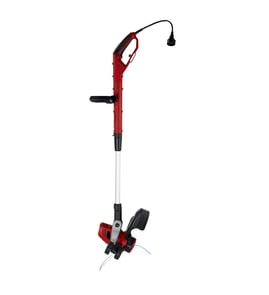

Which is better, .080 or .095 trimmer line?
For the Black & Decker GH3000, .080 inch round nylon line is the better choice because it is the specified size; using .095 line is heavier and can overload the motor and cause overheating. For tougher weeds, use proper technique instead of thicker line.
The GH3000 trimmer head and feed system are built around a specific line diameter.
- Use .080 inch (2.0 mm) round nylon monofilament line
- Avoid heavier gauge or serrated line
- Use the recommended replacement spool model SF-080 for best feeding
- Do not bump the head on the ground to advance line; this model self-feeds
For the exact line and spool guidance, follow the owner's manual.
| Feature | .080 line | .095 line |
|---|---|---|
| Best for | General trimming and edging | Heavier cutting on trimmers designed for it |
| Load on motor | Lower | Higher |
| On GH3000 | Recommended | Not recommended |
| Risk | Normal wear | Overheating, poor performance |
We see better results on the GH3000 by adjusting how you cut and edge, not by upsizing line.
- Keep the line at full speed before contacting weeds
- Take lighter passes through thick growth (do not force the head)
- Edge with the line over grass or dirt, not over sidewalk or concrete (abrasive surfaces wear line fast)
- Slightly tilt the trimmer for a closer cut when edging
- Keep air intake slots clear to prevent overheating
Using the correct .080 line helps the GH3000 feed smoothly, cut consistently, and protect the motor from overheating. Thicker line can reduce RPM, increase heat, and shorten tool life.
If you need to search additional GH3000 parts or accessories by model number, we recommend starting with the parts list for this model or using Sears PartsDirect.
Last updated: February 2026
What size trimmer line for gh3000?
For the Black & Decker GH3000 electric line trimmer, we use 0.080 inch (2.0 mm) round nylon monofilament line. Using heavier or non-round line can overload the motor and lead to overheating; the correct size keeps the Auto Feed System working properly (see the owner's manual).
Use the line style the GH3000 was designed for.
- Diameter: 0.080 inch (2.0 mm)
- Shape: round
- Material: nylon monofilament
- Feed system: Auto Feed System (do not bump the head to feed line)
- Avoid: serrated, twisted, or heavier-gauge line
| Item | What to use on GH3000 | Why it matters |
|---|---|---|
| Line diameter | 0.080 in (2.0 mm) | Prevents motor overload and overheating |
| Line shape | Round | Helps the spool feed and trim correctly |
| Line type | Nylon monofilament | Matches the trimmer head design |
- Cut with the tip of the line, not the full length.
- Keep the cutting angle around 5° to 10°.
- Keep at least 24 inches between the guard and your feet.
- Expect faster wear when edging near sidewalks or abrasive surfaces.
- If feeding seems inconsistent, confirm you are using the edging wheel correctly in edging mode.
We recommend matching the line size exactly to the GH3000 requirements when you shop for replacement line or spools. You can search by model number GH3000 on Sears PartsDirect to find compatible options.
Correct 0.080-inch round line protects the GH3000 motor, reduces overheating risk, and keeps the Auto Feed System feeding smoothly so you spend more time trimming and less time clearing tangles.
Last updated: February 2026
How to replace string trimmer line black and decker?
To replace the trimmer line on your Black & DECKER GH3000, unplug the trimmer, remove the spool cap, swap in a compatible spool (or rewind it with .080-inch line), then snap the cap back on until it clicks twice. See the step-by-step diagrams in the GH3000 owner's manual.
- Unplug the power cord before changing the spool or line
- Wear eye protection and gloves; the cutting blade area is sharp
- Keep fingers clear of the spool cap tabs when snapping the cover on
- Do not power on the trimmer until the spool cap is fully seated
- Depress the tabs and remove the spool cap from the spool housing.
- Pull the empty spool out.
- Feed the line end through the eyelet.
- Press the new spool down gently; rotate until it drops into place, then push to snap in.
- Align the spool cap tabs with the housing slots; snap the cap on.
What you should hear: two audible clicks when both lugs lock; then, when you power on, the line trims to length automatically.
Use only round nylon monofilament line.
- Line size: .080 inch (2.0 mm)
- Fold the line end about 3/4 inch (19 mm) and insert it into the upper hole in the spool
- Wind neatly in layers in the direction of the arrow; do not crisscross
- Dock the line in the spool slots, then reinstall the spool and cap
| Item | What to use | Why it matters |
|---|---|---|
| Line diameter | .080 in (2.0 mm) round nylon | Prevents motor overload and overheating |
| Spool seating | Turns a few degrees freely when installed | Confirms it is snapped in correctly |
| Spool cap install | Two clicks | Prevents the cap from popping off during use |
Correct line size and proper spool seating keep the GH3000 trimmer head feeding smoothly and protect the motor from overheating caused by heavy or serrated line.
To order the correct replacement items for your model, start with the parts list for GH3000, or search by model number on Sears PartsDirect.
Last updated: February 2026
Why do landscapers take the guard off string trimmers?
Landscapers remove the guard mainly for better visibility and easier access in tight spots, which can speed up edging. On the Black & Decker GH3000, the guard is a required safety component; we recommend keeping it installed and following the GH3000 owner's manual.
The GH3000 guard is designed to reduce common trimming and edging hazards.
- Helps reduce thrown debris (stones, metal, sticks) during edging
- Helps protect the operator from contact with the rotating nylon line
- Helps keep bystanders and pets safer by limiting the debris path
- Provides a consistent trimming and edging reference point
- Includes the line cutter area that limits how much line is safely exposed
In commercial use, some operators prioritize speed and access.
- Clearer sightline to the edge for straighter cuts
- Easier reach under shrubs, fences, and low obstacles
- Less snagging on posts, borders, and dense growth
| Factor | Guard installed | Guard removed |
|---|---|---|
| Debris control | Better | Worse |
| Visibility | Good | Better |
| Tight-spot access | Good | Better |
| Operator protection | Better | Worse |
- Wear eye protection, long pants, and sturdy footwear
- Clear wire, cord, and string-like debris from the area first
- Keep people and pets well away when edging
- Work away from solid objects to reduce ricochet
- Unplug the trimmer before adjustments or checking the head/guard
The GH3000 manual warns never to operate without the guard firmly in place because the rotating line can throw objects at high speed. Keeping the guard on reduces injury risk and helps the trimmer operate as designed.
If you need diagrams or replacement parts by model number, use the model parts list or search on Sears PartsDirect.
Last updated: February 2026