Installation guide
 Owner’s manual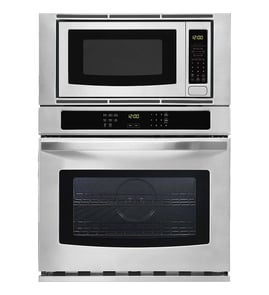





Why is the display not working on my KitchenAid microwave oven combo?
If the display is not working on your KitchenAid KOCE900HSS02 wall oven/microwave combo, the most common cause is a power interruption or incomplete power-up. After power is restored, the display should light briefly and may show “PF”, which indicates power was lost.
Quick checks that often restore the display
- Reset power at the breaker for 2 to 5 minutes, then turn it back on.
- If the unit is hardwired, confirm the breaker is fully seated (off, then on).
- If “PF” appears, clear it by pressing the appropriate on-screen prompt or Cancel, then set the clock.
- Make sure Control Lock is not enabled (a locked control can look like a “dead” panel).
- If the oven is in Sabbath Bake, only Cancel works and the microwave is disabled; exit the mode in Settings.
What “PF” means on this model
During installation and power reconnection, the display panel should light briefly and “PF” should appear. That is a normal indicator of a power failure or power reset, not a failed control by itself. See the installation guide.
When to suspect a part problem
If the breaker reset does not bring the display back (no brief light-up, no “PF”, no response to Cancel), a control or wiring issue is more likely.
Common related areas to inspect:
- Loose or damaged wiring connections at the junction box or harness
- Control board or console connection issues
- Door switch or interlock problems that prevent normal microwave operation
Parts that can be involved (depending on symptoms)
| Symptom you notice | What it often points to | Example part on this model |
|---|---|---|
| Display is dead and unit seems unresponsive | Power supply, wiring, control/console | Harness, main W11356124 (wiring) |
| Microwave runs only with door pressure or stops when door moves | Door interlock switch issue | Switch W10211972 |
Why it matters
A blank display can be as simple as a power reset condition, but it can also indicate an electrical connection problem. Restoring stable power and confirming normal startup (“PF” after reset) helps separate a power issue from a control or wiring fault.
Last updated: February 2026
How to replace KitchenAid oven temperature sensor?
For the KitchenAid KOCE900HSS02 wall oven/microwave combo, replacing the oven temperature sensor typically means disconnecting power, removing the sensor from inside the oven cavity, transferring the wire connector, and reinstalling the new sensor. Use the KOCE900HSS02 owner's manual for the correct access points and safe handling steps.
Before you start (safety and prep)
- Turn off power at the breaker; confirm the display is off.
- Let the oven cool completely.
- Protect the oven floor with a towel to prevent scratches.
- Use a flashlight to locate the sensor and mounting screws.
- Take a photo of the wire routing and connector before disconnecting.
Replacement steps (typical process)
- Remove oven racks for working room.
- Locate the oven temperature sensor inside the oven cavity (usually on the rear wall).
- Remove the mounting screws holding the sensor.
- Gently pull the sensor forward until the wire connector is accessible.
- Disconnect the wire connector; connect the new sensor.
- Carefully tuck excess wire back through the opening (do not pinch the harness).
- Reinstall the screws, reinstall racks, then restore power.
Quick troubleshooting after replacement
| What you notice | What it usually means | What to do next |
|---|---|---|
| Oven still heats inaccurately | Calibration or a different fault | Check calibration settings in the KOCE900HSS02 owner's manual |
| Error code returns quickly | Loose connector or wiring issue | Reseat connector; inspect harness for damage |
| No heat at all | Control, element, or safety issue | Verify bake element operation and wiring connections |
Parts that are commonly involved
If your diagnosis points to a failed sensor, replace it with the exact part listed for your model. If heating is still inconsistent after sensor replacement, the bake circuit may be involved.
Why it matters
A drifting or failed temperature sensor can cause underbaking, overbaking, long preheat times, and temperature-related error codes. Replacing the sensor restores accurate feedback to the electronic control so the oven can regulate heat correctly.
Last updated: February 2026
What is the error code f6e6 on a KitchenAid wall oven?
On the KitchenAid KOCE900HSS02 wall oven/microwave combo, error code F6E6 points to a communication or control issue involving the upper oven control (appliance manager) or the wiring connected to it. A quick power reset at the breaker often clears a one-time glitch.
What to do first (safe reset)
- Turn OFF the circuit breaker(s) supplying the oven.
- Wait 1 full minute.
- Turn the breaker(s) ON.
- Watch the display for about 1 minute to see if F6E6 returns.
- If the code comes back, avoid repeated resets and move to the checks below.
Checks that commonly cause F6E6
- Loose or damaged wiring harness connections between the control and components
- Pinched wires from installation or cabinet movement
- Moisture or heat-related connection issues after heavy oven use
- A failing electronic control (upper oven appliance manager)
For wiring identification and access points specific to KOCE900HSS02, follow the disassembly and wiring information in the owner's manual.
When to stop DIY and get service
Because this is an electronic control and wiring-related fault, we recommend service if any of the following are true:
| What you see | What it usually means | Next step |
|---|---|---|
| F6E6 returns immediately after reset | Persistent control or harness issue | Schedule service/diagnosis |
| Oven won’t heat or shuts down | Control is disabling operation for safety | Stop using, get service |
| Code appears during or after high-heat cycles | Heat-stressed connection or control | Check connections, then service |
Why it matters
F6E6 is not a simple cooking-mode setting issue; it is the oven telling you the control system is not communicating reliably. Addressing it quickly helps prevent intermittent shutdowns, incomplete cooking, and potential damage to wiring or electronic controls.
Last updated: February 2026
Where is the model number on a KitchenAid KOCE900HSS02 oven?
On the KitchenAid KOCE900HSS02 wall oven/microwave combo, we find the model and serial number on the product label at the bottom edge of the control panel, on the right-hand side. This label is the quickest way to confirm the exact model for parts and service.
Where to look on the appliance
Check these common label locations for this KitchenAid built-in combo unit:
- Bottom edge of the control panel, right-hand side (primary location)
- Oven frame area near the door opening (check the right side)
- Behind or along the upper-right area of the oven door opening (if your unit has a secondary label)
For the exact wording and location notes, use the KOCE900HSS02 owner's manual.
How to read the label (what to write down)
We recommend copying the information exactly as shown on the tag:
- Model number (example: KOCE900HSS02)
- Serial number
- Any revision or engineering code (if listed)
Quick reference
| What you need | Why it matters | Used for |
|---|---|---|
| Model number | Identifies the exact product version | Correct parts lookup and diagrams |
| Serial number | Identifies your specific unit | Service history and warranty paperwork |
Why it matters
KitchenAid wall oven/microwave combo models can look similar but use different wiring, door parts, and controls. Using the exact model number helps us match the correct replacement parts and avoid returns.
Last updated: February 2026