 Owner’s manual



How many watts is a GE JES2051DN4BB microwave?
The GE JES2051DN4BB countertop microwave is 1200 watts. That wattage is the cooking power you can use at power level 10 (High), and you can reduce output by selecting lower power levels for gentler heating.
Where to confirm the wattage
You can verify the 1200-watt rating and other key specs in the JES2051DN4BB owner’s manual.
What 1200 watts means in everyday use
Higher wattage generally heats faster, so you may need to shorten cook times compared to 800 to 1000 watt microwaves.
- Start with 10 to 20% less time when using recipes written for lower-watt microwaves.
- Use lower power levels (1 to 10) for foods that overheat easily (butter, chocolate, sauces).
- Stir, rotate, or turn food more often to reduce hot spots.
- Let food stand after cooking so heat finishes spreading through the center.
- Use microwave-safe cookware and keep the turntable installed for even cooking.
Power level quick guide (how output changes)
The JES2051DN4BB cycles microwave energy on and off at lower settings, which helps cook more evenly.
| Power level | Approx. output behavior | Best for |
|---|---|---|
| 10 (High) | 100% power | Boiling liquids, most reheating |
| 7 (Medium-high) | 70% power | Casseroles, quicker reheats with less splatter |
| 3 (Low) | 30% power | Defrosting, softening, gentle warming |
Why it matters
Matching cook time and power level to a 1200-watt microwave helps prevent overcooking edges while the center stays cool, and it improves texture for defrosting and simmering.
Last updated: February 2026
Is the JES2051DN4BB easy to use?
Yes. The GE JES2051DN4BB is designed for straightforward everyday use, with clear operating instructions, time features, auto and sensor cooking features, and simple control options like Child Lock-Out, beeper volume control, and display on/off settings (details are in the jes2051 owner’s manual).
What “easy to use” looks like on this model
These are common, practical features that make day-to-day operation simpler:
- Child Lock-Out: press and hold CLEAR/OFF for about 3 seconds to lock or unlock the controls
- Sound level control: adjust the beeper volume from 0 to 3 (mute to loud)
- Display on/off: press and hold 0 for about 3 seconds to toggle the clock display
- Time features: quick, familiar time-based cooking controls
- Auto and sensor features: built-in cooking options that reduce guesswork
Quick settings reference
| Feature | What it does | How to use it |
|---|---|---|
| Child Lock-Out | Prevents accidental starts | Hold CLEAR/OFF ~3 seconds |
| Beeper volume | Sets keypad/end-of-cycle sound level | Press Beeper Volume, choose 0–3 |
| Display on/off | Turns clock display on or off | Hold 0 ~3 seconds |
Why it matters
Simple controls help prevent accidental operation, reduce noise (mute option), and make the microwave easier for the whole household to use consistently, especially for quick reheats and routine cooking.
Helpful tip for smoother everyday use
If the turntable is wobbling, noisy, or not rotating smoothly, replacing worn turntable parts often restores normal operation:
- Check the glass tray for chips or warping
- Make sure the tray is seated correctly on the support
- Clean under the tray and support so food debris does not cause binding
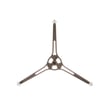
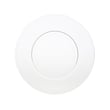
If you need replacements for this model, we list compatible options like the microwave glass turntable tray WB49X10189 and the microwave turntable tray support WB06X10633.
Last updated: February 2026
What are the dimensions of JES2051DN4BB?
The overall exterior dimensions for the GE JES2051DN4BB countertop microwave are listed in the specifications section of the JES2051DN4BB owner's manual. Use those measurements (width, height, depth) to confirm fit in a cabinet opening, on a shelf, or on a countertop with proper ventilation clearance.
Where to find the exact measurements
Check the specifications section in the manual and record these values:
- Width (left to right across the front)
- Height (countertop to top of cabinet)
- Depth (front to back, including the door)
- Required clearance for airflow around the cabinet
- Turntable diameter (helps confirm usable interior space)
How to measure your space correctly
Even with the correct microwave dimensions, fit issues usually come from door swing and airflow clearance.
- Measure the opening width at the front and back (some spaces taper)
- Measure depth to the wall outlet and plug clearance
- Allow extra depth for the door to open fully
- Leave ventilation space on the sides and top (do not block vents)
- Confirm the surface is level so the turntable rotates smoothly
Quick fit checklist (what to compare)
| What you are checking | What to compare it to | Why it matters |
|---|---|---|
| Shelf or opening width | Microwave width | Prevents binding and vibration |
| Shelf depth | Microwave depth plus door swing | Ensures the door opens freely |
| Vertical clearance | Microwave height plus airflow space | Prevents overheating |
| Level surface | Countertop or shelf level | Helps the tray rotate without rubbing |
Why it matters
Microwaves need adequate clearance for airflow and a level surface for stable operation. A tight fit can restrict ventilation, increase noise, and cause the turntable to drag. If your tray or support is worn, replacing the microwave glass turntable tray WB49X10189 or microwave turntable tray support WB06X10633 can also help restore smooth rotation.
Last updated: February 2026


