 Error Codes




Where is the model number on a GE electric range?
On a GE electric range like model XB625DK7WW, the model number is typically on a rating label around the oven door area (often on the frame behind the door) or on the back of the control panel area. We use that model number to match the correct parts and diagrams for your exact range.
Common places to check on model XB625DK7WW
Look for a paper or metal tag that lists MODEL and SERIAL.
- Open the oven door and check the frame around the door opening (left or right side)
- Check the bottom edge of the oven door frame area
- Look behind the storage drawer (remove the drawer and look on the frame)
- Check the back panel of the range (you may need a flashlight)
- Check the rear control panel area (behind or underneath the control console)
Quick tips to find it faster
- Wipe grease and dust off the frame with a damp cloth so the print is readable
- Use your phone camera and zoom in; labels are often small
- Write the model number exactly as shown (letters and numbers matter)
What the label usually looks like
| What you’ll see | What it’s used for |
|---|---|
| Model number (example: XB625DK7WW) | Ensures parts fit your exact GE range |
| Serial number | Helps identify production details for service |
Why it matters
GE ranges can use different surface elements, control boards, and door parts depending on the exact model. Using the correct model number helps us match items like the range radiant surface element, 8-in WB30T10132 without guesswork.
Last updated: February 2026
How do you reset a GE electric stove?
To reset your GE XB625DK7WW electric range, we recommend doing a full power reset: turn the range circuit breaker OFF for 1 minute, then turn it back ON. This clears many control glitches after a power outage, error code, or unresponsive keypad.
The best reset method (breaker reset)
- Set all surface burner knobs to OFF.
- Turn OFF the range breaker (usually a 240V double-pole breaker).
- Wait 60 seconds.
- Turn the breaker ON.
- Set the clock and test Bake and a surface element.
If the breaker reset does not fix it
- Check for an error code on the display; the code points to the failed circuit or sensor.
- If the display is blank, confirm the breaker is fully seated (OFF then ON) and that the home has power.
- If the oven heats but the cooktop does not, focus on the surface-element circuit (element, wiring, switch).
- If a surface element stays on or will not heat, stop using that burner and troubleshoot the control.
- If the oven will not heat after reset, the issue is often in the heating circuit (element, control, wiring).
Quick troubleshooting guide
| Symptom after reset | Most likely area to check | Common next step |
|---|---|---|
| Display works, oven will not heat | Heating circuit | Follow oven wont heat troubleshooting electric range problems video |
| One burner will not heat | That burner element or wiring | Inspect/replace range radiant surface element, 8-in WB30T10132 if it matches the failed burner |
| Hot surface light stays on | Hot surface indicator circuit | Use quick tips and fixes range hot surface light troubleshooting video |
| Error code returns immediately | Sensor/control/lock circuit | Look up the code in GE freestanding range error codes |
Why it matters
A reset restores normal operation after a power interruption, but repeated failures after resetting usually mean a part is overheating, shorted, or out of range. Addressing the underlying cause helps prevent nuisance shutdowns and uneven cooking.
Last updated: February 2026
Why is my GE electric range not turning on?
If your GE XB625DK7WW electric range is completely dead (no display, no beeps, no oven light), the most common causes are a tripped breaker, a loose or burned power connection, or a failed electronic control. Start with a power reset, then confirm the range is getting the full 240 volts.
Quick checks (fastest first)
- Reset the range by turning the double breaker OFF for 1 minute, then ON.
- Confirm the outlet cord is fully seated (if your model is plug-in).
- Check the house breaker: ranges typically use a double-pole 240V breaker; one side can trip and leave the range “dead.”
- If the oven light works but the control is blank, the control circuit is likely not powering up.
- If nothing works at all, focus on incoming power and the terminal block connection.
What to test (power and safety)
Turn power OFF at the breaker before removing any covers.
| What you check | What it tells us | Typical next step |
|---|---|---|
| Breaker fully reset | Restores power after a trip | Re-test display and surface elements |
| 240V supply (L1 to L2) | Confirms full range power | If missing, fix supply/breaker/outlet |
| 120V supply (L1 to N and L2 to N) | Confirms each leg is present | If one leg is missing, range may not power on |
| Burn marks/loose lugs at power connection | Common “dead range” cause | Repair wiring/terminal block as needed |
Likely failed parts when power is good
If the breaker is good and voltage is correct but the control panel stays blank, the failure is usually in the control system.
- Electronic oven control (clock/control board) can fail and prevent the display from lighting.
- Wiring harness connections at the control can loosen or overheat.
- A shorted component can take down the low-voltage supply.
For control-related symptoms and fault patterns, use our GE freestanding range error codes guide.
Why it matters
A range that will not turn on is often a power-leg issue (240V split supply) or a control failure. Verifying power first prevents replacing good parts and helps you target the correct repair.
Last updated: February 2026
What are the parts of an electric oven?
An electric oven in a GE XB625DK7WW range is built around heating, temperature sensing, lighting, and door-sealing parts that work together to cook evenly and safely. The most common oven-related components include the broil element, oven racks, door gasket, and the oven light assembly.
Core electric oven parts (what they do)
- Bake system: Provides the main heat for baking and roasting (often a lower element, sometimes hidden under the oven floor).
- Broil system: Provides high, direct top heat for broiling; a common replacement is the range broil element WB44X45497.
- Oven cavity and liner: The insulated cooking box that holds heat; some models use a replaceable liner such as the oven liner WB55T10200.
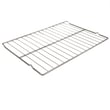
- Racks and supports: Hold cookware at different heights; a common wear item is the range oven rack WB48T10063.
- Door and seal: Keeps heat in; the range oven door gasket WB04T10086 is the key sealing component.
- Oven light system: Lets you see food while cooking; typically a bulb plus a lens such as the wall oven light bulb WB25T10102 and lens WB25X24023.
Quick “part to symptom” guide
| Symptom | Most likely area | Example part for XB625DK7WW |
|---|---|---|
| Broil does not heat | Broil heating circuit | Range broil element |
| Heat leaks, long preheat | Door seal | Oven door gasket |
| Rack wobbles or is missing | Rack system | Oven rack |
| Light out or dim | Bulb or lens | Oven light bulb, lens |
Why it matters
Knowing the main oven parts helps you troubleshoot faster and order the correct GE replacement part the first time. For example, a worn door gasket can waste energy and cause uneven baking, while a failed broil element stops proper browning.
Helpful DIY references
Last updated: February 2026
Why does my GE stove work but not the oven?
If your GE XB625DK7WW surface elements heat but the oven will not, the issue is usually a control setting that is not starting a bake cycle or a failure in the oven heating circuit (broil element, wiring, or electronic control). We confirm settings first, then compare bake vs. broil operation.
Quick checks (no tools)
- Select Bake (or Broil), set a temperature, then press Start (if your control uses a Start key).
- If knobs were removed for cleaning, reseat them fully and align them correctly.
- Cancel any Delay Start or Timed Bake so the oven starts immediately.
- Power-cycle the range: turn the breaker off for 2 minutes, then back on.
- If an F-code appears, use it to narrow the failure.
Pinpoint the failure fast
- Broil heats but Bake does not: bake circuit problem (often wiring or a hidden bake system on some models).
- Neither Bake nor Broil heats: power feed to the oven, wiring, or the electronic control.
- Oven heats weakly or unevenly: element or connection issue.
| What you observe | What it usually means | Best next step |
|---|---|---|
| Cooktop OK; oven dead | Control or oven power path | Check for error codes; inspect wiring connections |
| Broil OK; bake no heat | Bake-side failure | Inspect terminals and harness for heat damage |
| Error code displayed | Control sensed a circuit problem | Follow GE code guidance |
Parts commonly involved
Error codes (why they matter)
GE ranges use fault codes to point to issues like a sensor circuit, control problem, or door lock circuit. Use GE freestanding range error codes to match the code to the most likely fix.
Why it matters
Many electric ranges use separate circuits for the cooktop and oven. Testing broil vs. bake prevents replacing the wrong part and speeds up an accurate repair.
Last updated: February 2026




