 Owner’s manual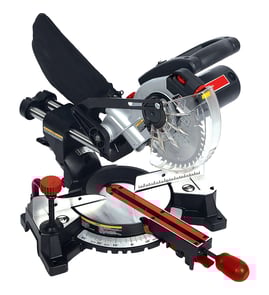

How to change blade on pro tech miter saw?
To change the blade on your Pro-Tech 7208 compound miter saw, unplug the saw, raise and tilt the lower blade guard to expose the arbor screw, lock the arbor, remove the screw and collars, install the new 10-inch blade in the correct direction, then reassemble and tighten securely (see the owner's manual).
- Unplug the saw to prevent unexpected starting.
- Loosen the guard hardware and lift the lower guard up; tilt the guard assembly back to expose the arbor screw.
- Locate the arbor lock between the upper guard and the saw handle.
- Place the blade wrench on the arbor screw; press and hold the arbor lock.
- Turn the wrench clockwise to loosen and remove the arbor screw, arbor washer, outer blade collar, and blade.
- Wipe sawdust off the blade collars before installing the new blade.
- Install a new 10-inch blade; match the blade rotation arrow to the clockwise rotation arrow on the upper guard.
- Reinstall the outer blade collar, arbor washer, and arbor screw; press the arbor lock and turn the wrench counterclockwise to tighten.
| Task | Wrench direction | What happens |
|---|---|---|
| Loosen arbor screw | Clockwise | Removes blade hardware |
| Tighten arbor screw | Counterclockwise | Secures blade hardware |
- Confirm the lower blade guard drops fully to cover the blade when the head is raised.
- Make a dry run with the power off to verify the blade path clears the fence and table.
- Keep hands clear and hold the workpiece firmly against the fence during use.
- Avoid gloves, loose clothing, jewelry, and untied long hair around the spinning blade.
Correct blade direction and fully tightened collars help prevent wobble, poor cut quality, and binding. A properly working lower guard is critical for safe operation during miter, bevel, and compound cuts.
You can also search by model number 7208 to find compatible replacement parts and accessories on Sears PartsDirect.
Last updated: February 2026
How to unlock a pro tech miter saw?
To unlock your Pro-Tech 7208 compound miter saw, release the handle latch that holds the saw in the lowered (storage) position, then loosen the miter lock handle to rotate the turntable to your desired angle and lock it back down. See the owner's manual for the exact control locations.
- Unplug the saw before adjusting locks or moving guards.
- If the saw is locked down for storage: push the handle down slightly.
- Move the handle latch to the other side to release the head so it can rise.
- Loosen the miter lock handle to free the turntable.
- Rotate to the desired miter angle (index points are commonly 0°, 15°, 22.5°, 30°, and 45° left or right).
- Turn the miter lock handle clockwise to lock the angle.
| Control | What it unlocks | What it’s for |
|---|---|---|
| Handle latch | Saw head (up and down travel) | Locks the saw in the lowered position for compact storage |
| Miter lock handle | Turntable rotation | Locks the saw at a chosen miter angle |
| Bevel lock handle | Bevel tilt | Locks the saw at a chosen bevel angle |
- Confirm the handle latch is fully released; it can bind unless you press down slightly on the handle first.
- Make sure the miter lock handle is actually loosened before trying to rotate the base.
- Check that the fence lock screws are not interfering with the turntable movement after a fence position change.
- Clear sawdust around the turntable and miter scale area; packed debris can make the base feel “locked.”
Using the correct lock for the adjustment prevents forced movement that can throw off miter scale alignment, affect squareness to the fence, or damage the lock mechanism.
For replacement parts and diagrams for your Pro-Tech 7208, start with the parts list for this model, or search by model number on Sears PartsDirect.
Last updated: February 2026
What should you never cut with a miter saw?
For the Pro-Tech 7208 compound miter saw, we never cut materials the saw is not designed for (the manual limits use to wood, wood-like products, and soft metals like aluminum), and we never cut short pieces that force your hands too close to the blade. See the owner's manual for the exact safety rules and approved accessories.
Avoid these common high-risk situations because they can cause binding, kickback, or thrown pieces:
- Ferrous metals (steel, iron) and unknown metals; they can grab the blade and throw the work
- Masonry (brick, tile, concrete) and brittle composites; they can shatter
- Freehand cuts (not held firmly against the fence); the work can twist or slip
- Rip cuts (cutting with the grain like a table saw); a miter saw is built for crosscuts and miters
- Warped, twisted, or irregular shapes unless secured in a jig or fixture so they cannot rock
- Round stock (dowel rods, tubing) unless held in a proper fixture so it cannot roll
The manual warning is about control and hand clearance. If you cannot keep your hold-down hand at least 4 inches from the blade path while still supporting the work, do not make the cut.
- Clamp the workpiece to the fence and table
- Use a stop block only on the keep side, not trapping the cutoff
- Use a purpose-built jig for molding, short blocks, or round material
- Do a power-off “dry run” to confirm the blade path before cutting
| Material or situation | Use the 7208 miter saw? | What to do instead |
|---|---|---|
| Wood and wood-like products | Yes | Use the correct 10-inch blade and clamp as needed |
| Soft metal (aluminum) | Yes | Use the correct blade for non-ferrous metal and secure the work |
| Steel/iron, masonry, brittle materials | No | Use the correct tool for that material |
| Short pieces near the blade | No | Use a jig, clamp, or a different cutting method |
A miter saw can “bite” and throw material when the work rolls, twists, gets pinched, or is confined. Following the approved-material guidance, keeping the area clear, and maintaining hand distance prevents sudden pull-in and kickback.
You can look up diagrams and replacement parts by model number on Sears PartsDirect.
Last updated: February 2026
What are the parts of a miter saw?
On the Pro-Tech 7208 compound miter saw, the main parts you use and adjust are the switch/trigger in the handle, the upper and lower blade guards, the fence and table, and the miter and bevel locking controls that set your cut angles (miter and bevel). For diagrams and names, use the owner's manual.
- Miter saw handle: includes the trigger switch and lock-off button; you push down to lower the blade into the workpiece.
- Upper and lower blade guards: the lower guard retracts as you lower the blade; both help keep hands away from the blade.
- Fence: supports the workpiece; this model’s fence has two positions for increased crosscut capacity.
- Fence lock screws/clamps: secure the fence to the base.
- Miter lock handle: locks the saw at a chosen miter angle; common index points include 0°, 15° right/left, 22.5° right/left, 30° right/left, and 45° right/left.
- Bevel lock handle/clamp: locks the saw at a chosen bevel angle.
- Arbor (shaft): the shaft the blade mounts to; many saws also include an arbor lock to help with blade changes.
- Handle latch: locks the saw in the lowered position for compact storage.
| Part or control | What it adjusts/controls | Why you use it |
|---|---|---|
| Miter lock handle | Left/right miter angle | Miters for trim, frames, and angled crosscuts |
| Bevel lock handle | Tilt angle of the blade | Bevels and compound cuts |
| Fence and table | Work support and alignment | Keeps cuts straight and repeatable |
| Blade guards | Blade coverage during operation | Reduces accidental contact risk |
Knowing the names and functions of the miter lock handle, bevel lock handle, fence lock screws, and blade guards helps you set angles accurately, clamp and support the workpiece correctly, and operate the saw safely and consistently.
- Turn the saw off and unplug it before adjusting miter, bevel, or fence positions.
- Keep hands at least 4 inches from the blade path.
- Hold the workpiece firmly against the fence; keep it from twisting or rolling.
- Make a dry run with the power off to confirm the blade path before cutting.
If you need replacement parts for the Pro-Tech 7208, start with the parts list for this model, or search by model number on Sears PartsDirect.
Last updated: February 2026
Is it worth getting a double bevel mitre saw?
Yes, a double bevel miter saw is worth it when you regularly make compound cuts (miter plus bevel) for trim or molding because it lets you bevel left and right without flipping the workpiece, which saves time and reduces setup errors. For basic crosscuts and occasional DIY, a single bevel saw is the better value; the Pro-Tech 7208 is designed for standard miter, bevel, and compound cuts as outlined in the owner's manual.
A double bevel (dual bevel) saw pays off most when your projects involve repeatable, mirrored cuts.
- Crown molding and nested crown setups
- Baseboard and door casing with frequent left and right bevels
- Production work where speed and consistency matter
- Taller trim where flipping the board is awkward or unsafe
- Jobs where you want fewer chances to shift the workpiece against the fence
If your cuts are straightforward, you can get excellent results without paying for dual bevel.
- Mostly 90° crosscuts and simple miters
- Occasional bevel cuts (you do not mind flipping the board)
- Limited shop space or budget
- You already use jigs and stop blocks for repeatability
| Feature | Single bevel miter saw | Double bevel miter saw |
|---|---|---|
| Bevel direction | Typically one side | Left and right |
| Flipping the workpiece | Often required | Usually not required |
| Speed for mirrored cuts | Slower | Faster |
| Setup error risk | Higher (more repositioning) | Lower |
Every time you flip or re-seat material, you introduce a chance for the board to lift off the fence, shift, or change reference faces. The Pro-Tech 7208 manual emphasizes keeping the workpiece firmly against the fence and doing a dry run with the power off to confirm blade path; dual bevel capability simply reduces how often you need to re-handle the stock for opposing cuts.
These steps help you get “dual bevel-like” consistency on a single-bevel workflow.
- Mark a clear reference face and edge on every board
- Use the fence positions correctly for capacity (2x4 vs 2x6 guidance is in the manual)
- Do a power-off dry run before each new angle setup
- Wait for the blade to stop completely before moving the workpiece
- Lock the miter angle firmly at the index points before cutting
To find compatible replacement parts by model number and keep your saw cutting accurately, search on Sears PartsDirect.
Last updated: February 2026