Owner’s manual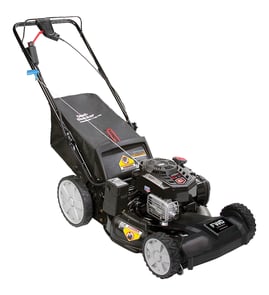



How old is my lawn mower by serial number?
For a Snapper walk-behind mower like model 7800831, the serial number can often be decoded to estimate the build date, but the exact format varies by production run. The most reliable way is to match your serial number format to the identification section in the 7800831 owner's manual and then translate the date code into a month and year.
Where to find the serial number on a walk-behind mower
Most walk-behind mowers place the model and serial information on a label or stamped plate. Check these common spots:
- On the mower deck (top surface near the engine)
- On the rear of the deck near the discharge door area
- On the handle support or lower handle bracket area
- Near the wheel height adjustment area
- On a frame rail or crossmember under the deck lip
How to decode the serial number (what to look for)
Serial numbers commonly include a date code embedded in the first several characters. Look for patterns such as:
- 6 digits that resemble a date (examples: MMDDYY or YYMMDD)
- 4 digits that resemble month and year (examples: MMYY or YYMM)
- A letter + numbers block where the letter indicates a month or plant code
- A week/year format (examples: WWYY)
Quick decoding guide
| What you see in the serial | Usually means | Example result |
|---|---|---|
| MMDDYY | Month, day, year | 031522 = March 15, 2022 |
| YYMMDD | Year, month, day | 220315 = March 15, 2022 |
| WWYY | Week of year + year | 1423 = week 14 of 2023 |
Why it matters
Knowing the mower’s age helps us choose the right maintenance schedule and parts. For example, the operator manual calls out routine checks like inspecting the mower blade and belt at regular intervals, and age plus usage hours helps you decide when to replace wear items instead of only adjusting them.
If you are trying to confirm parts compatibility
When you are ordering parts for Snapper model 7800831, use both the model number and the serial number (or product number) to avoid mismatches caused by mid-year design changes.
- Use the manual’s identification section to confirm the exact serial format
- Compare your serial prefix to any “type” or “revision” notes
- If you are replacing hardware, match size and thread exactly (for example, a flange nut vs. a standard nut)
Last updated: January 2026
What causes a self-propelled lawn mower to stop working?
On the Snapper 7800831, the self-propelled drive usually stops working when the drive system slips or cannot fully engage due to a stretched/misadjusted drive cable, worn drive components, or debris buildup. We start by checking cable operation and then inspect the belt and transmission drive parts.
Most common causes (and what to check first)
- Drive cable out of adjustment or stretched: the drive may slip under load (thick grass or hills) and stop pulling.
- Handle or control linkage issue: incorrect handle assembly, bent parts, or loose fasteners can prevent full engagement.
- Worn or damaged drive belt: a belt can glaze, stretch, or break, so the transmission never gets power.
- Debris buildup: packed grass around the drive area can restrict movement and cause slipping.
- Transmission wear: if the cable and belt are good, the transmission can be the failure point.
How we recommend troubleshooting it (safe, quick sequence)
Before any inspection or adjustment, stop the engine, wait for all moving parts to stop, and disconnect the spark plug wire.
- Confirm the control moves freely: operate the engine stop lever several times and make sure the cable moves smoothly.
- Adjust the drive cable: follow the turnbuckle and jam nut procedure in the 7800831 owner's manual. Make small adjustments (about a half turn), then test.
- Inspect the drive belt: look for cracking, glazing, fraying, or a belt that rides loose on pulleys. If you need the correct replacement, match it to the model parts list, such as the belt 7103362YP when applicable.
- Check for loose/bent hardware: verify fasteners are tight and parts are not broken or bent.
- Clean the mower housing and drive area: grass and debris can keep the mower working correctly; clean after mowing.
Symptoms-to-cause guide
| What you notice | Most likely cause | Best next step |
|---|---|---|
| Drive works on flat ground but slips in thick grass | Cable needs adjustment or belt is worn | Adjust cable, then inspect belt |
| Drive never engages at all | Cable/linkage issue or broken belt | Check control movement, then belt |
| Drive engages but mower barely creeps | Belt slipping or transmission wear | Inspect belt, then evaluate transmission |
Why it matters
A slipping drive system on a walk-behind mower can worsen quickly: belt heat and wear increase, and you can lose control on slopes. Keeping the cable adjusted and the underside clean helps the Snapper 7800831 maintain consistent traction.
Last updated: January 2026
What are the most common issues with 7800831?
The most common issues we see with the Snapper 7800831 walk-behind mower are no-start conditions, poor cutting or discharge, excessive vibration, and uneven cutting. The troubleshooting section in the 7800831 owner's manual focuses on fuel quality, spark plug connection, deck buildup, and blade or blade-adapter problems.
Common problems and what usually causes them
- Engine will not start: old fuel, spark plug wire disconnected, wiring harness disconnected, flooded cylinder
- Engine will not stop: engine stop lever not released, stop cable bent or damaged
- Bad performance (bogging, weak power): cutting too low in tall grass, debris under deck, dirty cooling fins, low oil, bad gasoline
- Excessive vibration: bent blade, unbalanced blade, damaged blade adapter
- Poor discharge or uneven cut: packed grass under deck, dull blade, wheel height set unevenly
Quick checks we recommend first (fast and safe)
- Turn the engine off and disconnect the spark plug wire.
- Confirm fresh, clean gasoline in the tank (drain old fuel if needed).
- Check the spark plug wire is firmly seated on the plug.
- Tip the mower safely (per manual guidance) and clean grass buildup from the blade housing.
- Verify all wheels are set to the same height-of-cut setting.
Parts that commonly get inspected or replaced
These are model-specific parts we often see involved when symptoms point to the drive system, handle hardware, or discharge components:
| Symptom | What to inspect | Example part for 7800831 |
|---|---|---|
| Self-propel not pulling well | belt condition, routing, tension | Snapper belt 7103362YP |
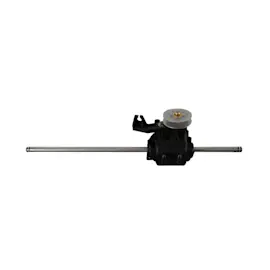
| Drive issues persist | transmission operation | Snapper transmission 7103311YP |
| Rear discharge door not closing right | hinge, pivot rod, door alignment | Snapper door hinge, rear discharge 7103292 |
Why it matters
Ignoring vibration, uneven cutting, or discharge problems usually leads to more deck buildup, poorer cut quality, and faster wear on rotating parts. Addressing fuel, deck cleaning, and blade-related issues early keeps the mower running smoother and safer.
Last updated: March 2026