Owner’s manual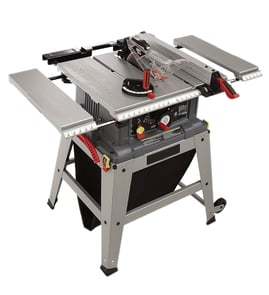

What not to do with a table saw?
On the Craftsman 113298142 10-inch table saw, do not operate the saw until it’s fully assembled per the owner's manual, and never do unsafe feeding or reaching actions that can cause kickback or pull your hands into the blade.
Never do these high-risk actions
- Never leave the saw running unattended; turn it off and wait for a complete stop.
- Never feed material into the blade from the rear of the saw.
- Never reach over or behind the blade to pull a workpiece through the cut.
- Never pick up small cutoffs from the table while the blade is moving; push them off with a long stick.
- Never remove pieces trapped inside the blade guard while the saw is running.
- Never use another person as “extra support” for long or wide stock.
Setup and operating mistakes to avoid
- Do not run the saw without the proper table insert installed and adjusted flush with the tabletop.
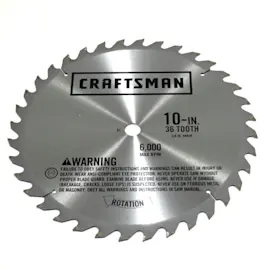
- Do not use blades or cutters rated below the saw’s operating speed (the manual calls out 3450 RPM).
- Do not use a cutting tool larger than the diameter the saw was designed for.
- Do not raise the blade higher than needed for the cut; keep the cutting tool as low as practical.
Quick safety checklist (before every cut)
| Check | What “good” looks like | Why it matters |
|---|---|---|
| Body position | You stand to either side of the blade | Reduces injury risk if kickback happens |
| Cut completion | You start and finish the cut from the in-feed side | Prevents pulling stock through from the out-feed side |
| Long stock support | You use outfeed/side support, not a helper | Prevents tipping, binding, and loss of control |
| Stall response | You switch OFF before freeing a stalled blade | Prevents sudden grab and kickback |
Why it matters
Most table saw injuries come from kickback and from reaching into the blade path. The manual’s rules focus on controlling the workpiece (proper support and feeding direction) and keeping hands away until the blade fully stops.
Last updated: February 2026
Where is the reset button on a Craftsman table saw?
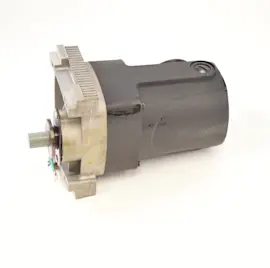
On the Craftsman 113298142 10-inch table saw, there typically is not a front-panel “reset” button. If the motor overheats and trips its overload, the reset is usually on the motor itself, often under small protective caps on the end of the motor housing; press the reset mechanism and let the motor cool first.
What to check first (safe, fast steps)
- Turn the saw switch OFF and unplug the power cord before touching the motor or wiring.
- Let the motor cool 15 to 30 minutes if it stopped during a heavy cut.
- Look at the end of the motor for small plastic caps or a small reset access point.
- Clear packed sawdust from the cabinet and motor area; buildup can cause overheating.
- Spin the blade by hand (unplugged) to confirm it turns freely and nothing is binding.
How the overload trip usually happens
A thermal overload opens when the motor draws too much current or runs too hot. Common causes include a dull blade, feeding stock too fast, misalignment that pinches the blade, or restricted airflow from sawdust.
Common causes and fixes
| Symptom | Likely cause | What we do next |
|---|---|---|
| Motor stops mid-cut | Overload trip from heavy load | Cool down, reset at motor, reduce feed rate |
| Trips repeatedly | Dull blade or binding | Replace/sharpen blade, check alignment |
| Runs hot quickly | Sawdust packed in motor/cabinet | Blow out dust; keep vents clear |
Why it matters
Resetting the overload gets you running again, but repeated trips usually mean the motor is being overloaded. Fixing the root cause helps prevent motor damage and nuisance shutdowns.
Manual tip for this model
Our owner's manual includes safety steps and maintenance guidance (including keeping sawdust from accumulating inside the saw and motor), which directly affects overheating and overload trips.
Last updated: February 2026
Does Craftsman make a good table saw?
Yes; Craftsman table saws are a solid choice for many DIYers and hobbyists, and the Craftsman 113298142 10-inch table saw is known as a sturdy, serviceable design when it is assembled correctly, aligned, and used with the proper safety equipment. For daily professional production work, users typically prioritize heavier-duty fences and tighter tolerances.
What “good” means for a table saw
A table saw can be “good” in different ways; here is how we recommend evaluating it:
- Cut accuracy: fence stays parallel to the blade and locks consistently
- Power delivery: motor starts smoothly and holds speed under load
- Safety system: guard, spreader, and anti-kickback setup is complete and used
- Serviceability: common wear items (switch, cord, belts, bearings) can be maintained
- Parts support: you can identify parts by part number using the diagrams
For model 113298142, the owner's manual includes safety instructions and a detailed parts list that helps you keep the saw working correctly.
Strengths and tradeoffs we commonly see
| Area | What’s typically good | What to watch for |
|---|---|---|
| Value | Strong capability for the cost | May need tune-up for best precision |
| Durability | Many older Craftsman saws hold up well | Condition varies by age and maintenance |
| Accuracy | Can cut accurately when aligned | Fence alignment and blade setup matter most |
| Maintenance | Straightforward mechanical design | Switch, wiring, and alignment checks are important |
Quick checks that improve results (and safety)
- Confirm the blade is parallel to the miter slot and fence
- Verify the fence locks square and does not toe in toward the blade
- Use the guard/spreader system; the manual lists a guard assembly and spreader support components
- If the saw struggles to start or bogs down, inspect the switch, capacitor, and wiring
- Use the correct circuit protection (proper fuse or breaker size) and avoid undersized extension cords
Why it matters
A “good” table saw is one that cuts predictably and safely. Most complaints about cut quality trace back to alignment, fence setup, or electrical issues (switch, wiring, or low voltage), not the basic saw design.
Last updated: February 2026
What are the parts of a table saw?
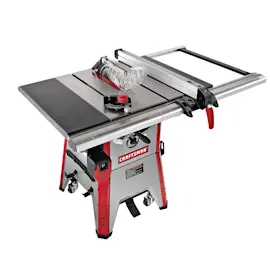
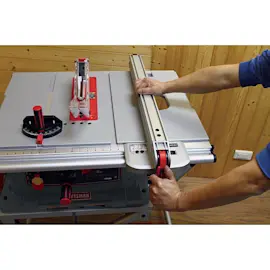
A table saw has a flat work surface (table top) with a circular blade that rises through a throat plate, plus guiding and safety parts that control the cut. On the Craftsman 113298142 10-inch table saw, key assemblies include the rip fence, spreader support/rod, and the on/off power outlet switch. See the owner's manual for the full exploded views and parts lists.
Main parts you will see on most table saws
- Table top (cast or stamped surface you cut on)
- Throat plate (blade insert) around the blade opening
- Saw blade and arbor (the shaft the blade mounts to)
- Rip fence (parallel guide for ripping)
- Miter gauge and miter slots (for crosscuts and angled cuts)
- Blade height and bevel controls (raise/lower and tilt the blade)
- Blade guard and anti-kickback system (varies by design)
- Spreader or riving knife (helps reduce kickback)
- Switch assembly (on/off, often with a removable safety key)
Model-specific examples from Craftsman 113298142
Your manual’s parts lists call out several common assemblies by name, including:
| Assembly | What it does | Where you’ll use it |
|---|---|---|
| Fence assembly (rip fence) | Guides straight rip cuts parallel to the blade | Sizing boards and sheet goods |
| Spreader support/rod | Helps keep the kerf from closing behind the blade | Ripping solid wood to reduce binding |
| On/off power outlet (switch) | Controls power; may use a locking key/cover | Starting and stopping the saw safely |
Why it matters
Knowing the correct part names helps you match symptoms to the right area (for example, a fence that will not lock points to the fence lock/roller parts, while a saw that will not start points to the switch, cord, or wiring). It also makes it easier to use the diagrams in the manual when you are identifying replacement parts.
Quick safety and maintenance reminders
- Unplug the saw before adjusting, cleaning, or inspecting parts.
- Keep the fence parallel to the blade to reduce burning and kickback.
- Use the spreader/guard system when the cut allows it.
- Keep the table clean and waxed so stock feeds smoothly (avoid highly volatile solvents).
- Confirm the switch key and cover are installed and working before use.
Last updated: February 2026