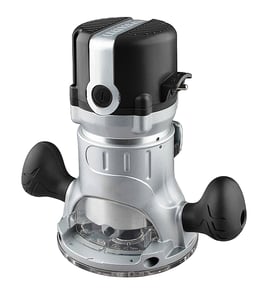

How to replace router bits sears Craftsman router?
To replace router bits on your Craftsman model 14923910, unplug the router, loosen the collet nut, remove the old bit, insert the new bit to the correct depth, then tighten the collet firmly. This prevents bit slippage and helps you get a clean, controlled cut.
Safe, reliable steps to change a router bit
- Unplug the router (or remove the battery if applicable) before touching the collet.
- Raise the bit (if mounted in a table) so you can access the collet nut.
- Lock the spindle (if your router has a spindle lock) or use two wrenches (one on the spindle, one on the collet nut).
- Turn the collet nut counterclockwise to loosen; remove the old bit.
- Insert the new bit shank fully, then pull it back out about 1/8 inch so the collet grips correctly.
- Tighten the collet nut firmly (snug plus a little more); do not overtighten.
- Spin the bit by hand to confirm it clears the base and is seated straight.
Quick checks before you power back on
| Check | What you want to see | Why it matters |
|---|---|---|
| Bit shank size | Matches the collet (commonly 1/4 inch or 1/2 inch) | Wrong size can slip or damage the collet |
| Bit insertion depth | Shank mostly inside collet; not bottomed out | Better grip, less vibration |
| Collet condition | Clean, no cracks, no heavy resin buildup | A dirty or worn collet can loosen during use |
Common problems and fixes
- Collet nut feels stuck: clean dust from the nut/collet area; try loosening with steady pressure (not jerking).
- Bit keeps slipping: reseat the bit (do not bottom it out), then retighten; inspect the collet for wear.
- Excess vibration: confirm the bit is straight, sharp, and fully supported by the collet.
Why it matters
A properly seated router bit reduces chatter, improves cut quality in wood, and lowers the chance of the bit walking out of the collet during a pass.
For general DIY safety practices before servicing power tools, use our guide: are diy appliance repairs safe.
Last updated: February 2026
What is a Sears Craftsman router?
A Sears Craftsman router (including the Craftsman model 14923910) is a woodworking power tool that spins a cutting bit at high speed to shape edges, cut grooves (dados/rabbets), and make joinery. It is commonly used for trim work, cabinetry, and detailed profiling.
What a router does (and why it matters)
A router is designed for controlled material removal. The bit profile and the way you guide the tool determine the final shape and surface quality.
- Shapes edges with round-over, chamfer, ogee, and other profile bits
- Cuts grooves and slots for shelves, panels, and joinery
- Makes rabbets and dadoes for stronger wood connections
- Trims laminate and flush-cuts edges using bearing-guided bits
- Creates repeatable cuts when used with a fence, guide, or template
Why it matters
Using the right router setup improves cut accuracy and reduces tear-out, burning, and chatter. It also helps you choose the correct bit type, speed, and feed rate for hardwood vs. softwood.
Common router types you may see
Even within the “Sears Craftsman router” label, routers are typically grouped by how they’re used.
| Router type | Best for | Typical features |
|---|---|---|
| Fixed-base router | Edge profiling, straight cuts with a guide | Stable base, consistent depth |
| Plunge router | Grooves, mortises, stopped cuts | Spring-loaded plunge action |
| Router table use | Repeatable shaping, small parts | Fence-guided cuts, better control |
Basic setup and safety checks
Before routing with a corded electric router, we recommend these quick checks.
- Unplug the router before changing bits or adjusting depth
- Fully seat the bit shank, then back it out slightly before tightening the collet
- Use the correct collet size (commonly 1/4-inch or 1/2-inch) for the bit
- Make multiple shallow passes instead of one deep cut
- Keep the cord clear of the cutting path and use eye and hearing protection
Helpful DIY reference
For electrical troubleshooting basics (useful if the router won’t start or cuts out), see how to use a multimeter to test electrical parts video.
Last updated: February 2026
Does Craftsman make a router table?
Yes, Craftsman has made router tables and router table accessories. For your Craftsman model 14923910, keep in mind it’s a benchtop shaper/router style tool with an integrated base, so it’s typically used as a standalone bench-top unit rather than mounted into a separate router table.
What this means for Craftsman 14923910
A traditional router table is designed for a handheld router motor that bolts to an insert plate. The 14923910 is already a table-style tool, so “adding a router table” usually means improving your existing setup or building a larger support surface around it.
- Use the 14923910 as a dedicated benchtop station
- Add infeed and outfeed support for longer stock
- Improve dust collection at the fence and below the cutter area
- Upgrade workholding (featherboards, push blocks, guards)
- Verify cutter/bit shank size and speed ratings before changing tooling
If you still want a separate router table
If your goal is a larger work surface or different fence system, most people choose a complete router table package that includes its own insert plate and is meant for a handheld router. That setup is separate from the 14923910.
| Goal | Best option | Why it fits |
|---|---|---|
| More table space for the 14923910 | Build a support top around the tool | Keeps the integrated benchtop design |
| Router-table features (insert plate, lift-ready) | Buy a dedicated router table + compatible handheld router | Designed for plate mounting |
| Better control and safety | Add featherboards, guard, and a switch you can reach | Reduces kickback risk |
Why it matters
Trying to mount an integrated benchtop shaper/router into a router table can create stability and guarding problems. Using the 14923910 as intended, then adding support and safety accessories, gives better cut quality and safer operation.
Helpful next step
Confirm you’re shopping for accessories that match the correct tool type by using: how to find your appliance model number (and what it means for parts).
Last updated: February 2026