 Owner’s manual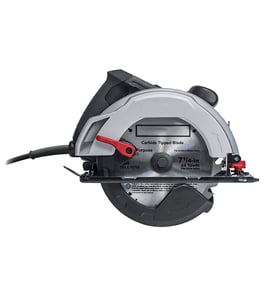

Where can I buy Craftsman replacement parts?
You can buy replacement parts for your Craftsman 315115161 cordless trim saw through Sears PartsDirect by using the model number to match the correct repair parts list and diagrams. For safe fit and performance, the manual recommends using identical Craftsman replacement parts.
Best way to shop parts for model 315115161
- Use the exact model number 315115161 when searching parts
- Confirm the part name and key number using the exploded view
- Match the part number from the parts list before ordering
- Replace worn fasteners with the same size and type (for example, metric screws and bolts)
- Follow the manual safety guidance when servicing the saw
What the manual says about replacement parts
The parts list and exploded view in the owner's manual show the repair parts for model 315115161, and the service guidance states to use identical Craftsman replacement parts to help prevent hazards and product damage.
Quick checklist before you order
| What to check | Why it matters | Where to find it |
|---|---|---|
| Model number: 315115161 | Ensures correct fit | Motor housing model plate; owner's manual |
| Part number | Prevents wrong part orders | Parts list section |
| Exploded view location | Confirms you picked the right item | Exploded view/diagram |
| Quantity needed | Avoids repeat orders | Parts list QTY column |
Why it matters
Power tool parts like base components, knobs, screws, and guards must match the original design so the saw stays aligned and operates safely. Using the correct model-based parts list reduces downtime and helps your repair go smoothly.
Last updated: February 2026
How to change an old Craftsman circular saw blade?
To change the blade on your Craftsman 315115161 trim saw, remove the battery pack first, lock the spindle, then remove the blade screw and outer washer so you can slide the blade out through the lower guard. Follow the steps in the owner's manual for the correct blade direction and screw rotation.
Step-by-step: remove the old blade
- Remove the battery pack from the saw.
- Pull the blade wrench (5 mm hex key) from its storage area.
- Rotate the blade by hand until the spindle lock button can fully engage.
- Press and hold the spindle lock button.
- Loosen and remove the blade screw (turn clockwise to remove).
- Remove the outer blade washer.
- Retract the lower blade guard using the guard handle, then lift the blade off the spindle.
Install the new blade correctly
- Confirm blade size: 5-1/2 inch maximum for this saw.
- Check blade thickness: it must allow the outer blade washer to engage the flats on the spindle.
- Slide the blade inside the lower blade guard and onto the spindle.
- Set tooth direction: teeth point upward at the front of the saw.
- Reinstall the outer blade washer.
- Press the spindle lock and tighten the blade screw (turn counterclockwise to tighten).
Quick reference table
| Task | What to do | Direction |
|---|---|---|
| Remove blade screw | Hold spindle lock, loosen screw | Clockwise |
| Tighten blade screw | Hold spindle lock, tighten screw | Counterclockwise |
| Blade orientation | Teeth at front of saw | Point upward |
Why it matters
Using the correct blade size, thickness, and orientation helps the blade clamp properly and reduces binding and kickback risk. A blade that is too large or too thick can contact the guard or prevent the screw from securing the blade.
Last updated: February 2026
Does Craftsman make a track saw?
Yes. Craftsman has made track-saw style cutting systems (often sold as a “track cut” or “track saw” kit) that let you guide a circular saw along a straight track for cleaner, straighter cuts than freehand. Your Craftsman 315115161 is a cordless laser trim saw, not a track saw.
Track saw vs. your 315115161 trim saw
A track saw is designed to ride on a guide rail; your 315115161 is designed to cut freehand using its base (shoe) and depth/bevel adjustments.
| Feature | Track saw system | Craftsman 315115161 trim saw |
|---|---|---|
| Primary use | Long, straight cuts in sheet goods | Trim and smaller crosscuts/rips |
| Guidance | Guide rail (track) | Saw base against a straightedge (optional) |
| Cut quality | Typically cleaner with less tear-out | Depends on blade and technique |
| Safety focus | Anti-kickback features vary by system | Kickback prevention steps in the manual |
How to get track-saw-like results with this model
If you want straighter cuts with your Craftsman 315115161, we recommend these practical steps:
- Use a straightedge guide clamped to the workpiece (a level or factory edge works well).
- Use a sharp, correct-size blade; dull blades increase binding and kickback risk.
- Support large panels on both sides of the cut to prevent sagging and blade pinching.
- Set blade depth so the blade just clears the material (deeper cuts can increase binding).
- Keep the base flat on the workpiece and feed at a steady pace.
For model-specific safety rules (including kickback prevention and laser guide warnings), follow the 315115161 operator's manual.
Why it matters
Track saws and trim saws solve different problems. A track saw system is built around guided accuracy on sheet goods; a trim saw like the 315115161 is optimized for portability and quick cuts. Using the right blade, support, and a straightedge guide gives you the best accuracy while keeping kickback risk down.
Last updated: February 2026
Why is my Craftsman circular saw not spinning?
If your Craftsman circular saw model 315115161 powers on but the blade will not spin, the most common causes are blade binding in the cut, a stuck spindle lock, incorrect blade washer or screw installation, or an electrical problem such as worn motor brushes. Use the owner's manual for the correct blade hardware order and safety steps.
Quick checks (power off first)
- Remove the battery pack or unplug the saw before touching the blade area.
- Try rotating the blade by hand; it should turn freely with only light resistance.
- Confirm the spindle lock button is fully released (not partially engaged).
- Check the lower blade guard moves freely and is not jammed.
- Verify blade depth and bevel locking levers are tight; shifting settings can cause binding.
Binding and cut setup (common mid-cut stall)
Binding happens when the kerf pinches the blade. Correct support and blade depth prevent repeat stalls and reduce kickback risk.
| What to check | Correct setup | If wrong |
|---|---|---|
| Blade depth | About one tooth below the material | Too deep increases friction and binding |
| Work support | Support both sides near the cut line | Sagging panels pinch the blade |
Verify blade installation (washers and screw)
The blade-change procedure in the manual highlights these points:
- Replace the inner blade washer if it was removed; the blade will not tighten properly without it.
- Blade screw direction: clockwise to remove, counterclockwise to tighten.
- Do not use a blade that is too thick for the outer blade washer to engage the spindle flats.
Electrical causes (blade spins freely by hand)
- Worn motor brushes
- Loose or damaged wiring
- Failed trigger switch
A meter check helps confirm power to the motor; see how to use a multimeter to test electrical parts video.
Why it matters
Most “not spinning” complaints trace to binding or blade hardware issues; fixing those prevents repeat stalls and improves control.
Last updated: February 2026
