Owner’s manual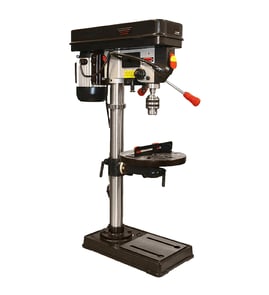

What is a good horsepower for a drill press?
A good horsepower depends on what you drill most often. For typical home shop work, 1/2 HP to 3/4 HP is a strong, practical range; for frequent large bits, hard metals, or heavy hole-saw use, 1 HP or more helps. Your Craftsman 113213170 drill press is rated at a maximum developed 1 1/2 HP.
Horsepower matters most when you push larger diameter bits, drill thicker stock, or drill tougher materials. More HP helps maintain spindle speed under load, which reduces stalling and overheating.
- Woodworking and light metal (small to medium bits): 1/2 HP to 3/4 HP
- Regular metalworking (larger bits, step bits, frequent use): 3/4 HP to 1 HP
- Heavy-duty drilling (large hole saws, thick steel, production-style use): 1 HP+
- If you already own the Craftsman 113213170, you have power headroom for many demanding tasks when you use the correct speed and sharp bits (see the owner's manual).
Even a higher-HP drill press can struggle if the belt speed is too fast for the bit and material. The Craftsman 113213170 uses a belt-and-pulley system with 16 spindle speeds from 200 to 3630 RPM, which is a big advantage for matching speed to the job.
| Task type | Typical approach | What to prioritize |
|---|---|---|
| Large bits in wood | Lower speed, steady feed | Torque, sharp bit, clamping |
| Drilling steel | Low speed, cutting fluid | Correct RPM, firm feed |
| Small bits | Higher speed | Runout control, bit quality |
- Use the lowest practical RPM for larger bits and harder metals.
- Keep bits sharp; dull bits mimic “low horsepower.”
- Clamp the workpiece and use a backup board to prevent grabbing and tear-out.
- Set belt tension correctly so the belt does not slip under load.
- Use a dedicated, properly grounded outlet and correct circuit protection as described in the owner's manual.
Choosing the right horsepower helps you drill cleaner holes with less stalling, less heat, and better control. In real use, correct RPM selection, belt setup, and bit condition often improve results more than jumping to a bigger motor.
Last updated: February 2026
How to repair a drill press spindle?
On the Craftsman 113213170 17" drill press, spindle repair usually means removing the quill assembly, inspecting the spindle taper and bearings, then replacing worn spindle bearings or the spindle if it’s bent. Use the owner's manual for the correct disassembly order and safety steps.
- Unplug the drill press before any adjustment or disassembly.
- Do not wear gloves, loose clothing, jewelry, or a necktie; tie back long hair.
- Lower the table for clearance and support the head and quill parts as you remove them.
- Clamp and support workpieces during testing to reduce kickback risk.
- If any safety device, switch, or cord is damaged, stop and repair that first.
- Remove the chuck and any guards needed to access the quill/spindle area.
- Prevent the quill from dropping; then remove the quill retaining hardware and slide the quill out.
- Separate the spindle from the quill and inspect:
- Spindle taper (rust, oil, scoring)
- Spindle bearings (roughness, play, noise)
- Pulley retaining nut and pulley set screws (loose hardware can mimic bearing problems)
- Replace worn spindle bearings; if the spindle is bent or the taper is damaged, replace the spindle.
- Reassemble, then verify smooth quill travel and correct return action.
| Symptom | Most common cause | What to do |
|---|---|---|
| Wobble or runout at the bit | Bent drill bit or worn spindle bearings | Try a straight bit; replace bearings if play remains |
| Chuck falls off or slips | Dirty or oily tapers | Clean chuck and spindle tapers with household detergent; reinstall |
| Quill does not return smoothly | Quill return spring tension issue | Adjust spring tension per manual |
A worn bearing or dirty taper can cause wobble, poor hole accuracy, and higher kickback risk. A smooth, tight spindle and properly returning quill help the drill press cut cleanly and safely.
Last updated: February 2026
What is the 4 inch rule for drill press?
On a drill press, the 4-inch rule means we keep our hands and fingers at least 4 inches away from the rotating drill bit, chuck, and spindle while drilling. On the Craftsman 113213170 17" drill press, this works with the manual’s core safety guidance: secure the work and avoid any setup work while the tool is rotating.
- Clamp the workpiece to the table or hold it in a vise; do not hand-hold small parts.
- Use a scrap backer board under the work to reduce grabbing and tear-out.
- Use a brush or a stick to clear chips; never use your fingers near the bit.
- Stop the drill press completely before measuring, adjusting the table, or repositioning the work.
- Remove the switch key when you step away so the drill press cannot be started accidentally.
The owner's manual reinforces several habits that support the 4-inch rule, including:
| Safety habit | What it prevents | When to do it |
|---|---|---|
| Turn power off and wait for a complete stop | Accidental contact with the rotating tool | Before any adjustment or cleanup |
| Do not do layout, assembly, or setup on the table while rotating | Thrown workpiece, tool contact | Any time the bit is spinning |
| Use only approved accessories and correct speeds | Broken accessories, thrown parts | Before drilling or sanding |
| Keep the drill press stable (bolt down if needed) | Tipping, shifting, loss of control | During installation and heavy use |
Most drill press injuries happen at the point of operation: the bit can grab the workpiece, pull material upward, or spin it unexpectedly. Keeping a 4-inch buffer gives you reaction time and reduces the chance your hand gets pulled into the rotating chuck or bit.
Last updated: February 2026
Where can I buy Craftsman replacement parts?
You can buy replacement parts for your Craftsman 113213170 17-inch drill press directly through Sears PartsDirect by searching the model number and matching the part number to the drill press parts list in the owner's manual. This helps you order the correct item the first time.
We recommend using the parts diagrams and parts lists for this exact model, then ordering by the listed part number (not the diagram key number). The manual for this drill press includes repair parts breakdowns and ordering guidance.
- Confirm the model number is 113213170 on the tool’s ID label
- Use the repair parts lists and diagrams in the owner's manual
- Write down the part number you need (example categories: belt, chuck, spindle bearing)
- Match the description to the correct assembly (spindle/quill, pulleys/belt, table/column)
- Order the replacement using the model-based parts listing on Sears PartsDirect
These are typical wear or service items on a Craftsman drill press like the 113213170:
| Part type | What it affects | Common symptom |
|---|---|---|
| V-belt | Speed changes, power transfer | Slipping, squealing, poor torque |
| Chuck and arbor | Bit holding, runout | Bit wobble, chuck won’t seat |
| Spindle/quill bearings | Smooth drilling | Noise, vibration, rough feed |
| Table clamp and elevation parts | Table stability | Table drifts, won’t lock |
Ordering by the correct model number and part number prevents fit issues and repeat downtime. This is especially important on a drill press because parts like belts, bearings, and chuck/arbor interfaces must match the original dimensions to run true and safely.
Last updated: February 2026
How to determine drill press size?
Drill press “size” is usually the swing: twice the distance from the center of the spindle (chuck) to the center of the column. That swing equals the largest diameter workpiece you can drill in the center without hitting the column; confirm your Craftsman 113213170 details in the owner's manual.
- Unplug the drill press and remove the switch key.
- Lower the quill so the chuck is easy to reference.
- Measure from the center of the chuck/spindle straight back to the center of the column.
- Multiply that measurement by 2 to get the swing.
- If you cannot find the exact spindle center, measure from the front of the column to the spindle center, then add half the column diameter.
Different listings use “size” differently. Here are the most common meanings:
| Spec people call “size” | What it describes | Why it matters |
|---|---|---|
| Swing | Max centered workpiece diameter | Clearance to drill the middle of a round piece |
| Throat depth | Spindle-to-column distance | Same measurement used to calculate swing |
| Spindle speeds | RPM range and number of speeds | Matching speed to bit size and material |
| Chuck capacity | Largest shank the chuck grips | Determines what drill bits/accessories fit |
Knowing the swing helps you choose the right setup for larger workpieces and prevents the stock from contacting the column during drilling. It also helps when comparing a “17-inch drill press” class tool to smaller bench-top models.
- Table position and height (raise/lower with the table crank)
- Table tilt (use the bevel scale and lock it securely)
- Depth stop setting (use the depth scale and depth scale lock)
- Speed selection (use the belt and pulley chart inside the belt guard)
Last updated: February 2026