Error Codes





Why is my Maytag electric range not heating up?
If your Maytag MER8800FZ3 electric range is not heating, the most common causes are a failed heating element, a bad surface or oven control switch, or a power supply problem (one leg of 240V missing). Start with a quick power check, then test the heating circuit parts.
Quick checks we recommend first
- Confirm the range is getting full power: the cooktop and oven need 240V; lights and the clock can still work on 120V.
- Make sure the control is set correctly (Bake vs. Broil, temperature set, and Start pressed if required).
- If the oven is the issue, try Broil; if Broil heats but Bake does not, the bake element is the top suspect.
- If a surface burner is the issue, try a different burner; this helps separate a single-element failure from a control issue.
- Power reset: turn the breaker off for 2 minutes, then back on.
What usually fails (and what to test)
Use a multimeter (with power disconnected) to check continuity and obvious heat damage.
| Symptom | Most likely cause | Common fix path |
|---|---|---|
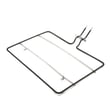
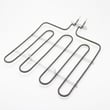
| Oven will not bake, broil works | Failed bake element | Replace the bake element W10779716 |
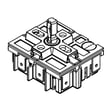
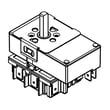
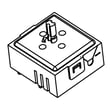
| One surface element will not heat | Failed radiant element or switch | Inspect element; test/replace switch such as range infinite switch W10917724 |
| Multiple heating functions weak or dead | Loose/burned power connection | Inspect/replace range terminal block WPW10245259 |
Safety and access notes
- Turn off the range breaker before removing panels or testing parts.
- If you see melted wires, scorching, or a burning smell at the cord connection, stop and address the power connection first.
- After any repair, verify the range is level; uneven leveling can affect cookware contact and cooking results (use a leveling leg if needed).
Why it matters
Heating problems often trace back to a single failed component, but a damaged terminal block or wiring can cause repeat failures and overheating. Fixing the power connection and the correct heating part restores normal preheat times and stable temperatures.
Last updated: February 2026
Where is the model number on a Maytag electric range?
On a Maytag electric range like model MER8800FZ3, the model number is usually printed on a rating label around the oven door opening (door jamb) or on the frame behind the storage/warming drawer. Check these spots first before looking on the back of the range.
Most common places to check
- Oven door jamb: open the oven door and look along the frame edge
- Behind the bottom drawer: pull the storage drawer out and look on the frame
- Lower side trim or frame: near the front legs or side panel edge
- Back panel: near the power cord entry or rear vent area
- Under the cooktop lip (less common): along the front edge under the glass/metal top
What the label looks like (and what to write down)
The rating label typically includes the model number and a serial number. For parts lookup and ordering, we recommend recording both.
| Label item | Example format | Why it matters |
|---|---|---|
| Model number | MER8800FZ3 | Identifies the exact Maytag range version |
| Serial number | Letters and numbers | Helps match production changes |
Why it matters
Maytag ranges can use different bake elements, surface elements, or wiring parts depending on the exact model and production run. Using the correct model number helps us match parts like the bake element W10779716 or the range terminal block WPW10245259 to your range.
Last updated: February 2026
Why is my Maytag oven broiler not working?
If the broiler in your Maytag electric range model MER8800FZ3 is not working, the most common causes are a failed broil heating circuit (element or wiring), a bad control (relay/board), or a door or temperature-related safety condition that prevents broil from energizing.
Quick checks we recommend first
- Confirm you selected Broil (not Bake) and set a temperature or broil level.
- Make sure the oven door is closed to the normal broil position (some ranges will not broil properly with the door open).
- Check for power issues: an electric range needs full 240V supply; a tripped breaker can leave you with lights but no heat.
- Cancel the cycle, wait 1 minute, then retry Broil to clear a temporary control glitch.
- If the oven recently ran self-clean, let it cool fully and try again (high heat can expose weak parts).
What usually fails on an electric broiler
On MER8800FZ3, broil heat is produced by an upper heating element and controlled by the electronic control and wiring.
| Symptom | Most likely cause | What to do next |
|---|---|---|
| No broil heat at all | Control not sending power, open wiring, or failed broil element | Inspect wiring and test element continuity; replace failed part |
| Broil works sometimes | Weak relay on control, loose connection at terminal block | Check connections; inspect for heat damage |
| Oven heats on Bake but not Broil | Broil circuit issue (element, wiring, control relay) | Focus troubleshooting on broil circuit |
Parts that commonly solve “no broil” complaints
- If you find burned or loose power connections, replace the range terminal block WPW10245259.
- If you see heat-damaged wiring at the back or near the cooktop, inspect the harness and connections; a damaged harness can interrupt broil power.
Why it matters
A broiler that will not heat is often a power-delivery problem (breaker, terminal block, wiring) or a control/relay issue. Catching a loose or overheated connection early helps prevent repeated failures and protects the control from damage.
Last updated: February 2026
Where can I get Maytag replacement parts?
For your Maytag MER8800FZ3 electric range, we recommend buying replacement parts from a model-specific parts catalog so you get the correct fit the first time. Start with common, high-failure items like the bake element W10779716 and match parts by model number before ordering.
Best places to buy Maytag MER8800FZ3 parts
- A model-specific parts catalog for MER8800FZ3 (best for exact fit)
- Local appliance parts stores (bring the model number and part description)
- Authorized service companies that supply OEM parts
- Major retailers and marketplaces (verify the model cross-reference before buying)
How to make sure you order the right part
Use this quick checklist before you check out:
- Confirm the appliance model is MER8800FZ3 (from the frame or storage drawer area)
- Match the part by function (bake, broil, surface element, control) and location
- Compare the part ID and description, not just a photo
- If wiring is involved, label wires and take a picture before disconnecting
- For electrical parts, confirm power is off at the breaker before servicing
Common parts customers replace on this model
| Symptom | Likely part category | Example part for MER8800FZ3 |
|---|---|---|
| Oven not heating or uneven baking | Oven heating | Bake element W10779716 |
| Burner not heating or stuck on one setting | Surface element control | Range infinite switch W10917724 |
| Power cord connection overheats or is loose | Power connection | Range terminal block WPW10245259 |
Why it matters
Ranges often have multiple versions of similar-looking parts. Ordering by MER8800FZ3 helps avoid returns, prevents wiring mismatches (like at the terminal block), and gets your oven or radiant element heating correctly again.
For troubleshooting help before you buy a part, use oven wont heat troubleshooting electric range problems video to narrow down whether the issue is the bake element, a control, or a power supply problem.
Last updated: February 2026
Are Maytag electric ranges any good?
Yes. Maytag electric ranges, including model MER8800FZ3, are generally a solid choice for everyday cooking because they are built for consistent baking performance, durable heating components, and straightforward controls. Long-term satisfaction usually comes down to proper installation, routine cleaning, and replacing wear parts when symptoms show up.
What “good” looks like in real use
Most owners judge an electric range by heat-up speed, even baking, and how well the cooktop controls hold a steady simmer. For MER8800FZ3, these are the most common “quality signals” we see:
- Oven reaches and holds set temperature without wide swings
- Bake results are even across multiple rack positions
- Surface elements cycle normally (on and off) without dead spots
- Control knobs feel consistent (not loose, not sticking)
- Cooktop stays smooth and easy to maintain with the right tools
Parts that most affect performance
If performance drops over time, it is usually tied to a few serviceable parts rather than the whole range being “bad.”
| Symptom | Common cause | Example part for MER8800FZ3 |
|---|---|---|
| Oven not heating or uneven baking | Failed bake heater | Bake element W10779716 |
| One surface burner not heating | Failed radiant element | Element (1200w)(left rear & right rear) W11171119 |
| Burner heat is erratic | Worn control switch | Range infinite switch W10917724 |
Why it matters
Electric ranges are repairable appliances. When a heating circuit (bake element, radiant element, or infinite switch) starts failing, food results suffer first. Replacing the right part restores normal cooking performance and helps you avoid repeat issues.
Quick care tips that keep Maytag ranges performing well
- Keep the cooktop clean to prevent heat trapping and staining
- Use flat-bottom cookware for better contact and steadier heating
- Avoid foil on the oven bottom; it can disrupt airflow and heat
- If preheat seems long, verify the oven actually reaches temperature before adjusting recipes
- Address “one burner not working” early; it is often a simple element or switch fix
For step-by-step help, use how to clean and maintain your stove and oven wont heat troubleshooting electric range problems video.
Last updated: February 2026
What does F3 mean on Maytag oven?
On a Maytag electric range like model MER8800FZ3, an F3 error typically points to an oven temperature sensing problem (most often the oven temperature sensor circuit reading too hot, too cold, or open/shorted). The most common fixes are checking the sensor wiring and replacing the failed component.
What to check first (safe, quick steps)
- Press Cancel/Off to clear the code; if it returns, continue troubleshooting.
- Turn power off at the breaker for 1 minute, then restore power and retest.
- If the oven recently overheated, let it cool completely and try Bake again.
- If the code appears as soon as you start Bake or during preheat, focus on the sensor circuit.
- If you smell burning or see heat damage, keep power off and inspect wiring before using the oven.
Likely causes and what they mean
| Likely cause | What you’ll notice | Typical fix |
|---|---|---|
| Oven temperature sensor circuit issue | F3 during preheat or shortly after starting | Check sensor connector and harness; replace sensor if failed |
| Damaged wire harness or loose connector | Intermittent F3, especially after moving the range | Reseat connectors; repair/replace harness |
| Control not reading sensor correctly | F3 persists after wiring checks | Control diagnosis by a technician; replace control if confirmed |
Parts that commonly relate to F3 symptoms
Even though F3 is usually a sensor-circuit code, heat-related failures can overlap with other oven-heating complaints. If your oven also will not heat or heats unevenly, these model-compatible parts are often involved:
- Bake element W10779716 (if the oven will not bake or has weak heat)
- Range wire harness W11134550 (if wiring is brittle, burned, or connections are loose)
Why it matters
When the control thinks the oven temperature is unsafe or unknown, it may shut heating down to prevent overheating or poor temperature control. Fixing the sensor circuit restores accurate temperature feedback, which improves baking results and helps prevent repeat error codes.
Helpful DIY guidance
For a step-by-step diagnostic flow that matches common electric range failures, use: f30 and f31 error code troubleshooting for ranges video and oven wont heat troubleshooting electric range problems video.
Last updated: February 2026
How to reset Maytag wall oven?
On the Maytag MER8800FZ3 electric range, the most reliable “reset” is a power reset: turn the range off at the household breaker for 1 minute, then restore power. For many control issues, pressing Cancel/Off also clears a stuck timed cooking mode or keypad state.
Reset steps we recommend (in order)
- Press Cancel/Off once; wait 10 seconds.
- If a timed feature is active, press Delay Start or Cook Time to exit the timed setting, then press Cancel/Off.
- If Control Lock is on, press and hold Control Lock for about 3 seconds (until the lock indicator clears).
- Power reset: switch the range breaker OFF for 1 minute, then ON.
- If an error code returns immediately after power is restored, write it down before resetting again.
What a reset fixes (and what it does not)
A reset clears temporary control glitches, a stuck keypad, or an active timer. It does not repair a failed heating component or a loose power connection.
| Symptom after reset | What it usually points to | What to check next |
|---|---|---|
| Display works but oven will not heat | Heating circuit issue | Bake element, wiring, control |
| Range is dead or flickers | Power supply/connection issue | Breaker, cord, terminal block |
| One surface element will not heat | Cooktop heating control issue | Element, infinite switch |
Parts that commonly relate to “won’t heat” symptoms
- Oven not baking: inspect the bake element W10779716 for blisters, cracks, or burn spots.
- Range dead or intermittent power: check the cord connection at the range terminal block WPW10245259.
- Single radiant element not heating: test the element and the range infinite switch W10917724 for that burner.
Why it matters
Resetting helps you separate a one-time control problem from a repeatable failure. If the issue returns right away, troubleshooting the bake element, terminal block connection, or a switch gets you to a lasting fix.
Related DIY help
Use our step-by-step video: oven wont heat troubleshooting electric range problems video.
Last updated: February 2026
What is the warranty on MER8800FZ3?
Maytag electric ranges in the MER8800FZ series are sold with a 10-year limited parts warranty on specific major components (commonly the glass cooktop, certain elements, and the oven cavity). For MER8800FZ3, confirm the exact coverage by matching your model and serial number to your purchase paperwork.
What this warranty covers (typical for the MER8800FZ series)
Warranty language is component-specific; it is not a full 10-year warranty on the entire range.
- Glass cooktop surface (cooktop glass)
- Certain heating elements (coverage depends on the written terms)
- Oven cavity or liner (the oven cavity structure)
- Parts coverage only for the covered components
- Labor and service calls are typically separate from parts coverage
What to check on your range before you call or order parts
Use the rating label and your receipt so the warranty start date and eligibility are clear.
| Item to gather | Where to find it | What it affects |
|---|---|---|
| Model number: MER8800FZ3 | Rating label on the range frame | Confirms the exact variant |
| Serial number | Same rating label | Ties coverage to production unit |
| Proof of purchase date | Receipt or order confirmation | Establishes warranty start |
| Failed symptom | Notes (preheat time, error codes, burner behavior) | Helps identify the covered component |
If you are troubleshooting a heating problem
A failed bake circuit is often a bake element, wiring connection, or control issue. If you are diagnosing “oven not heating,” start with a visual inspection of the element and connections.
- Look for blisters, cracks, or burn spots on the bake element
- Verify the range has proper power (a tripped breaker can leave you with partial heat)
- Check for loose or overheated wiring at the terminal block
- If a surface burner is the issue, the infinite switch or surface element can be involved
Common related parts for this model include the bake element W10779716 and the range terminal block WPW10245259. For a step-by-step diagnostic flow, use oven wont heat troubleshooting electric range problems video.
Why it matters
Knowing whether a symptom involves a covered component helps you decide whether to pursue warranty parts first or proceed directly with a repair.
Last updated: February 2026