Installation guide
 Owner’s manual
 Error Codes


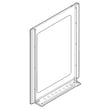
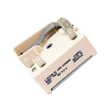

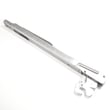
How do I know what model Kenmore oven I have?
To identify your Kenmore oven or range model, we look for the model number on the appliance’s rating label, then match that number exactly when ordering parts or checking instructions. For this page, the model is Kenmore 79092809014.
Most Kenmore electric ranges like model 79092809014 have the rating label in one of these spots:
- On the oven frame behind the storage drawer (pull the drawer out)
- Along the oven door frame (visible when you open the oven door)
- Behind the lower kick panel (if your range has one)
- On the back of the range (you may need a flashlight)
Use the exact characters from the label (including any leading zeros) when searching parts.
Record these details from the label:
- Model number (example: 79092809014)
- Serial number (helps confirm production run)
- Electrical rating (useful for installation and wiring checks)
- Brand name (Kenmore)
| Item | What it identifies | Example format | Used for |
|---|---|---|---|
| Model number | The whole appliance | 79092809014 | Finding diagrams, manuals, correct parts |
| Part number / part ID | A specific replacement part | 316490000 | Ordering the exact component |
Kenmore ranges often have similar-looking control panels and cooktops across different models. Using the exact model number prevents ordering the wrong bake element, control switch, or control board, and it ensures the instructions in the 79092809014 installation guide match your unit.
If you are troubleshooting an error message after you confirm your model family, our Kenmore 790 range 4-digit error codes guide can help you narrow down whether the issue points to the control, sensor, or wiring.
Last updated: February 2026
How do you reset a Kenmore 79092809014 oven?
To reset a Kenmore 79092809014 electric range oven, we recommend doing a full power reset: turn the range off, shut off power at the breaker for 1 to 5 minutes, then restore power and re-set the clock. This clears many control glitches and false error beeps.
- Turn all surface element knobs to OFF.
- If the oven is running, press Cancel/Off.
- Switch the range circuit breaker OFF (or unplug if accessible).
- Wait 1 to 5 minutes.
- Restore power, then set the clock and try Bake again.
A “reset” often means getting the door unlocked and the control responsive again.
- Let the oven cool completely (door locks can stay engaged while hot).
- Power reset at the breaker (steps above).
- If the door remains locked after cooling and resetting, the door lock system may be sticking.
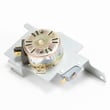
Common related part: Range oven door lock motor and switch assembly 5304528973
If the oven still will not heat or keeps showing an error after a power reset, the issue is usually a failed sensor, heating circuit problem, or an electronic control problem.
- Confirm the range has the correct power supply (a range needs full 240V for normal baking).
- Try Broil; if broil works but bake does not, the bake circuit is the likely issue.
- If temperatures are wildly off or you get a sensor-related error, check the oven sensor.
- If the display is dead, scrambled, or unresponsive, the control may be failing.
| Symptom | Most likely area | Example part for this model |
|---|---|---|
| Oven will not heat in Bake | Bake heating circuit | Frigidaire range bake element 316505500 |
| Temperature inaccurate or error returns | Oven temperature sensing | Frigidaire range oven temperature sensor 316490000 |
| Display issues, random beeping | Electronic control | Frigidaire range oven control board and clock 316560127 |
A breaker reset clears the control’s temporary memory and can restore normal operation after a power surge or keypad glitch. If symptoms return quickly, checking the heating and sensing components prevents repeated shutdowns and uneven cooking.
For model-specific control features and any special reset or error-code steps, follow the 79092809014 owner's manual.
Last updated: February 2026
What does F90 mean on a Kenmore stove?
On Kenmore electric range model 79092809014, the F90 error typically points to an oven door lock problem during or after a self-clean cycle; the control senses the lock is not moving or not reaching the correct position, so the oven may stay locked or stop the cycle.
- Press CANCEL/OFF to stop the cycle.
- Let the oven cool completely; the lock often will not release until temperatures drop.
- Power reset: turn the range breaker OFF for 5 minutes, then turn it back ON.
- If the door is locked, avoid forcing it; forcing can bend the latch or damage the lock switch.
- Review the self-clean and lock behavior for your model in the 79092809014 owner's manual.
F90 is usually caused by one of these conditions:
- Door lock motor is weak or stuck
- Door lock switch is not changing state when the latch moves
- Latch mechanism is binding from heat, grease, or misalignment
- Wiring connection issue between the lock assembly and control
- Electronic control is not reading the lock circuit correctly
| Symptom you see | Most likely area | Example part to check |
|---|---|---|
| Door stays locked after clean | Lock motor or lock switches | Range oven door lock motor and switch assembly 5304528973 |
| Error appears during preheat/clean | Temperature feedback affecting clean logic | Frigidaire range oven temperature sensor 316490000 |
During self-clean, the range is designed to lock the oven door for safety. When the control cannot confirm the lock position, it triggers F90 to prevent unsafe operation and to protect the latch system from overheating or mechanical damage.
If the range was recently installed or moved, confirm the electrical connection and grounding are correct; loose connections can cause control errors. The installation guide covers safe electrical connection practices and terminal block handling.
Last updated: February 2026
What is the code Dr 0 on a oven?
On the Kenmore 79092809014 electric range, the DR 0 (DR-0) code points to an oven door lock problem. The control is sensing the lock is stuck, not moving, or not in the expected position, so the oven may not heat or the door may stay locked.
- Turn the range off and let it cool completely.
- Disconnect power at the breaker for 1 to 2 minutes, then restore power.
- If the door is locked, do not force it; forcing can bend the latch or damage the door.
- If the code returns, run the door lock test steps in the 79092809014 owner's manual.
- If the code appeared after self-clean, allow extra cool-down time; the lock can stay engaged until the oven is safe.
In most cases, DR 0 is caused by a failed lock motor/switch, a stuck latch mechanism, or a wiring/connection issue between the latch and the control.
| Symptom | Most common cause | What usually fixes it |
|---|---|---|
| Door stays locked after cool-down | Lock motor/switch not returning | Replace the lock assembly |
| Code appears immediately on power-up | Lock switch signal incorrect | Check wiring, then replace lock assembly if needed |
| Oven will not start bake/broil | Control does not see “unlocked” | Diagnose latch circuit, repair/replace failed part |
Part to know: If you’re replacing the latch assembly, the model uses a door lock motor and switch style assembly such as the range oven door lock motor and switch assembly 5304528973.
The door lock circuit is a safety system. When the control cannot confirm the correct lock position, it may disable heating or keep the door locked to prevent unsafe operation.
- Use the Kenmore 790 self-cleaning range error codes guide to match DR/door lock related codes to the right troubleshooting path.
Last updated: February 2026
Why is my Kenmore electric range not heating up?
If your Kenmore electric range model 79092809014 is not heating, the most common causes are a failed bake or broil element, a bad oven temperature sensor, or a power supply issue (the range can light up but still not heat if one leg of 240V is missing). Use the 79092809014 installation guide to confirm safe electrical connections and clearances before troubleshooting.
- Confirm the range is getting 240 volts at the outlet or junction box (a partial power loss can stop heating).
- Make sure the oven is not in a delayed start or special mode; verify settings in the 79092809014 owner's manual.
- Try Bake and Broil; if one works and the other does not, the failed side often points to a single element.
- Look for visible damage: blisters, cracks, or burn spots on the element.
- If the oven heats but is inaccurate, suspect the sensor or calibration.
These parts are commonly involved when an electric oven will not heat or heats incorrectly:
| Symptom | Most likely cause | Part to check |
|---|---|---|
| No bake heat (broil may work) | Open bake element | Frigidaire range bake element 316505500 |
| No broil heat (bake may work) | Open broil element | Range broil element 316203301 |
| Heats but temperature is wrong, or shuts off early | Bad sensor reading | Frigidaire range oven temperature sensor 316490000 |
| Display works but no heat from either element | Power supply or control issue | Terminal block wiring, control board |
An electric range needs a solid 240V supply and working heating circuits to reach and hold temperature. A loose connection at the terminal block or a failed element can prevent heating and can also cause overheating at wiring connections if left uncorrected.
- Turn off the breaker before removing panels or testing wiring.
- Do not loosen factory terminal block nuts that secure internal wiring; keep connections tight and reinstall the rear cover after checks.
- Confirm the anti-tip bracket is fully engaged after moving the range.
Last updated: February 2026