 Installation guide
 Owner’s manual
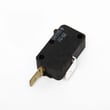




How to hard reset a KitchenAid microwave?
To hard reset your KitchenAid KHMS2040BSS0 microwave/hood combo, unplug it (or switch off the breaker) for 1 minute, then restore power. After the reset, test heating by microwaving 1 cup of cold water for 2 minutes on 100% power.
Hard reset steps (power cycle)
- Unplug the microwave from the outlet; if it is hardwired, turn the circuit breaker off.
- Wait 60 seconds.
- Restore power.
- Set the clock if the display prompts you.
- Run a quick heat test: 1 cup (250 mL) of cold water for 2 minutes on High (100%).
If it still will not heat after the reset
A reset clears minor control glitches, but it will not fix a failed heating circuit. If the water does not heat, focus on these common causes:
- Make sure the door closes firmly and latches fully.
- Check the household fuse or circuit breaker; reset if tripped.
- If the unit runs but does not heat, heating components may be involved (high-voltage parts require advanced service).
Common parts related to “runs but won’t heat”
| Symptom | Commonly involved part | Example part for this model |
|---|---|---|
| Runs, no heat | High-voltage diode | Microwave high-voltage diode W11256462 |
| Runs, no heat | Magnetron | Microwave magnetron W10245183 |
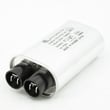
| Runs, no heat | High-voltage capacitor | Capacitor W10850446 |
Why it matters
A proper hard reset (power cycle) is the fastest way to clear a locked-up control and confirm whether you have a simple power or door issue versus a true heating failure.
For model-specific operating checks and troubleshooting steps, use the owner's manual.
Last updated: February 2026
Can you silence all microwaves?
Not all microwaves can be silenced. Many models, including some KitchenAid units, offer a mute or “sound off” setting, but the exact button sequence is model-specific. For KitchenAid KHMS2040BSS0, use the owner's manual to find the tone or sound setting for your control panel.
How to check if your KHMS2040BSS0 has a mute option
Look for any of these common control-panel clues:
- A Settings, Options, or Tools key
- A Sound, Tone, Beeper, or Volume menu item
- A “press and hold” function on Cancel/Off, Start, Clock, or 0
- A control lock or demo mode setting that changes how keys respond
- A confirmation beep pattern that changes after a setting is saved
If the microwave display shows messages such as “PF” after a power interruption, resetting the clock can also restore normal control behavior (including tones).
Quick troubleshooting if beeps seem “stuck on”
If you cannot find a mute setting or the keypad is acting unusual, we use these safe checks first:
- Power cycle: unplug for 1 minute (or switch the breaker off and back on), then reset the clock
- Confirm the door is closing firmly; door-related messages can prevent normal operation
- Turn off Control Lock if it is enabled
- Check for Demo Mode (some models) and turn it off
- Clean the door sealing surfaces; heavy soil can cause odd behavior and even arcing
What to expect (common outcomes)
| What you see on the control panel | What it usually means | What to do next |
|---|---|---|
| Sound/tone option in Settings | Mute is supported | Save the setting and test a keypress |
| No sound options anywhere | Mute may not be supported | Use normal operation; avoid forcing key sequences |
| Keys respond inconsistently | Control setting or door issue | Power cycle; verify door closure; check lock/demo |
Why it matters
Microwave beeps are not just convenience features; they confirm key presses and can signal door or control conditions that affect safe operation. If the unit is not operating properly, the manual guidance is to have it serviced by qualified personnel.
Last updated: February 2026
Who makes KitchenAid microwave ovens?
KitchenAid microwave ovens (including the KitchenAid KHMS2040BSS0 microwave/hood combo) are made under the KitchenAid brand of Whirlpool Corporation. In practice, that means the design, engineering, and many internal components are shared across Whirlpool-family appliances, even when styling and features differ.
What that means for parts and repairs
Because KitchenAid is a Whirlpool-owned brand, many replacement parts and service procedures follow common Whirlpool microwave/hood combo designs.
- Use your exact model number (KHMS2040BSS0) when ordering parts to avoid fit issues
- Expect shared component types such as door interlock switches, control panels, and high-voltage parts
- Follow the safety and troubleshooting guidance in the product documentation before replacing parts
- Match parts by part ID, not just by description (similar names can be different)
Common KitchenAid microwave components you may see on this model
If you are troubleshooting heating, door, or power issues on KHMS2040BSS0, these are examples of Whirlpool-family components that commonly apply to this design:
| Symptom area | Common component type | Example part for KHMS2040BSS0 |
|---|---|---|
| Won’t start or stops when door moves | Door interlock system | Microwave door interlock switch W10269458 |
| Runs but does not heat | High-voltage circuit | Microwave high-voltage diode W11256462 |
| No display or intermittent power | Power feed and connections | Power cord W10708076 |
Where to confirm manufacturer and model details
The most reliable way to confirm the exact product identification for your unit is to reference the model and serial label location and the documentation for KHMS2040BSS0.
- Check the model/serial label behind the door on the front-facing of the microwave opening
- Use the documentation to confirm operating and troubleshooting steps
- Keep the model number handy when selecting parts
For model-specific identification and guidance, use the owner's manual.
Why it matters
Knowing KitchenAid is a Whirlpool Corporation brand helps you understand why parts, wiring layouts, and troubleshooting steps often overlap with other Whirlpool-family microwaves. It also helps you focus on the correct door interlock, high-voltage, and control components when diagnosing symptoms.
Last updated: February 2026
Are KitchenAid microwaves any good?
KitchenAid microwaves, including the KitchenAid KHMS2040BSS0 microwave/hood combo, are a solid choice when you want a premium look, strong everyday cooking features, and an over-the-range vent fan; long-term satisfaction depends most on correct installation, proper use, and keeping airflow paths clean. For model-specific operation and care details, use the owner's manual.
What “good” usually means for an over-the-range microwave
Most owners judge an OTR microwave on a few practical areas:
- Heating performance for reheating and defrosting
- Vent fan effectiveness at capturing smoke and steam
- Noise level (fan and turntable)
- Controls and usability (sensor cook, presets, display)
- Reliability of door latches and switches
What we see most often in real-world use
KitchenAid units are commonly praised for fit and finish and strong feature sets. The most common complaints across OTR microwaves (any brand) tend to involve heating complaints, door switch issues, or power interruptions.
If your KHMS2040BSS0 ever seems weak on heating, the manual’s troubleshooting approach is to test by heating 1 cup of water for 2 minutes on 100% power. If it does not heat, the issue is typically in the high-voltage heating circuit or door safety circuit.
Common “not heating” parts on this model
| Symptom | What it often points to | Example model part |
|---|---|---|
| Runs but does not heat | High-voltage circuit problem | Microwave magnetron W10245183 |
| Runs but heats inconsistently or blows fuse | High-voltage component issue | Microwave high-voltage diode W11256462 |
| Starts then stops, or will not run with door closed | Door safety/interlock issue | Microwave door interlock switch W10269458 |
Why it matters
A microwave/hood combo has two jobs: cooking and ventilation. When either side is compromised (door not closing firmly, blocked vent grille, failing interlock), performance and safety shutoffs can make the microwave feel “bad” even when the core design is fine.
Quick care tips that improve satisfaction
- Keep the vent grille and intake areas clear of grease and dust
- Close the door firmly; avoid slamming
- Use microwave-safe cookware to prevent arcing and hot spots
- If the cavity light is out, replace it using the steps in the manual
- If power seems intermittent, check the household breaker and outlet first
Last updated: February 2026


