 Owner’s manual
 Error Codes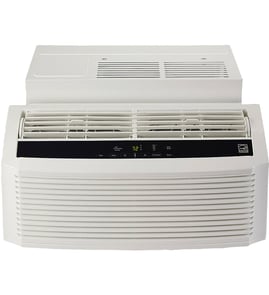




How to reset an LG air conditioner?
To reset an LG LW8017ERSM room air conditioner, we unplug the unit (or switch the breaker off), wait 1 to 2 minutes so the control fully powers down, then restore power and turn it back on. This clears many temporary control glitches.
Reset steps (recommended)
- Turn the air conditioner OFF.
- Unplug the power cord (or turn the circuit breaker OFF).
- Wait at least 1 to 2 minutes.
- Plug it back in (or turn the breaker ON).
- Press Power and select Cool mode; set the temperature.
If it still will not run or cool
These checks solve most “reset didn’t help” situations:
- Confirm the outlet has power (test with a lamp) and the plug is fully seated.
- Make sure the unit is not in a delay or protection cycle; wait 3 to 5 minutes after restoring power.
- Clean the air filter and make sure the front grille is not blocked.
- Verify the temperature is set lower than the room temperature.
- If the display shows an error code, use our LG error codes guide to identify the issue.
What a reset does (and does not) do
| What a reset can fix | What a reset will not fix |
|---|---|
| Frozen controls, unresponsive buttons, minor WiFi or mode glitches | Failed electronic control board, damaged wire harness, fan motor problems |
If the unit powers on but behaves erratically after a reset, a control problem is common. For this model, the room air conditioner electronic control board EBR83604002 is the main control that manages operation.
Why it matters
A proper power reset lets internal electronics discharge to 0 volts and restart cleanly. That prevents repeated short-cycling and helps you avoid misdiagnosing a simple control lockup as a compressor or fan failure.
For model-specific operating details (including features like WiFi), follow the LW8017ERSM owner's manual.
Last updated: February 2026
How to use LG remote control for air conditioner?
To use the LG remote with model LW8017ERSM, point the remote at the front of the unit and use Mode to cycle through operating modes (such as Cool, Fan, and Dry). Then set the temperature and fan speed to match your comfort needs; see the LW8017ERSM owner's manual for the exact button layout and icons.
Basic remote steps (most common)
- Press Power to turn the air conditioner on or off.
- Press Mode to cycle modes; stop when the icon for the mode you want appears.
- Use Temp Up/Down to set the target temperature (in Cool mode).
- Press Fan Speed to choose low, medium, or high airflow.
- Use Timer (if equipped) to schedule start or stop.
- If your unit supports it, use WiFi to connect the air conditioner to your home network.
What the mode icons usually mean
These icons vary by LG remote, but the functions are consistent.
| Remote mode | What it does | When to use it |
|---|---|---|
| Cool | Actively cools the room to your set temperature | Hot days, steady cooling |
| Fan | Circulates air without cooling | Mild days, air movement |
| Dry | Reduces humidity while lightly cooling | Muggy conditions |
Quick troubleshooting if the remote does not work
- Replace the batteries and confirm they are installed correctly.
- Make sure nothing blocks the signal path to the unit’s front sensor.
- Try operating the unit from a shorter distance and straight on.
- If buttons respond inconsistently, the remote may be worn; replace it with the correct part.
Recommended replacement part
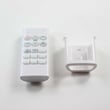
If you need a replacement remote for this model, we use the model-matched room air conditioner remote control AKB73795706.
Why it matters
Using the correct mode and fan speed helps the compressor cycle normally, improves comfort, and can reduce issues like poor cooling or excess humidity.
Last updated: February 2026
What is the common problem of an LG air conditioner?
The most common problems we see with an LG room air conditioner like model LW8017ERSM are not cooling well, water leaking, won’t power on, and unusual noises or vibration. Many issues are fixed with cleaning, correct installation, and basic checks; control or wiring failures usually require part replacement.
Most common symptoms and what usually causes them
- Running but not cooling: clogged air filter, dirty evaporator or condenser coils, blocked airflow, incorrect mode or temperature setting.
- Leaking water indoors: unit not tilted slightly to the outside, drain path restricted, dirty coils causing excess condensation.
- Won’t turn on: tripped breaker, loose plug, failed remote, damaged cord, or a control problem.
- Noisy operation: vibration from installation, fan contacting debris, or normal refrigerant and water sounds.
- WiFi not connecting (if equipped): network setup issues or control-related problems.
What’s normal vs. what’s a problem (noise quick guide)
Your LW8017ERSM can make normal operating sounds. Use this as a quick check (details are in the LW8017ERSM owner’s manual).
| Sound | Often normal? | What it usually means |
|---|---|---|
| Pinging or swishing | Yes | Water droplets hitting the condenser during operation |
| Gurgle or hiss | Yes | Refrigerant moving through the system |
| High-pitched chatter | Sometimes | High-efficiency compressor sound during cooling |
| Rattling or scraping | No | Loose hardware, debris, or fan blade contact |
Quick fixes we recommend first
- Set Cool mode and lower the set temperature.
- Clean the air filter and clear airflow at the front grille.
- Make sure the unit is installed solidly; poor window construction or incorrect installation can cause vibration.
- Inspect for obvious damage to the cord and plug.
- If the unit is unresponsive, check for control or wiring issues.
Parts that commonly solve “no power” or “no response” complaints
| Symptom | Part to consider | What it affects |
|---|---|---|
| Buttons do nothing, erratic operation | Electronic control board EBR83604002 | Main control functions |
| Intermittent power, display issues | Wire harness EAD63989002 | Electrical connections |
| Remote won’t operate unit | Remote control AKB73795706 | Remote commands |
Why it matters
Catching airflow and installation problems early prevents icing, water leaks, and extra strain on the compressor and fan motor. It also helps you avoid replacing parts that are not actually causing the symptom.
Last updated: February 2026
Is the LW8017ERSM any good?
Yes. The LG LW8017ERSM is a solid window (room) air conditioner for a medium-size room when it’s installed correctly and maintained; owners typically like its quiet operation, efficient cooling, and features such as WiFi connectivity (noted in the LW8017ERSM manual).
What “good” looks like for this model
For the LW8017ERSM, performance and comfort usually come down to setup, airflow, and expectations for room size.
- Cools best when the room size matches the unit’s capacity (most 8,000 BTU window units are intended for a medium room).
- Quieter operation is normal, but you may still hear “pinging,” “swishing,” or refrigerant “gurgle/hiss” sounds during operation.
- Vibration noise often points to window fit or installation issues, not a bad air conditioner.
- WiFi features can add convenience for scheduling and temperature control.
- Consistent maintenance (filter cleaning and coil care) keeps efficiency up.
Quick checks to decide if it’s right for your space
Use these practical checks before you commit to this model or troubleshoot comfort issues.
| What you want | What to check | What to expect |
|---|---|---|
| Strong cooling | Room size and sun exposure | Better comfort when sized correctly |
| Low noise | Solid window support and tight fit | Less vibration and rattling |
| Efficient operation | Clean airflow path | Shorter run times, steadier temps |
| Convenience | WiFi and control features | Easier adjustments and scheduling |
If it seems noisy or “not as good as expected”
Some sounds are normal for high-efficiency window ACs; the manual calls out several common noises.
- Confirm the unit is level and firmly supported in the window opening.
- Recheck the mounting hardware and seals shown in the LW8017ERSM owner’s manual.
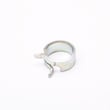
- If the fan is scraping or rattling, inspect the fan area; a loose clamp can cause noise (see fan blade clamp 3H02932B if you find the clamp damaged).
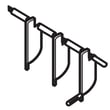
- If the unit runs but comfort is poor, verify the vent is closing properly; a stuck vent can reduce cooling (see vent damper MCQ66468702).
Why it matters
A window air conditioner can seem “bad” when the real issue is installation fit, vibration, or airflow restriction. Getting the window seal and support right improves cooling, reduces noise, and helps the compressor run more efficiently.
Last updated: February 2026
What are the symbols in an LG AC remote?
On the LG LW8017ERSM room air conditioner remote, the symbols are quick icons for modes and features such as Cool, Fan, Dry, temperature up or down, fan speed, Timer, and WiFi. The exact icon set and what each one does is listed in the LW8017ERSM owner’s manual.
Common LG remote symbols and what they mean
Most LG window and room air conditioner remotes use these symbols:
- Snowflake: Cool mode (compressor runs to cool the room)
- Fan icon: Fan mode (air circulation without cooling)
- Water droplet: Dry mode (dehumidifies; cooling may cycle)
- Up or down arrows: Temperature increase or decrease
- Fan speed bars: Low, Medium, High fan speed
- Clock: Timer On or Timer Off
- WiFi: Connects the air conditioner to home WiFi (the manual calls out WiFi as a feature)
How to match a symbol to the right button
Use this quick check so you do not confuse a mode icon with a status icon.
- Look for the same icon on the display after you press the button
- Cycle Mode until the icon you want stays on (Cool, Fan, Dry)
- Set Fan Speed after choosing the mode (fan speed changes airflow, not temperature)
- Use Timer only after the correct mode is selected
- If the remote seems unresponsive, replace batteries and confirm the unit beeps or responds
Quick reference table
| Symbol you see | What it controls | What you should expect |
|---|---|---|
| Snowflake | Cooling mode | Colder air after a short delay |
| Droplet | Dry mode | Less humidity; longer run times |
| Fan | Fan mode | Air movement only |
| WiFi | Wireless feature | WiFi indicator turns on when enabled |
Why it matters
Choosing the right symbol prevents “running but not cooling” complaints that are really a mode issue (for example, Fan mode selected instead of Cool). It also helps you avoid unnecessary parts replacement like an electronic control board EBR83604002 when the setting is the real problem.
Last updated: February 2026
What is the lifespan of LG AC?
Most LG room air conditioners like model LW8017ERSM typically last 10 to 15 years with normal seasonal use and regular maintenance; units in harsh coastal climates or run nonstop often land closer to 8 to 10 years. Following the care and operating guidance in the LW8017ERSM owner's manual helps you get the longest service life.
What affects lifespan the most
- Filter and coil cleanliness (restricted airflow makes the compressor work harder)
- Correct installation and support (reduces vibration and wear)
- Drainage and moisture control (standing water can lead to corrosion and odors)
- Power quality (surges and loose connections stress electronics)
- Run time and climate (long cooling seasons shorten life compared to light use)
Maintenance schedule we recommend
| Task | How often | What it helps prevent |
|---|---|---|
| Clean or replace the air filter | Every 2 to 4 weeks in heavy use | Icing, weak cooling, high energy use |
| Clean evaporator and condenser coils | At least once per season | Compressor strain, poor heat transfer |
| Check for vibration and secure mounting | At install and each season | Noise, cabinet wear, fan damage |
| Confirm proper drainage and tilt | Each season | Leaks, musty smells, rust |
Signs your AC is nearing end of life
- Cooling is weak even after cleaning the filter and coils
- The compressor frequently struggles to start, hums, or cycles rapidly
- Unusual noises get louder over time (rattling, persistent high-pitched chatter)
- Water leaks indoors despite correct installation and drainage
- Repairs start repeating (controls, fan motor, wiring)
Repair vs. replace: a simple rule
| If you’re seeing this… | Usually makes sense to… |
|---|---|
| Minor airflow or noise issues | Maintain and repair |
| Repeated electrical/control problems | Compare repair cost to replacement |
| Compressor-related failures | Replace in most cases |
Why it matters
A window air conditioner that is kept clean, stable in the window, and draining correctly runs cooler with less compressor stress; that directly extends lifespan and reduces energy costs.
Last updated: February 2026
How big of a room will a 8000 BTU AC cool?
An 8,000 BTU window AC like the LG LW8017ERSM typically cools about 300 to 350 square feet in average conditions (standard ceiling height, typical sun exposure, and normal insulation). For best results, match BTU to your room size and heat load; see the LW8017ERSM owner's manual for operating tips.
Quick sizing guide (8,000 BTU)
Use this as a practical starting point:
- 300 to 350 sq ft: best fit for most rooms
- 250 to 300 sq ft: good if the room gets strong afternoon sun or has poor insulation
- 350 to 400 sq ft: possible if the room is shaded, well insulated, and doors stay closed
- Add capacity if you have high ceilings, many windows, or lots of people/equipment
Adjust for real-world conditions
Room size is only part of the story. These factors change how well an 8,000 BTU unit performs:
| Condition in the room | What you will notice | What to do |
|---|---|---|
| Strong sun exposure | Runs longer, struggles to reach set temp | Close blinds, use curtains, seal air leaks |
| Poor insulation or air leaks | Uneven cooling, higher humidity | Weatherstrip, close gaps around the unit |
| Open doors/hallways | Cools the room slowly | Keep doors closed while cooling |
| High humidity | Feels clammy even when cool | Use Dry mode if available, clean filter |
Why it matters
Right-sizing helps your LG room air conditioner cool evenly, control humidity, and avoid constant run time. Oversizing can lead to short cycling and weaker dehumidification; undersizing can run nonstop and still feel warm.
Helpful related resources
Last updated: February 2026


