Owner’s manual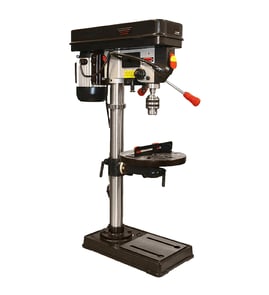

What is the 4 inch rule for drill press?
The 4-inch rule means we keep our hands and fingers at least 4 inches away from the rotating drill bit and chuck at all times. On the Craftsman 113213090 drill press, that rule is followed by clamping the workpiece to the table or securing it in a drill press vise instead of holding it by hand.
How to follow the 4-inch rule on this drill press
The 113213090 manual emphasizes clamping and avoiding free-hand drilling because the workpiece can spin or be thrown.
- Clamp short workpieces to the table so they cannot twist or lift
- Use the table slots or the clamping ledge around the table edge for solid clamping
- If you use a drill press vise, fasten the vise to the table first
- Never do work “free hand” (hand-holding the workpiece) except when polishing
- Do not do layout, assembly, or setup on the table while the cutting tool is rotating
For the model-specific safety panel guidance and operating rules, use the 113213090 owner's manual.
Quick setup checklist (before you pull the switch)
- Lock the head and support to the column; lock the table to the support
- Confirm the bit is centered and gripped firmly in the chuck jaws
- Run the tool briefly and watch for wobble or vibration
- Set the correct spindle speed for the material and operation (chart is inside the guard)
Why it matters
The 4-inch rule prevents the most common drill press injuries: fingers being pulled into the bit, and hands being struck when a workpiece catches and spins. Clamping also improves hole accuracy and reduces vibration.
Common “safe distance” practices
| Situation | Safer method | Why it helps |
|---|---|---|
| Small part near the bit | Clamp plus a scrap backer board | Keeps hands away; reduces tear-out |
| Round stock | V-block or vise clamped to table | Prevents the stock from spinning |
| Large overhanging work | Clamp and add auxiliary support | Prevents tipping and binding |
Last updated: February 2026
What is a good horsepower for a drill press?
For most home drilling in wood, plastic, and light metal, a 1/2 HP to 3/4 HP drill press is a good target. For frequent metalworking, larger bits, or hole saw work, 1 HP or more is the better choice, but low RPM capability and correct belt speeds matter just as much (or more) than horsepower.
How horsepower relates to real drilling performance
Horsepower mainly helps you keep the bit turning under load. On a drill press, you also need the right spindle speed and a stable setup.
Key factors that often matter more than raw HP:
- Low RPM options for larger bits and metal drilling
- Belt and pulley speed range (more steps gives better control)
- Sharp bits and proper feed pressure (reduces stalling)
- Workpiece clamping to prevent grabbing and spinning
- Correct accessory limits (some accessories require strict RPM caps)
What your Craftsman 113213090 can do (speed-wise)
Your Craftsman 113213090 drill press uses a belt-and-pulley system with 4 spindle speeds listed in the owner's manual.
| Speed setting | Typical best use (general) |
|---|---|
| 480 RPM | Larger bits, many metal drilling tasks |
| 930 RPM | General purpose drilling |
| 1750 RPM | Smaller bits in wood, plastics |
| 3000 RPM | Very small bits, light cuts in wood/plastic |
Quick horsepower guide (what we recommend)
Use this as a practical shopping and setup guide:
- 1/3 to 1/2 HP: light-duty, small bits, occasional use
- 1/2 to 3/4 HP: best all-around for most home shops
- 1 HP: frequent metal drilling, larger diameter holes, fewer stalls
- 1-1/2 HP and up: heavy-duty drilling, production-style use (often paired with more robust presses)
Why it matters
Choosing enough horsepower helps prevent stalling, overheating bits, and rough holes. Just as important, using the correct RPM and safe accessory limits (for example, hole saws must be kept to very low speeds) reduces binding and kickback risk.
Last updated: February 2026
What are the three types of drill presses?
The three most common drill press types are benchtop, floor (standing), and magnetic drill presses. Your Craftsman 113213090 is a traditional shop-style drill press; use the owner's manual to match safe setup, clamping, and speed selection to the work you’re doing.
Quick breakdown of the 3 types
- Benchtop drill press: Smaller, mounts to a workbench; great for light-duty drilling and limited shop space.
- Floor drill press: Taller, freestanding unit with more capacity and stability; best for frequent use and larger workpieces.
- Magnetic drill press: Portable drill press that clamps to steel using an electromagnet; used for on-site metal fabrication.
How these types compare
| Type | Best for | Typical strengths | Typical tradeoffs |
|---|---|---|---|
| Benchtop | Hobby and light shop work | Compact, affordable | Less throat depth and table travel |
| Floor | Home shop and heavy-duty drilling | More capacity, stability | Takes floor space |
| Magnetic | Field work on steel | Portable, drills where the work is | Requires ferrous surface and power; specialized |
What matters most for safe, accurate drilling
No matter which type you use, the fundamentals are the same. For the Craftsman 113213090, our manual guidance focuses heavily on stability, clamping, and correct spindle speed.
- Clamp the workpiece to the table when it cannot brace against the column.
- Avoid freehand drilling (hand-holding the workpiece) except for specific operations like polishing.
- Lock the head and table support before operating.
- Use backup material under the workpiece to reduce tear-out and improve control.
- Select the recommended spindle speed for the material and bit size (the belt-guard chart is the reference).
Why it matters
Choosing the right drill press type affects accuracy, safety, and the size of work you can handle. Even a powerful drill press can drill poorly or dangerously if the work is not supported, clamped, and run at the correct speed.
Last updated: February 2026
Are drill press chuck keys universal?
No. Chuck keys are not universal; you must match the key to the chuck’s gear-tooth size and pilot size so it fully engages and tightens safely on your Craftsman drill press model 113213090. This model uses a self-ejecting chuck key design, so using the correct replacement matters for safety and grip (see the owner's manual).
How to tell if a chuck key will fit
A correct chuck key seats fully in the chuck’s keyhole and meshes cleanly with the chuck’s teeth.
- The pilot (the small round post) fits into the chuck’s keyhole without wobble
- The gear teeth mesh fully with the chuck’s ring gear (no skipping)
- The key turns smoothly through tightening and loosening
- The key does not cam out under load
- The key “pops” out when you release it (self-ejecting style noted for this model)
Common “universal” options (and what they really mean)
Many multi-size or “4-way” chuck keys fit several common chucks, but they are still limited to the sizes built into the key.
| Key type | What it fits | Best use case |
|---|---|---|
| Single-size chuck key | One specific chuck size | Best match when you know the chuck/key size code |
| 4-way (multi-size) chuck key | Several common sizes | Good for shops with multiple tools, not guaranteed for every chuck |
| Self-ejecting chuck key | Designed to release when you let go | Correct style for this Craftsman drill press |
Why it matters
A loose-fitting key can slip, round off the chuck teeth, or fail to tighten the bit securely. On a drill press, that leads to bit slippage, poor hole accuracy, and higher risk of the key being thrown if it is left in the chuck.
Practical replacement tips for model 113213090
- Confirm whether your chuck has any stamped markings (often on the chuck body)
- Measure the pilot diameter and gear diameter on your existing key (if you still have it)
- If the original key is lost, match the chuck brand/model (if marked) and then match the key
- Do not substitute a different key style; this model is designed for a self-ejecting key
Last updated: February 2026
How to repair a drill press spindle?
On the Craftsman 113213090 drill press, spindle repair usually means correcting wobble or runout by cleaning the chuck taper, checking belt tension and pulleys, and replacing worn spindle bearings if needed. Use the owner's manual for the correct disassembly order and adjustment points.
Before you start (safety and setup)
- Turn the switch OFF and unplug the drill press before any maintenance.
- Remove the chuck key and any bit from the chuck.
- Lock the head and table to the column; never move them while the tool is running.
- Clamp the workpiece or a drill press vise to the table; avoid free-hand drilling.
Quick fixes that solve most “bad spindle” symptoms
Many spindle complaints are caused by setup issues, not the spindle itself.
- Wobble/runout: adjust belt tension; tighten pulley set screws; confirm the bit is straight and seated.
- Chuck falls off the spindle: clean oil, grease, and dirt from the chuck taper and spindle taper.
- Quill returns too slow/fast: adjust the quill return spring tension.
- Dry feel or sticking: lubricate the spindle splines (grooves) and the quill rack (teeth) as described in the manual.
When you actually need to rebuild the spindle
If wobble remains after the checks above, the manual’s troubleshooting points to worn spindle bearings as a common cause. On this model, ball bearings are factory-greased and do not need routine lubrication, so noise, roughness, or play typically means replacement.
Typical spindle repair workflow
- Remove the chuck and access the quill/spindle area.
- Inspect the spindle for scoring, bends, or damaged splines.
- Check bearings for rough rotation or looseness; replace if worn.
- Reassemble and verify smooth quill travel and stable drilling.
What to check after reassembly
| Check | What “good” looks like | What to correct |
|---|---|---|
| Runout/wobble | Bit spins true with minimal vibration | Reseat bit/chuck; adjust belt tension; replace bearings |
| Pulley security | No pulley movement on shafts | Tighten retaining nut and set screws |
| Quill return | Returns smoothly and consistently | Adjust return spring tension |
Why it matters
A drill press spindle that wobbles or has worn bearings causes oversized holes, chatter, broken bits, and unsafe vibration. Correcting belt tension, taper cleanliness, and bearing condition restores accuracy and protects the motor and pulleys.
Last updated: February 2026