 Owner’s manual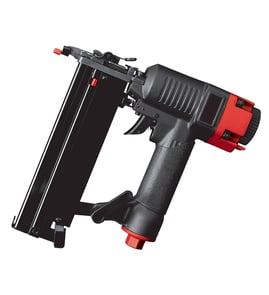

How to load Porter Cable nail gun fn250b?
To load the Porter Cable FN250B finish nailer, we connect it to a regulated compressed-air supply first, then pull the magazine follower fully back until it latches, insert a strip of 16-gauge finish nails points-down, slide the nails forward, and release the follower to feed the strip. See the FN250B owner's manual for the exact magazine and follower steps.
Step-by-step: loading nails in the FN250B
- Put on ANSI Z87.1 safety glasses (and hearing protection).
- Connect the nailer to clean, dry compressed air (regulated 70 to 120 PSI).
- Keep your finger off the trigger; do not depress the safety tip.
- Pull the follower all the way to the rear until it latches.
- Insert an approved strip of 16 ga. finish nails with the points down.
- Slide the strip forward to the front of the magazine (the magazine holds two full strips).
- Release the follower so it pushes the nails forward.
Safety checks we recommend before and after loading
- Confirm the trigger and safety mechanism move freely (no sticking or binding).
- Tighten loose screws and caps.
- Never load with the trigger or safety depressed.
- Do not use the tool if it leaks air or has missing or damaged parts.
Quick reference table
| Item | FN250B spec or requirement |
|---|---|
| Nail type | 16 ga. finish nails |
| Nail length range | 3/4 in. to 2-1/2 in. |
| Air pressure | 70 to 120 PSI |
| Nail orientation in magazine | Points down |
Why it matters
Loading with the follower latched and the nails oriented correctly prevents misfeeds and reduces the chance of an unintentional discharge while you are handling the magazine.
Last updated: February 2026
Can a 1 gallon air compressor run a nail gun?
Yes, a 1 gallon air compressor can run a nail gun, but only for short bursts; with a Porter-Cable FN250B finish nailer you need clean, dry air regulated between 70 and 120 PSI, and the small tank will cycle often and may struggle to keep up with continuous nailing (especially with longer nails or harder material). See the FN250B owner's manual for the required pressure range and air supply setup.
What to expect with a 1 gallon compressor
A 1 gallon tank stores limited air volume, so performance depends on how fast you shoot and how quickly the compressor refills.
- Works best for occasional trim work and small punch lists
- Expect frequent compressor cycling and pressure drop during rapid firing
- Depth of drive can vary as pressure falls; you may need to pause to recover pressure
- Longer nails and dense wood require more air per shot
- Hose and fitting size matter; restrictive fittings reduce tool performance
Minimum setup we recommend for the FN250B
The FN250B is designed for regulated compressed air and benefits from basic air prep components.
| Item | What to use | Why it matters |
|---|---|---|
| Regulator | Set within 70 to 120 PSI | Keeps driving force consistent and protects the tool |
| Filter | In-line air filter | Reduces moisture and contaminants that wear internal parts |
| Oiler (preferred) | In-line oiler near the tool | Extends tool life; reduces internal wear |
| Oil (if no oiler) | 5 to 6 drops air tool oil daily | Prevents dry running and premature wear |
Tips to make a small compressor work better
- Set the regulator so the tool gets the lowest pressure that still drives nails consistently (higher than needed increases wear).
- Use the largest practical air hose and fittings; the manual notes a 3/8-inch supply line and fittings are required for maximum performance.
- Let the tank fully charge before starting, then work in short runs.
- If you notice inconsistent depth, stop and let pressure recover before continuing.
Why it matters
Running below the needed pressure causes inconsistent nail set and more jams; running higher than needed increases wear and can damage internal components over time.
Last updated: February 2026
What are some drawbacks to battery operated nailers?
Battery-operated nailers are convenient, but compared with a pneumatic finish nailer like the Porter-Cable FN250B, they typically weigh more, cost more up front, and can slow down on long jobs due to battery swaps, charge time, and reduced power in cold weather.
Common drawbacks you may notice
- Heavier tool in hand: the battery adds weight and bulk, which can increase fatigue on trim and overhead work.
- Runtime limits: you may need multiple batteries to work continuously.
- Performance changes: power and cycle speed can drop as the battery drains or in colder temperatures.
- Higher cost per tool: cordless nailers often cost more than a comparable pneumatic nailer plus a basic compressor.
- More electronics to troubleshoot: battery contacts, control boards, and safety interlocks can add failure points.
Battery nailer vs pneumatic (like FN250B)
The FN250B is a pneumatic finish nailer designed to run on clean, dry compressed air at 70 to 120 PSI and drive 16-gauge finish nails from 3/4 inch to 2-1/2 inches. Those design details highlight where pneumatics often win on consistency for repetitive trim work. See the owner's manual for operating and safety details.
| Feature | Battery nailer | Pneumatic nailer (FN250B type) |
|---|---|---|
| Power consistency | Can vary with battery level | Consistent with regulated PSI |
| Downtime | Charging and battery swaps | Compressor cycling, hose setup |
| Weight | Usually heavier | Often lighter tool body |
| Best use | Punch-list, quick fixes | Long runs of trim, production work |
Why it matters
If you are doing baseboards, casing, or other finish carpentry where consistent depth and fast cycling matter, the “hidden costs” of cordless (fatigue, downtime, and variable drive) can show up quickly. Pneumatic tools trade that for hose management and the need for clean, regulated air.
Last updated: February 2026