 Installation guide
 Owner’s manual
 Error Codes






How to reset Jenn-Air wall oven?
To reset your Jenn-Air wall oven model JJW2830WP00, turn OFF the oven’s circuit breaker(s) for 1 minute, then turn the breaker(s) back ON. After power is restored, start a Bake cycle and watch for about 1 minute to confirm the error does not return. See the JJW2830WP00 owner's manual for control and display behavior.
- Turn the oven OFF at the home electrical panel (circuit breaker(s)).
- Wait 60 seconds.
- Turn the breaker(s) ON.
- Start a Bake cycle.
- Monitor the display for 1 minute for any returning error code or message.
A reset clears temporary control glitches, but repeating errors usually point to a heat-sensing, airflow, or control issue.
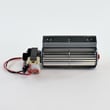
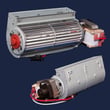
- If the oven overheats or shuts down, check the cooling fan operation; a failed oven blower WPW10273666 can cause temperature-related faults.
- If temperatures seem inaccurate, a failing sensor can trigger errors; the sensor probe WP74008369 is a common part involved in temperature feedback.
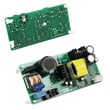
- If the screen is unresponsive or behaves erratically, the user interface control can be involved; review options and symptoms in the JJW2830WP00 owner's manual.
| Reset method | What it affects | Typical use |
|---|---|---|
| Circuit breaker power cycle | Reboots the electronic control | Error codes, frozen display, odd behavior |
| Setup/theme restart (menu-driven) | Restarts after saving display theme/settings | Screen appearance changes, setup changes |
Resetting the JJW2830WP00 correctly helps you separate a one-time control glitch from a repeatable failure tied to the oven’s electronic control, temperature sensing, or cooling airflow.
Last updated: January 2026
What is the best electric wall oven to buy?
The best electric wall oven to buy is the one that fits your cabinet cutout, electrical circuit, and cooking needs (single vs. double, convection, self-clean). If you already own a Jenn-Air JJW2830WP00, the “best” choice is usually keeping this oven and repairing key parts when performance drops; use the JJW2830WP00 owner's manual to match features and settings to how you cook.
- Size and fit first: confirm 27-inch vs. 30-inch class and your cabinet cutout requirements.
- Single vs. double oven: double ovens add flexibility but typically need more electrical capacity.
- Convection features: look for true convection (fan plus element) if you bake frequently.
- Controls and usability: choose a control layout you will actually use daily.
- Serviceability: availability of common replacement parts (lights, controls, blowers) matters long-term.
Your home wiring and breaker size can determine which ovens are a good match. The installation instructions for this oven family note that:
- Higher-rated models (about 7.3 to 9 kW at 240V) typically use a 40-amp dedicated circuit.
- Lower-rated models (about 4.8 kW and below at 240V) typically use a 20-amp dedicated circuit.
- A circuit breaker is recommended; the oven connects through a junction box using copper cable and proper grounding.
Use the JJW2830WP00 installation guide to confirm what applies to your setup.
| What you’re comparing | Better choice when… | Why it matters |
|---|---|---|
| Single vs. double | You cook multiple dishes at once | More capacity and flexibility |
| Convection vs. standard | You want even browning and faster baking | More consistent results |
| Repair vs. replace | The oven heats unevenly but the cabinet and wiring are good | Repairs can restore performance without a remodel |
If your Jenn-Air JJW2830WP00 is otherwise a good fit, these common fixes often restore performance:
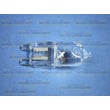
- Replace a failed oven light with the wall oven light bulb WPW10169757.
- Address cooling or airflow issues by checking the oven blower WPW10273666.
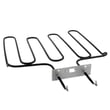
- If broil performance is weak, inspect the broiler element WPW10184147.
Wall ovens are tightly tied to cabinet dimensions and electrical capacity. Choosing based on fit, circuit requirements, and features prevents costly installation changes and helps you get reliable baking and broiling results.
Last updated: January 2026
How long do Jenn-Air wall ovens last?
A Jenn-Air wall oven like model JJW2830WP00 typically lasts 15 years with normal household use and basic maintenance. Keeping the cooling airflow clear, using the controls correctly, and fixing small issues early helps you reach (and often exceed) that lifespan; see the JJW2830WP00 owner's manual.
Most built-in electric wall ovens fall into a predictable ownership pattern:
- 0 to 5 years: Mostly routine use; occasional light bulb replacement is common.
- 5 to 10 years: Wear items and heat-related components may start to show symptoms.
- 10 to 15 years: More frequent repairs can occur (fans, controls, sensors, door hardware).
- 15+ years: Many units still run well, but repair frequency and cost usually increase.
| Age of oven | What’s most common | Best next step |
|---|---|---|
| Under 5 years | Minor adjustments, learning features | Follow operating and care guidance in the manual |
| 5 to 10 years | Occasional part replacement | Address noises, heat issues, or error symptoms early |
| 10 to 15 years | Intermittent heating or control issues | Compare repair cost vs. overall condition |
| 15+ years | Multiple symptoms at once | Prioritize safety and reliable temperature control |
These factors make the biggest difference in how long your JJW2830WP00 lasts:
- Keeping vents and cooling airflow unobstructed
- Avoiding repeated self-clean cycles back-to-back (high heat stresses components)
- Not slamming or hanging weight on the oven door
- Cleaning spills before they bake onto surfaces and seals
- Fixing overheating, error codes, or unusual noises promptly
When a wall oven starts acting up, these parts often determine whether it’s a quick fix or a bigger repair:
- Cooling/blower fan issues (overheating, loud fan noise): oven blower WPW10273666
- Temperature regulation problems (baking too hot/cold): sensor probe WP74008369
- Broil performance issues (weak or uneven broiling): broiler element WPW10184147
- Interior light failures (visibility only, not heating): wall oven light bulb WPW10169757
A wall oven’s “end of life” is usually about temperature accuracy and reliability, not just whether it turns on. Consistent preheat, stable baking temperatures, and proper cooling fan operation protect electronic controls and help prevent repeat failures.
Last updated: January 2026
Why is my Jenn-Air electric oven not heating?
If your Jenn-Air JJW2830WP00 electric wall oven is not heating, the most common causes are a failed heating circuit (bake or broil element), a temperature sensing problem, or a control issue such as Demo Mode being turned on. Use the checks below to pinpoint the failure before replacing parts.
- Confirm the oven is not in Demo Mode; Demo Mode allows selections without heating (it shows as ON on the display). See the JJW2830WP00 owner's manual for the exact menu path.
- Verify you are starting a real cooking mode (Bake, Broil, Convect) and setting a temperature.
- Check for a tripped breaker; many wall ovens use a 240V circuit and can appear “on” with only one leg of power.
- If the oven light and display work but there is no heat, suspect a heating component or control output issue.
- If the oven overheated previously and then stopped heating, a high-limit condition can interrupt heating until the underlying cause is fixed.
In an electric wall oven like JJW2830WP00, these are typical failure points:
- Broil element: if broil will not heat, or if the oven struggles to preheat; consider the broiler element WPW10184147.
- Oven temperature sensor: if temperature is wildly inaccurate or the oven will not regulate heat; consider the sensor probe WP74008369.
- Electronic control: if the oven will not energize elements even though settings are correct; consider the electronic control W10811884.
- Cooling/oven blower: if the oven shuts down or behaves erratically due to overheating; consider the oven blower WPW10273666.
| Symptom | Most likely direction | What to check next |
|---|---|---|
| Display works, no heat in Bake or Broil | Control, power supply, or safety interruption | Breaker, wiring, control outputs |
| Broil does not heat but Bake does | Broil circuit issue | Broil element, wiring |
| Oven starts then stops heating | Overheat or sensor/control issue | Blower operation, sensor probe |
| Oven “acts normal” but never warms | Demo Mode enabled | Demo Mode indicator in settings |
An oven that will not heat is usually a power delivery or control-to-element problem. Identifying whether the issue is mode-related (Demo Mode), sensing-related (sensor probe), or component-related (element, control, blower) prevents unnecessary part replacement and gets you back to reliable baking.
Last updated: January 2026





