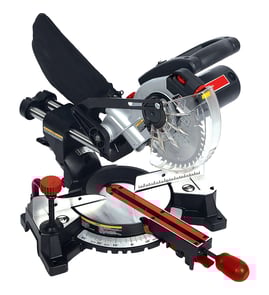

Can you cut a 4x4 with a 10 inch miter saw?
Yes, a 10-inch miter saw can cut a 4x4, but whether it’s a one-pass cut depends on the saw’s maximum cut depth and whether it’s a sliding design. For the Pro-Tech model 7107, plan on needing a flip cut unless your saw’s depth rating clearly covers 3-1/2 inches.
What to expect with a 4x4 on a 10-inch saw
A “4x4” is typically 3-1/2 in. x 3-1/2 in. (actual size). Many 10-inch non-sliding miter saws do not have enough vertical cut capacity to clear 3-1/2 inches in a single pass.
Common outcomes:
- 10-inch non-sliding saw: usually requires a flip cut (cut, rotate the post, finish the cut).
- 10-inch sliding saw: often cuts a 4x4 more easily, but depth still varies by design.
- 12-inch saw: typically handles 4x4s with fewer limitations.
Safe, accurate way to do a flip cut
If your Pro-Tech 7107 does not clear the full thickness in one pass, we use this method:
- Mark the cut line on all four faces of the 4x4.
- Set the fence and table square; lock the miter at 0°.
- Clamp the workpiece firmly; keep hands well away from the blade path.
- Make the first cut as deep as the saw allows.
- Rotate the 4x4 180° (or to the next face) and align the blade to the same line.
- Finish the cut slowly to avoid binding and tear-out.
Quick capability check (what matters most)
| Feature | Why it matters for 4x4 cuts | What to do |
|---|---|---|
| Max cut depth at 90° | Determines one-pass vs flip cut | Compare to 3-1/2 in. |
| Sliding rails | Helps with width; sometimes improves usability | Use if equipped |
| Sharp blade (tooth count) | Cleaner cut, less burning | Use a quality crosscut blade |
| Fence alignment | Prevents angled, inaccurate cuts | Verify square before cutting |
Why it matters
Forcing a too-thick cut can pinch the blade, stall the motor, and pull the workpiece off line. Planning for a flip cut keeps the cut square and reduces kickback risk.
Parts and support
If you need replacement parts for the Pro-Tech 7107 miter saw (guards, switches, brushes, fences), we recommend searching by model number on Sears PartsDirect to match the correct fit.
Last updated: February 2026
How to unlock a pro tech miter saw?
To unlock a Pro-Tech miter saw model 7107, we release the lock that holds the saw head down for storage or the lock that holds the miter angle in place. Most saws use a pull/push lock pin for the head and a front miter lock knob or lever for the base; once released, the saw moves freely.
Common unlock points on a Pro-Tech 7107 miter saw
Check these areas in this order (they are the most common “it won’t move” causes):
- Head (down) lock pin: Look near the pivot/hinge at the rear of the saw arm; pull the pin out (or twist to hold it out) to raise the head.
- Miter lock knob/lever: Usually at the front of the turntable; loosen it to rotate left or right.
- Miter detent override: Some saws have a small lever/button that helps you move off common detent stops (0°, 15°, 22.5°, 31.6°, 45°).
- Bevel lock knob/lever: Typically on the back of the saw; loosen it to tilt the saw for bevel cuts.
- Slide/rail lock (if equipped): A knob that locks the carriage so it cannot slide in and out.
Quick steps (safe, no guessing)
- Unplug the saw.
- If the head is stuck down, support the handle with one hand and release the head lock pin near the hinge.
- If the base will not rotate, loosen the front miter lock knob/lever, then rotate the table to your angle and re-tighten.
- If it stops hard at a common angle, use the detent override (if present) and try again.
What you should feel when it is unlocked
| Adjustment | Locked behavior | Unlocked behavior |
|---|---|---|
| Head (down) lock | Handle will not rise | Head lifts smoothly on the pivot |
| Miter lock | Turntable will not rotate | Base rotates with light resistance |
| Bevel lock | Saw will not tilt | Head tilts after loosening lock |
Why it matters
Unlocking the correct control prevents forcing the turntable, bevel pivot, or hinge. Forcing a locked miter saw commonly leads to misalignment, damaged detents, or stripped lock hardware.
Parts and diagrams help
If a knob, lever, or pin is missing, bent, or will not hold, use the model 7107 parts diagrams to match the correct replacement, or search by model on Sears PartsDirect. For electrical issues that mimic a “lock” (like a stuck switch or damaged cord), see how to repair broken or damaged wires video.
Last updated: February 2026
What should you never cut with a miter saw?
For a Pro-Tech 7107 miter saw, never cut materials the saw is not designed for (like steel or masonry), never make freehand cuts, and never cut tiny pieces without proper support. These situations greatly increase the risk of kickback, binding, and hand-to-blade contact.
Materials you should not cut
Avoid cutting anything that requires a different tool, blade type, or guarding method.
- Ferrous metals (iron or steel): sparks, blade damage, and loss of control
- Masonry (brick, concrete, tile): dust and shattering hazards; not a wood miter saw job
- Unknown composites that can splinter or grab (especially if you cannot clamp them securely)
- Material thicker or wider than the saw’s capacity: binding and stalled blade risk
Cuts you should not attempt
These are common “looks easy” cuts that cause most control problems.
- Ripping boards (cutting with the grain): use a table saw or circular saw with a guide instead
- Freehand cuts (no fence contact, no clamp, no stable work support)
- Cutting warped, twisted, or bowed lumber without clamping it flat to the fence and table
- Cutting very short pieces where your fingers end up close to the blade path
Safer alternatives and setup tips
Use the right method so the work stays stable and your hands stay away from the blade.
| Task | Better tool or method | Why it’s safer |
|---|---|---|
| Rip cut (with the grain) | Table saw or circular saw with straightedge | Prevents twisting and binding on a miter saw |
| Small parts | Use a stop block, clamp, and auxiliary fence | Keeps hands away and controls the cutoff |
| Metal or masonry | Use the correct saw and rated blade for that material | Reduces shatter, sparks, and kickback |
Why it matters
A miter saw is built for controlled crosscuts and miters with the work held firmly against the fence. When the material is unsupported, too hard, too thick, or not clamped, the blade can grab and throw the work (kickback) or pull your hand into the danger zone.
Parts and help for your Pro-Tech 7107
If you need replacement parts (guards, switches, cords, or hardware), start with the parts list for model 7107; you can also search by model number on Sears PartsDirect. For electrical troubleshooting practices, we recommend how to use a multimeter to test electrical parts video.
Last updated: February 2026
Why is 31.6 on a miter saw?
The 31.6° mark on the Pro-Tech miter saw model 7107 is there to simplify common crown molding cuts. It is a preset miter angle used with a matching bevel setting (often 33.9°) to create tight corner joints when crown molding is cut as a compound angle.
What the 31.6° setting is used for
On most miter saws, 31.6° is a “shortcut” angle for crown molding so you do not have to calculate compound angles every time.
- It is primarily for crown molding corner joints (inside and outside corners).
- It is used with a bevel angle (commonly 33.9°) to form a 45° corner.
- It assumes a standard crown spring angle (commonly 38° or 52° crown profiles).
- It reduces trial-and-error when you are doing repeated cuts.
- It is most helpful when you are cutting crown in a consistent, repeatable setup.
Typical settings you will see (and what they mean)
These are the common “compound miter” presets many saws reference for crown molding.
| What you are cutting | Common miter setting | Common bevel setting | Notes |
|---|---|---|---|
| Crown molding corners (common spring angles) | 31.6° | 33.9° | Used to make a 45° corner joint with compound cuts |
| Standard picture frame / baseboard corner | 45° | 0° | Simple miter cut, no bevel |
Why it matters
Crown molding is tricky because it meets the wall and ceiling at angles, not flat like baseboard. The 31.6° mark helps you get accurate, repeatable joints faster, especially when you are doing multiple corners and want consistent results.
Tips for getting clean crown molding cuts
- Confirm whether you are cutting crown nested (against the fence) or laid flat; the required angles change.
- Make a couple of test cuts on scrap before cutting finished trim.
- Keep the workpiece firmly supported; use clamps when possible.
- Verify the saw is square (fence and table alignment) before precision trim work.
- If the saw struggles or the cut burns, check blade sharpness and cleanliness.
Finding parts and diagrams for your saw
For Pro-Tech 7107 parts, we recommend using the model parts diagrams first; if you need to broaden your search by model number or category, use Sears PartsDirect.
Last updated: February 2026