 Owner’s manual



What is the most common problem with Samsung dishwashers?
For the Samsung DW80B7070AP dishwasher, the most common issues we see are poor cleaning (food left on dishes), draining problems, and leak-related shutdowns. In many cases, the root cause is maintenance-related, such as a clogged filter, blocked spray nozzles, or debris in the drain pump area; see the DW80B7070AP user manual for model-specific cleaning and troubleshooting steps.
- Not cleaning well: clogged spray nozzles, dirty filter, low water temperature, low water pressure, or dishes blocking spray arm rotation.
- Not draining: debris in the drain pump/impeller area, a clogged filter, or a restricted drain hose.
- Leaks or water in the base: loose drain hose connection, door not sealing well, or oversudsing from the wrong detergent.
- Won’t start: door not fully latched, Control Lock enabled, or power supply issue.
- Poor drying: rinse aid empty, Auto Release Dry turned off, or SmartDry option not used.
- Clean the filter monthly and make sure it locks in place.
- Inspect and rinse spray nozzles if you see food debris or weak spray.
- Check the drain pump area for foreign objects if it won’t drain or it’s noisy.
- Confirm hot water supply; best cleaning typically needs about 120°F incoming water.
- Use the right detergent and rinse aid; avoid anything that creates excess foam.
| Symptom | Most likely area to check | Typical next step |
|---|---|---|
| Dishes still dirty | Filter, spray nozzles, loading | Clean filter/nozzles; reload to avoid blocking |
| Standing water | Filter, drain pump, drain hose | Clear debris; verify hose routing |
| Won’t start | Door latch, Control Lock, power | Latch door; unlock; reset breaker |
| Wet dishes | Rinse aid, SmartDry, Auto Release Dry | Refill; enable drying options |
On the DW80B7070AP, routine cleaning of the filter, nozzles, and drain pump area prevents many “mystery” problems and helps avoid repeat error codes and mid-cycle stoppages.
Last updated: January 2026
What are the commonly replaced parts in a dishwasher?
For the Samsung DW80B7070AP dishwasher, the most commonly replaced parts are the ones that directly affect filling, washing, draining, drying, and sealing. In practice, we see frequent replacements tied to leaks, poor cleaning, no-drain problems, and control issues; use the DW80B7070AP manual to match symptoms to the right area.
- Door seal or door gasket: helps prevent leaks at the door
- Spray arms and nozzles: restore wash pressure and coverage when cleaning is poor
- Filters: reduce food debris recirculation and protect the pump
- Drain pump and drain hose: address standing water and slow or no draining
- Water inlet valve: fixes no-fill, underfill, or fill errors
- Heating circuit parts (heater, thermostat): improve drying and water temperature
- Control panel or electronic control board: resolves dead controls, random stopping, or cycle issues
| Symptom | Most likely part area | First check we recommend |
|---|---|---|
| Water on floor near door | Door seal, door alignment | Inspect seal for tears and debris; confirm door closes evenly |
| Dishes not clean | Spray arms/nozzles, filters | Clean filters and nozzle holes; verify arms spin freely |
| Won’t drain | Drain pump, drain hose, filter area | Clean filter and pump cover area before replacing parts |
| Won’t fill | Water inlet valve, float/overfill system | Confirm supply valve is open and water pressure is adequate |
| Poor drying | Heater circuit, rinse aid system | Use rinse aid and verify drying options are enabled |
The DW80B7070AP manual includes routine care steps that often solve the problem without replacing anything:
- Clean the filter monthly
- Remove and clean clogged nozzles (top, upper, and lower)
- Clean the drain pump area if draining is slow or noisy
Replacing the correct part the first time saves money and prevents repeat issues. Many “bad part” symptoms on a dishwasher are actually caused by clogs (filter, spray arm holes, drain pump area) or loading issues that reduce water circulation.
Last updated: January 2026
How to replace rubber flap on Samsung dishwasher?
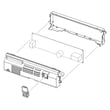
On the Samsung DW80B7070AP dishwasher, the rubber flap under the door (often part of the lower sound/insulation or kick plate area) typically reattaches by removing the kick plate, seating the flap’s corner cutouts into their slots, then reinstalling the kick plate. Use the DW80B7070AP user manual for panel and safety guidance.
- Turn off power at the breaker; avoid working around live wiring.
- Open the door and remove the screws holding the lower kick plate (toe panel) in place.
- Pull the kick plate forward and set it aside.
- Align the rubber flap so its corner cutouts fit into the matching tabs/slots along the bottom edge.
- Press the flap firmly into place so it sits flat and does not curl under.
- Reinstall the kick plate and screws; confirm the door opens and closes without rubbing.
- The flap should hang straight down and not fold inward.
- The kick plate should sit flush; no gaps at the corners.
- Nothing should contact the door as it closes (no pinched insulation or wiring).
- If the flap keeps popping out, check for broken tabs on the kick plate or hardened rubber.
| Item | Why it matters |
|---|---|
| Phillips screwdriver | Removes and reinstalls kick plate screws |
| Work gloves | Protects hands from sharp panel edges |
| Flashlight | Helps you see tabs/slots under the tub |
That rubber flap helps reduce noise and can help direct moisture and airflow around the lower front of the dishwasher. If it’s loose or missing, you may notice more operating noise or minor moisture issues near the toe-kick area.
Last updated: January 2026
Can you buy parts for a dishwasher?
Yes. For the Samsung DW80B7070AP dishwasher, you can buy replacement parts to fix common problems (not draining, not cleaning, leaks, or not starting) instead of replacing the whole unit. The key is matching parts to the exact model number and using the procedures in the DW80B7070AP user manual.
For Samsung dishwashers like DW80B7070AP, replacement parts are commonly available for both performance issues and “won’t run” problems, including:
- Filters and filter covers (helps with poor cleaning and drainage)
- Spray nozzles or spray arms (helps with not cleaning dishes)
- Drain pump-related components (helps with not draining or noisy operation)
- Door latch and door seal components (helps with won’t start or leaking)
- Detergent dispenser components (helps with detergent cup not opening)
- Control panel or user interface components (helps with dead buttons or won’t start)
Because Samsung model numbers can look similar, we recommend verifying fit by using the complete model number DW80B7070AP and comparing the part description to what’s installed in your dishwasher.
- Confirm the model number on the dishwasher’s rating label
- Identify the failed system (wash, drain, fill, heat, door)
- Use symptoms and any information code on the display to narrow it down
- Compare the old part visually (connectors, mounting points, shape)
- Follow the disassembly and safety guidance in the DW80B7070AP user manual
| Symptom | Most likely part area to check first | Common first step |
|---|---|---|
| Not cleaning dishes | Filter, nozzles/spray arms | Clean filter and nozzles |
| Won’t drain | Drain pump area, filter | Clean filter and drain pump cover |
| Won’t start | Door latch, control lock, power | Confirm door latches and Control Lock is off |
| Poor drying | Rinse aid system, settings | Refill rinse aid and check settings |
Buying the correct dishwasher parts for your exact Samsung DW80B7070AP model helps ensure proper fit, prevents repeat failures, and avoids wasting time on returns. It also lets you target the real cause, like a clogged filter versus a failed drain pump.
Related DIY help: Samsung dishwasher error codes
Last updated: January 2026





