 Owner’s manual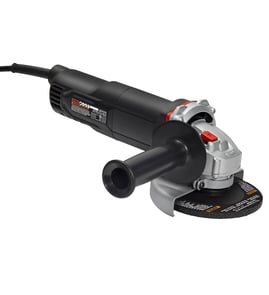

What not to do with an angle grinder?
For the Craftsman angle grinder model 17211502, don’t use the tool in unsafe conditions, don’t run it without proper control (two-handed grip), and don’t overload the motor by forcing the disc. Follow the safety and operating steps in the 17211502 owner's manual to prevent kickback, sparks injuries, and electrical hazards.
Don’ts that cause most injuries and tool damage
- Don’t operate in explosive atmospheres (flammable liquids, gases, or dust); grinder sparks can ignite fumes.
- Don’t let bystanders, children, or visitors stand close while grinding; distractions cause loss of control.
- Don’t grind or sand one-handed; use the body grip plus the auxiliary side handle for control.
- Don’t aim the exposed part of the disc toward your body; position the guard so sparks and debris point away.
- Don’t force the wheel to “speed up” the job; heavy pressure drops RPM and can overload the motor.
- Don’t work aggressively into corners; the wheel can catch and make the grinder jump or twist.
Safe operating habits we recommend (quick checklist)
- Unplug the grinder before changing discs or adjusting the guard.
- Use light, steady pressure and let the abrasive do the work.
- Keep your work area clean and well lit.
- Wear eye protection every time; add hearing protection and gloves as needed.
Angle and pressure guidelines (from typical use)
| Task | Typical disc angle to work surface | What to avoid |
|---|---|---|
| Grinding | About 30° | Pushing hard until RPM drops |
| Sanding (with backing pad) | About 10° to 15° | Digging an edge into the surface |
Why it matters
Most “don’ts” come down to two risks: loss of control (kickback, twisting in corners, one-handed use) and overload (forcing the disc, overheating the motor). Using the guard correctly and keeping a two-handed grip greatly reduces both.
Last updated: February 2026
What cannot be cut with an angle grinder?
An angle grinder like the Craftsman 17211502 should not be used on materials that can ignite from sparks, bind and kick back, or clog the wheel. It also will not reliably cut specialized “grinder-resistant” composites designed to defeat abrasive cutting. For safe limits and setup, follow the 17211502 owner's manual.
Materials and items you should not cut
Avoid cutting these with an angle grinder because they commonly create unsafe conditions (kickback, fire, wheel failure) or poor results:
- Flammable or explosive materials: fuel containers, aerosol cans, solvent-soaked items, or areas with combustible dust or fumes
- Wood and other soft, fibrous materials: they can grab the wheel and cause violent kickback
- Plastics and nylon: they can melt, smear, and bind the disc
- Thin sheet metal that is not secured: it can chatter, pinch the wheel, and throw sparks unpredictably
- Unknown “mystery” materials: if you cannot identify it, do not cut it with a grinder
- Grinder-resistant composites (security-grade materials): they are engineered to dull, deflect, or rapidly wear abrasive wheels
Common “can I cut this?” guidance
Use this quick check before you cut anything.
| Material or situation | What typically happens | Better approach |
|---|---|---|
| Flammable vapors, liquids, or dust nearby | Sparks can ignite the area | Move the work, ventilate, eliminate ignition sources |
| Wood, plastic, nylon | Wheel can bind, melt, or kick back | Use the correct saw or cutting method for that material |
| Soft metals like aluminum (with abrasive wheels) | Wheel can load up and cut poorly | Use a wheel rated for non-ferrous metals (if approved) |
| Security composites | Wheel wear or deflection | Use the method specified for that product |
Setup and technique that reduce binding and wheel damage
The manual’s operating guidance helps prevent overload and loss of control:
- Unplug the tool before changing discs and use the spindle lock correctly
- Keep the guard positioned so the exposed disc points away from you
- Use light pressure; forcing the cut can overload the motor
- Hold with two hands (body and side handle) for control
- Secure the workpiece so it cannot shift and pinch the wheel
Why it matters
Angle grinders throw sparks and can kick back when a wheel binds. Using the wrong disc or cutting the wrong material increases the chance of wheel damage, motor overload, and injury. The 17211502 owner's manual also calls out avoiding explosive atmospheres and using proper guarding and handling.
Last updated: February 2026
What are the parts of an angle grinder?
On a Craftsman angle grinder model 17211502, the main parts include the on/off switch, motor components (armature and field), spindle and flanges that hold the wheel or sanding disc, the guard, and the side handle for control. For the exact parts list and diagram, use the 17211502 owner's manual.
Main components you will see on most angle grinders
These are the common assemblies that make the tool run safely and smoothly:
- Switch (on/off): starts and stops the grinder (often a slider switch)
- Motor assembly: armature and field that generate power
- Spindle: the rotating shaft that the wheel or backing pad mounts to
- Inner flange and outer flange: clamp the wheel or sanding setup to the spindle
- Spindle lock: holds the spindle still so you can tighten or remove the flange
- Guard: shields you from sparks and debris
- Side handle: improves control and reduces twist or kickback
Model 17211502 parts called out in the manual
The Craftsman 17211502 manual identifies these specific part names for this tool:
| Part (what it does) | Example part name in the diagram | Why it matters |
|---|---|---|
| Drives the tool | Armature, field | Power and speed under load |
| Turns the accessory | Spindle | Wobble or vibration often starts here |
| Holds the wheel/disc | Inner flange, outer flange | Prevents slipping and uneven wear |
| Protects the user | Guard | Helps direct sparks and debris away |
| Improves control | Side handle | Reduces the chance of the grinder jumping |
Related hardware and fasteners
Angle grinders use multiple screws to secure covers, guards, and internal components. If you are replacing a stripped or missing fastener, match it by location and diagram callout; one example listed for this model is the screw 42976900.
Why it matters
Knowing the names of the grinder parts helps you pick the correct replacement part, install accessories correctly (flanges, backing pad, abrasive disc), and troubleshoot issues like vibration, slipping discs, or a switch that will not stay engaged.
Last updated: February 2026
Are all angle grinder discs interchangeable?
No. Angle grinder discs are only interchangeable when they match your grinder’s wheel diameter and spindle (arbor) size, and when the disc type is rated for the job. For the Craftsman 17211502, use the disc and flange setup shown in the owner's manual to ensure safe fit and control.
What must match for a disc to fit
- Disc diameter: Use the diameter your guard and tool are designed for (this model is shown as a 4-inch angle grinder in the manual parts pages).
- Arbor (spindle) hole size: The disc’s center hole must match the grinder’s spindle and flange system.
- Disc type: Cutting wheel, grinding wheel, flap disc, sanding disc with backing pad, diamond wheel, etc.
- Speed rating: The disc’s maximum RPM must meet or exceed the grinder’s no-load speed.
- Mounting hardware: Inner flange, outer flange, and any backing pad must be installed in the correct order.
Disc types are not interchangeable for the same task
Using the wrong disc type is a common cause of poor results and kickback. Here is a quick guide:
| Task | Typical disc type | Notes |
|---|---|---|
| Cut metal | Thin cut-off wheel | Use the guard and correct orientation for cutting. |
| Grind metal | Depressed-center grinding wheel | Designed for side loading and material removal. |
| Sand | Abrasive sanding disc + backing pad | The manual shows using a backing pad for sanding. |
| Masonry/concrete | Diamond wheel | Use dust control and proper PPE. |
How we recommend installing a sanding disc on the 17211502
The manual’s “Fitting abrasive discs” section shows the correct stack-up for sanding:
- Turn off and unplug the tool.
- Remove the guard (as directed for that sanding setup).
- Install inner flange, backing pad, abrasive disc, then outer flange.
- Press the spindle lock and tighten the outer flange with the spanner wrench.
Why it matters
Correct disc size, arbor fit, and disc type reduce binding, overheating, and motor overload. The manual also notes that pushing too hard can drop speed and damage the motor, so the right disc and light pressure work together for safer, cleaner results.
Last updated: February 2026
Can you turn an angle grinder into a sander?
Yes. Your Craftsman 17211502 angle grinder can be used for sanding by fitting a backing pad and abrasive disc on the spindle, then using a lighter touch and a shallower working angle than grinding. Follow the accessory setup and safety steps in the 17211502 owner's manual.
How to set up the grinder for sanding
Always turn off and unplug the tool before changing accessories.
- Remove the guard as directed for fitting abrasive discs.
- Install the stack in order: inner flange, backing pad, abrasive disc, outer flange.
- Press the spindle lock button and rotate the spindle until it locks.
- Tighten the outer flange with the spanner wrench.
- Confirm the disc is centered and secure before powering on.
How to sand safely and get better results
Sanding creates more continuous contact than grinding, so controlling heat and load matters.
- Hold the tool with one hand on the body and the other firmly on the side handle.
- Position the guard so as much of the exposed disc as possible points away from you.
- Keep a shallow angle to the work surface when sanding (most users stay around 10° to 15°).
- Use light pressure; pushing too hard drops speed and can overload the motor.
- Use eye protection and a suitable dust mask for the material being sanded.
Quick comparison: grinding vs. sanding
| Task | Typical disc angle to surface | Pressure | Common problem if pushed too hard |
|---|---|---|---|
| Grinding | About 30° | Light to moderate | Tool can jump or twist, overheating |
| Sanding | About 10° to 15° | Light | Motor overload, gouging, fast disc wear |
Why it matters
Using the correct backing pad setup and light pressure helps prevent overheating, reduces the chance of the grinder jumping in corners, and protects the motor from overload during longer sanding passes.
Last updated: February 2026