 Installation guide
 Owner’s manual
 Error Codes




What model Bosch oven do I have?
If you’re on the Bosch wall oven parts page for model HBL8451UC, your oven’s model number is HBL8451UC. To confirm on the appliance, check the model and serial tag on the oven frame (most often visible when you open the oven door). For exact tag location details, use the HBL8451UC owner’s manual.
We typically see the model and serial label in one of these spots:
- On the oven frame behind the door, along the left or right side trim
- Along the top edge of the oven opening (visible with the door open)
- Along the bottom edge of the oven opening (visible with the door open)
- On the side of the door jamb area near the hinges
Record both the model and serial information so we can match the correct parts and diagrams.
- Model number (example: HBL8451UC)
- FD number (Bosch production code, if shown)
- Serial number
- Any “/xx” revision or index number shown on the tag
| Item | What it tells us | Used for |
|---|---|---|
| Model number | The oven’s design family | Finding correct parts lists and diagrams |
| Serial number | Your unit’s unique identifier | Verifying production range and compatibility |
| FD number | Production date code | Narrowing down version-specific parts |
Bosch wall ovens can have multiple versions that look identical but use different components (control boards, door parts, sensors). Using the exact model and tag details helps prevent ordering the wrong part and avoids repeat repairs.
Last updated: January 2026
How long does a Bosch wall oven last?
A Bosch wall oven like model HBL8451UC typically lasts 15 to 20 years with normal household use and basic maintenance. Keeping airflow clear, avoiding harsh cleaners on controls, and fixing heating or fan issues early helps you reach the high end of that range.
Most built-in electric wall ovens fall into a similar lifespan range; the difference is usually how hard the oven is worked and how well heat is managed around the cabinet.
- Heavy use (daily high-heat roasting, frequent self-clean) shortens life
- Good ventilation and a working cooling fan extend control-board life
- Power surges and loose wiring can damage electronic controls
- Door seal condition affects heat retention and bake times
- Prompt repair of unusual noises, weak heating, or error codes prevents bigger failures
These are the components that most often drive major repair decisions on an electric built-in oven.
| Component | What it does | Common symptom when failing |
|---|---|---|
| Heating element | Produces bake heat | Slow preheat, uneven baking, no heat |
| Cooling fan | Protects controls from heat | Hot control panel, fan noise, shutdown |
| Control board/module | Runs temperature and functions | Dead display, random beeps, won’t start |
| Door gasket | Seals heat in the cavity | Heat leaks, longer cook times |
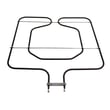
If you are troubleshooting heat problems on HBL8451UC, the wall oven bake element 00791650 is one of the first parts we check for visible damage or an open circuit.
Use these habits to reduce stress on the heating system and electronics.
- Keep the door gasket clean and seated evenly
- Do not block oven vents; keep cabinet airflow paths clear
- Wipe spills after the oven cools; avoid soaking the control area
- Use self-clean sparingly; high heat is hard on wiring and electronics
- If the oven overheats or shuts down, inspect the cooling fan operation
Knowing the typical lifespan helps you decide whether to repair or replace. If your HBL8451UC is under about 10 years old, repairs like an element or fan are usually practical; past 15 years, multiple electronic or door issues can add up.
For model-specific care and operating guidance, follow the HBL8451UC owner’s manual.
Last updated: January 2026
How do you reset a Bosch wall oven?
To reset your Bosch wall oven model HBL8451UC, turn the oven off at the circuit breaker (or unplug if accessible), wait about 30 minutes, then restore power. This clears many control glitches and lets the control board reboot normally.
- Turn the oven off using the control panel.
- Switch the oven’s circuit breaker OFF (most wall ovens are hardwired).
- Wait 30 minutes.
- Switch the breaker ON.
- Set the clock, then test Bake at a low temperature for a few minutes.
A reset helps with temporary electronic lockups. If the oven is still dead, keeps beeping, or shows an error again, focus on what the oven is telling you.
- Write down the exact error code or message.
- Check whether the cooling fan runs after cooking; a failed fan can trigger overheating protection.
- If the display is blank or unresponsive, power may be present but the control is not operating.
- If the oven overheated, a safety device may have opened and needs diagnosis.
Helpful references for your model: HBL8451UC manual, HBL8451UC installation guide.
| Symptom after reset | Common suspect | Example part for HBL8451UC |
|---|---|---|
| Oven overheats, shuts down, or errors during use | Cooling airflow problem | Wall oven cooling fan assembly 00759374 |
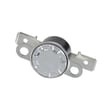
| Oven completely dead after overheating event | Safety cutout opened | Wall oven thermal fuse 00631343 |
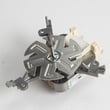
| Convection not working, uneven baking | Convection fan not running | Thermador wall oven convection fan motor 00642845 |
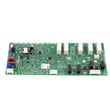
A breaker reset restores the control module and display control board to a known startup state. If an error returns immediately, it usually points to an ongoing issue (cooling, temperature sensing, wiring, or a control problem) that a reset will not permanently fix.
Last updated: January 2026
What are the common problems with Bosch ranges?
Common Bosch range problems usually involve surface burners not heating evenly, oven temperature issues, control or display glitches, and door or fan noise. If you are troubleshooting a Bosch HBL8451UC electric built-in oven (not a range), the same categories apply, but the checks focus on bake, convection, cooling airflow, and door sealing; use the HBL8451UC manual for mode and error-code guidance.
- Range cooktop (electric or induction): element not heating, cycling too hot or too cool, pan detection issues.
- Range cooktop (gas): weak ignition, uneven flame, burner won’t light.
- Oven (range or wall oven): no heat, uneven baking, long preheat, fan noise, error codes.
- Controls: unresponsive keypad, blank display, intermittent beeping.
- Confirm the correct cooking mode (Bake vs Convection) and set temperature.
- Cancel any timed cooking or Sabbath settings.
- Power-reset at the breaker for 1 minute, then retry.
- Check the door closes fully and the gasket is not torn or flattened.
- For convection modes, listen for the fan after preheat starts.
| Symptom | What to check | Example part for this model |
|---|---|---|
| No or weak bake heat | Bake heating circuit | Wall oven bake element 00791650 |
| Uneven convection baking | Convection airflow | Thermador wall oven convection fan motor 00642845 |
| Oven goes dead after overheating | Safety cutoff | Wall oven thermal fuse 00631343 |
| Loud fan or poor cooling | Cooling airflow for controls | Wall oven cooling fan assembly 00759374 |
| Heat leaking at door | Door seal | Door gasket 00755053 |
Heating and airflow problems affect cooking results and can overheat the control area. Fixing a weak element, failing fan, or leaking gasket restores temperature stability and helps protect electronic controls.
Built-in ovens rely on correct cabinet clearances and airflow; confirm those requirements in the HBL8451UC installation guide.
Last updated: January 2026





