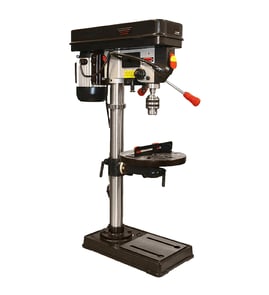

How much does a Craftsman 11324590 drill press weigh?
The exact weight for the Craftsman drill press model 11324590 varies by the specific configuration (bench vs. floor setup and any added accessories), but most Craftsman drill presses in this class weigh roughly 60 to 120 lb. For the most accurate match, confirm the model number on the ID plate and compare to listings on Sears PartsDirect.
Most drill press weight comes from the cast-iron base, column, and head assembly. Use these ranges to plan lifting and mounting:
- Bench drill press: typically 50 to 90 lb
- Floor drill press: typically 90 to 150 lb
- Add-ons (vise, table, work light, guards): often 5 to 25 lb extra
| Drill press type | Typical weight | What changes it most |
|---|---|---|
| Bench model | 50 to 90 lb | Base size, motor size, pulley cover material |
| Floor model | 90 to 150 lb | Column length, base thickness, head casting size |
If you need a practical number for moving, shipping, or mounting, we recommend this approach:
- Weigh major assemblies separately (head, table, base) using a bathroom scale
- Subtract your body weight to get the part weight (hold the assembly safely)
- Add accessories you plan to keep installed (vise, fence, chuck key holder)
- Round up for packing materials if you are boxing it
Knowing the weight helps you choose a safe mounting surface and hardware. A drill press that is not properly supported can vibrate, drill inaccurately, and shift during use.
- Unplug the drill press before moving it
- Remove the chuck, belts cover contents, and loose accessories first
- Use two people for most head assemblies
- Bolt the base to a sturdy bench or floor (use appropriate lag screws or anchors)
- Recheck table clamp tightness and belt tension after relocation
Last updated: February 2026
What is the 4 inch rule for drill press?
The 4-inch rule for a drill press means we keep our hands and fingers at least 4 inches away from the rotating drill bit, chuck, and spindle while the Craftsman 11324590 drill press is running. This simple spacing rule helps prevent accidental contact and serious injury.
- Clamp the workpiece to the table; do not hold small parts by hand.
- Use a drill press vise, V-block, or hold-down clamps for round stock.
- Use a scrap backer board to support thin material and reduce grabbing.
- Stop the machine before clearing chips; use a brush, not your fingers.
- Remove the chuck key immediately after tightening the bit.
- Tie back long hair and avoid loose sleeves, gloves, and jewelry.
| Item to check | What “good” looks like | Why it helps |
|---|---|---|
| Workpiece control | Clamped or in a vise | Keeps hands away from the bit |
| Bit condition | Sharp, straight, fully seated | Reduces walking and grabbing |
| Speed selection | Slower for large bits, faster for small bits | Prevents binding and overheating |
| Feed pressure | Steady, not forced | Lowers kick and breakage risk |
Most drill press injuries happen at the point of operation: the spinning bit can pull in fingers, gloves, or loose material fast. Keeping a 4-inch buffer forces safer habits like clamping, using proper fixtures, and stopping the tool before adjustments.
If you need replacement parts (for example, belts, pulleys, switches, or chuck components), use the model number 11324590 to match the correct diagrams and listings. We also make it easy to search by model on Sears PartsDirect.
Last updated: February 2026
How to take chuck off Craftsman drill?
On the Craftsman drill press model 11324590, the chuck typically comes off by loosening the chuck jaws fully, removing the retaining screw (if your chuck has one), then using a sharp “pop” to break the taper or threads loose. Unplug the drill press before starting.
- Unplug the drill press and remove the key from the switch.
- Lower the table or remove the workpiece so you have clear access to the chuck.
- Wear eye protection; the chuck can drop suddenly when it releases.
- Support the chuck with one hand or place a block of wood on the table under it.
- Take a quick photo of the chuck and spindle area so reassembly is easier.
Most drill presses use one of these chuck styles.
- Open the chuck jaws all the way.
- Lower the quill to expose the joint between the chuck and arbor.
- Insert the correct wedge(s) at the slot (if your spindle/arbor has a drift slot).
- Tap the wedge(s) evenly until the chuck pops free.
- Open the jaws fully.
- Look for a retaining screw inside the chuck (often reverse thread); remove it.
- Use an Allen wrench in the chuck, tighten the jaws on it, then strike the wrench to break the chuck loose.
| What you see | Likely chuck type | What usually works |
|---|---|---|
| No screw inside chuck; taper fit on arbor | Jacobs taper | Drift key/wedges and a firm tap |
| Screw inside chuck body | Threaded + retaining screw | Remove screw, then unthread chuck |
| Slot in spindle/arbor for a drift | Taper system | Use a drift key in the slot |
Removing the chuck the right way prevents bent arbors, damaged quill bearings, and spindle runout that can cause wobble and oversized holes.
If you are unsure which chuck/arbor style your Craftsman 11324590 uses, use the exploded diagrams and parts list to match what you see on your machine, then order the correct replacement parts through the model page or search by model on Sears PartsDirect.
Last updated: February 2026
What does the drill press do better than any machine in the shop?
A Craftsman drill press like model 11324590 drills straight, repeatable holes more accurately than handheld tools; it keeps the bit square to the work, controls depth, and reduces wandering so hole size and location stay consistent across multiple parts.
- Holds alignment: The quill and chuck guide the bit so holes stay plumb (90 degrees) or at a set angle.
- Repeats results: You can drill the same hole pattern over and over with consistent spacing and depth.
- Controls depth: A depth stop helps you hit a target depth for blind holes.
- Improves hole quality: Less wobble and walking means cleaner, rounder holes.
- Handles larger bits safely: Forstner bits, hole saws, and step bits are easier to control at the right speed.
| Task | Drill press advantage | Typical add-on or setup |
|---|---|---|
| Drilling multiple identical holes | Consistent depth and position | Fence, stop block, depth stop |
| Drilling perpendicular holes | Keeps bit square to the table | Table square check, vise |
| Drilling angled holes | Locks in a repeatable angle | Tilting table or angle jig |
| Larger-diameter holes | Better control and stability | Correct RPM, sharp bit |
- Square the table to the bit using a small machinist square.
- Clamp the workpiece; do not hand-hold small parts.
- Use a center punch (metal) or awl (wood) to start the hole precisely.
- Start with a pilot hole for larger diameters.
- Match speed to material and bit size; larger bits need slower RPM.
Accuracy and repeatability save time and material. When holes are straight, round, and consistently placed, parts fit correctly, fasteners seat properly, and assemblies stay aligned, especially in jigs, cabinetry, and metal fabrication.
For diagrams and replacement part lookup by model number, use the parts list for Craftsman 11324590 or search by model on Sears PartsDirect.
Last updated: February 2026