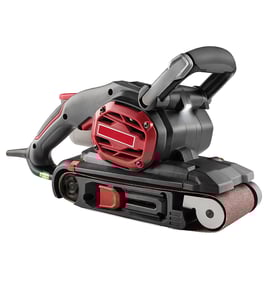

Why did my belt sander suddenly stop working?
A Craftsman 137215150 1 x 30" belt/disc sander that suddenly stops is usually losing drive under load (belt slipping or tracking off), overheating and tripping a thermal protector, or failing to get power through the cord, switch, or brushes. Start with the simplest checks: belt condition, tracking, and power.
- Unplug the sander; remove dust buildup around the belt path, drive roller, and disc.
- Check belt tracking; if the belt walked off the rollers, it can bind and stall.
- Inspect the sanding belt for glazing, tearing, or stretching; a worn belt can slip when you apply pressure.
- Reduce pressure on the workpiece; pushing too hard can stall the motor and trigger overheat protection.
- Try a different outlet; a weak connection can cause intermittent stops.
- Drive roller and idler roller: Look for packed debris, damaged rubber, or wobble.
- Belt tension mechanism: A weak spring or misadjustment lets the belt slip.
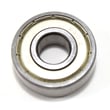
- Bearings: If rollers feel rough or tight when spun by hand, friction can stall the motor.
- Motor brushes (if equipped): Worn brushes can cause sudden loss of power or arcing.
| What you notice | Most likely cause | What to do |
|---|---|---|
| Stops only when sanding | Belt slipping or too much pressure | Replace belt; lighten pressure; verify tension |
| Stops, then runs again after cooling | Thermal overload tripping | Clean dust; reduce load; check ventilation |
| Hums but belt does not move | Belt off-track or roller seized | Re-track belt; inspect rollers/bearings |
| Completely dead (no sound) | Cord, switch, or internal wiring issue | Inspect cord; test switch continuity |
Use a multimeter to confirm power flow through the cord and switch before assuming a motor failure.
- Check the cord for cuts, kinks, or a loose plug.
- Test the switch for continuity in the ON position.
- Inspect internal wire terminals for looseness or heat discoloration.
For step-by-step meter technique, use our how to use a multimeter to test electrical parts video.
A belt sander that stalls can quickly overheat the motor, damage rollers, and ruin sanding belts. Fixing tracking, tension, and dust buildup early prevents repeat shutdowns and extends motor life.
Last updated: February 2026
What are the main parts of a belt sander?
On the Craftsman 137215150 1 x 30" belt/disc sander, the main parts are the abrasive sanding belt running over two rollers (drive and idler), the motor that turns the drive roller, and the belt-tracking and tension hardware that keeps the belt centered and tight during sanding.
- Sanding belt: the abrasive belt that does the cutting
- Drive roller (lower roller): powered roller that moves the belt
- Idler roller (upper roller): free-spinning roller that helps guide the belt
- Motor: provides rotation to the drive roller (often through a shaft or belt drive)
- Belt tension mechanism: spring/lever/adjuster that tightens the sanding belt
- Tracking adjustment: knob/screw that centers the belt so it does not walk off the rollers
- Platen or sanding table: supports the workpiece behind/under the belt
| Part | What it does | Common symptom when it is off |
|---|---|---|
| Drive roller + motor | Moves the belt at sanding speed | Belt stalls, slow sanding, burning |
| Idler roller | Guides belt return path | Belt wanders, uneven belt wear |
| Tension mechanism | Keeps belt tight | Belt slips, flaps, or jumps |
| Tracking adjustment | Keeps belt centered | Belt runs off one side |
Knowing these core parts helps you troubleshoot fast. For example, a belt that keeps drifting is usually a tracking or idler roller issue, while a belt that slips is usually tension or a worn drive roller surface.
If you are diagnosing a no-start or intermittent power issue on a sander, use a meter to check the cord, switch, and motor circuit: how to use a multimeter to test electrical parts video.
Last updated: February 2026
Can you replace the pad on a Sander?
Yes. On most sanders, the sanding pad (the backing pad that holds the abrasive) is a replaceable wear part; you remove the old pad and install a matching replacement so the abrasive sits flat and the tool runs smoothly. For the Craftsman 137215150 1 x 30" belt/disc sander, the exact pad style depends on whether you mean the disc backing pad or a platen-style pad behind the belt.
On a 1 x 30" belt/disc sander like model 137215150, customers typically mean one of these:
- Disc backing pad: the surface behind the sanding disc that supports the abrasive disc.
- Belt platen pad: a wear surface behind the sanding belt that helps keep the belt sanding area flat.
- Rubber drive/drum surface (less common): a worn drum can cause tracking and vibration issues.
Use this checklist to avoid vibration, wobble, and poor sanding results:
- Unplug the sander before any service.
- Remove the abrasive disc or sanding belt.
- Inspect how the pad is attached (screws, adhesive, hook-and-loop, or a clamp/plate).
- Match the replacement by diameter/shape, mounting hole pattern, and thickness.
- Clean the mounting surface so the new pad sits flush.
- Reinstall the abrasive and hand-spin the disc/drum to confirm it clears guards and runs true.
| Symptom | Most likely cause | What to check first |
|---|---|---|
| Disc wobbles or vibrates | Warped backing pad or loose mounting | Tighten fasteners; check pad flatness |
| Disc sanding is uneven | Pad face is glazed, torn, or compressed | Look for grooves, soft spots, missing material |
| Belt sanding isn’t flat | Platen pad worn or missing | Inspect platen area for wear-through |
| Belt tracks poorly | Worn drum/crowned roller, misalignment | Check tracking adjustment and roller condition |
A worn or warped pad makes the abrasive run out-of-true, which causes chatter marks, poor control, and faster belt/disc wear. Replacing the pad restores flat support and improves finish quality.
For help identifying the correct replacement part by model number and diagram, use how to find your appliance model number (and what it means for parts).
Last updated: February 2026