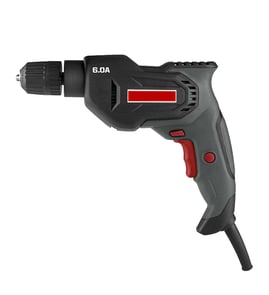

What are the parts of a drill called?
On the Craftsman 31511490 commercial 1/2-inch electric drill, the main parts are typically the chuck (holds the bit), motor, trigger switch, forward/reverse selector, gearbox, and housing. On the drill bit itself, common names include the shank, flutes, lands, and tip.
Common drill (tool) parts
These are the names customers most often use when troubleshooting, ordering, or describing a problem:
- Chuck: clamps the drill bit; may be keyed or keyless
- Motor: provides rotation power
- Trigger switch: turns the drill on and controls speed (variable-speed models)
- Forward/reverse selector: changes rotation direction
- Gearbox: reduces speed and increases torque (common on 1/2-inch drills)
- Brushes (brushed motors): wear items that can cause intermittent running
- Power cord and strain relief: supplies power and protects the cord at the handle
- Housing/handle: supports internal parts and provides grip
Common drill bit parts (nomenclature)
If you are describing the bit rather than the drill, these are the standard terms:
- Shank: the smooth end that goes into the chuck
- Neck: area between shank and body (often where size markings appear)
- Body: the main length of the bit
- Flutes: spiral grooves that carry chips out of the hole
- Lands: the raised areas between flutes that guide the bit
- Cutting lips (cutting edges): do the cutting at the tip
- Point/tip: the very end that starts the hole
Quick reference table
| If you mean... | You are probably talking about... | What it does |
|---|---|---|
| The part that holds the bit | Chuck | Grips the shank |
| The part you squeeze | Trigger switch | Starts/stops and may vary speed |
| The spiral grooves on the bit | Flutes | Clears chips |
| The raised strips between grooves | Lands | Guides the bit |
Why it matters
Using the right part name helps us match the correct repair path. For example, a “bit slipping” complaint points to the chuck, while “runs only when I wiggle the cord” points to the cord, strain relief, or internal wiring.
For safe electrical troubleshooting steps, use our how to use a multimeter to test electrical parts video.
Last updated: February 2026
How to get a drill to grip drill bit?
To get your Craftsman 31511490 commercial 1/2" electric drill to grip a drill bit, fully seat the bit in the chuck jaws, hand-tighten first, then finish tightening with the chuck key so all three jaws clamp evenly.
Quick steps to tighten the chuck correctly
- Unplug the drill before touching the chuck or bit.
- Open the chuck wide enough that the bit slides in without forcing.
- Center the bit so it sits evenly between all three jaws.
- Push the bit in, then pull it back out about 1/16 inch so it is not bottomed out.
- Hand-tighten the chuck until the jaws contact the bit.
- Insert the chuck key and tighten in all keyholes (if your chuck has more than one) for even clamping.
Common reasons the bit still slips
| Symptom | Most likely cause | What to do |
|---|---|---|
| Bit spins in chuck under load | Not tightened evenly | Tighten with the key in each keyhole position |
| Bit wobbles | Bit not centered in jaws | Re-seat the bit and re-tighten |
| Chuck tight but bit still slips | Worn chuck jaws or oily jaws | Clean jaws; replace chuck if jaws are rounded |
| Bit keeps falling out | Wrong shank type/size | Use a straight, correct-size shank for a 1/2" chuck |
Cleaning and inspection tips (improves grip)
- Wipe the bit shank clean and dry before tightening.
- Blow dust out of the chuck jaws (wear eye protection).
- Look for rounded, chipped, or uneven chuck jaws; that wear prevents a solid clamp.
- If the chuck key skips or will not tighten smoothly, inspect the key and chuck gear teeth.
Why it matters
A properly tightened chuck protects the bit, the workpiece, and the drill. It also reduces wobble, improves hole accuracy, and helps prevent the bit from overheating or snapping.
For electrical testing and wiring checks related to power tools, we use the same safe methods shown in how to use a multimeter to test electrical parts video.
Last updated: February 2026
How to change bits on a Craftsman drill?
To change bits on your Craftsman 31511490 commercial 1/2" electric drill, loosen the chuck, remove the old bit, fully seat the new bit, then tighten the chuck securely before drilling. Always unplug the drill first so the trigger cannot start it.
Steps to change the drill bit (keyed or keyless chuck)
- Unplug the drill (or remove the battery on cordless models).
- Open the chuck:
- Keyless chuck: hold the chuck sleeve and turn it counterclockwise until the jaws open.
- Keyed chuck: insert the chuck key and turn counterclockwise to open the jaws.
- Remove the old bit.
- Insert the new bit shank straight into the jaws (push it in fully, then pull it back slightly so it centers).
- Tighten the chuck:
- Keyless chuck: turn clockwise until snug; then hand-tighten firmly.
- Keyed chuck: tighten in all keyholes (if your chuck has more than one) for the best grip.
- Tug-test the bit; it should not wobble or slide.
Quick checks if the bit keeps slipping
- Clean the bit shank and chuck jaws (oil and dust reduce grip).
- Use the right shank type (round shank can slip more than hex shank in some chucks).
- Tighten more firmly; a 1/2" drill has high torque and needs a tight chuck.
- Replace worn bits; polished shanks can spin.
- If the chuck jaws look rounded or uneven, the chuck may be worn.
Keyed vs. keyless chuck: what’s different?
| Chuck type | How it loosens/tightens | Best practice |
|---|---|---|
| Keyless | Twist the chuck by hand | Hand-tighten firmly, then recheck after the first few seconds of drilling |
| Keyed | Use a chuck key | Tighten in multiple keyholes for maximum clamping force |
Why it matters
A properly tightened chuck prevents bit slippage, reduces wobble, and helps protect the motor and gears from sudden binding, especially on a high-torque 1/2" electric drill.
For more DIY safety basics before working on wiring or switches, use our are diy appliance repairs safe guide.
Last updated: February 2026
What are the parts of the electric drill motor?
On the Craftsman 31511490 commercial 1/2-inch electric drill, the motor assembly is the system that turns electrical power into rotation at the chuck. Most drill motors include the armature and field (or stator), carbon brushes, a commutator, bearings, and a cooling fan; these work together to create torque and keep the motor running smoothly.
Main motor components (what each one does)
- Armature (rotor): the spinning core that produces rotation.
- Field/stator: the stationary windings or magnets that create the magnetic field.
- Commutator: segmented copper ring on the armature that switches current as it spins.
- Carbon brushes and brush holders: deliver power to the commutator while allowing rotation.
- Bearings or bushings: support the armature shaft and reduce friction.
- Cooling fan and air vents: move air through the housing to reduce heat.
- Motor housing/end bell: holds the motor parts in alignment.
How power flows through a brushed drill motor
| Step | Component | What happens |
|---|---|---|
| 1 | Power cord and trigger switch | Power is sent to the motor when you pull the trigger. |
| 2 | Brushes | Current transfers to the spinning commutator. |
| 3 | Commutator and armature windings | Current is switched through windings to keep the armature turning. |
| 4 | Field/stator | Magnetic field interacts with the armature to create torque. |
| 5 | Bearings and fan | Shaft stays supported; heat is pushed out through vents. |
Symptoms that point to a motor-related problem
- Heavy sparking at the brush area
- Burning smell or excessive heat at the housing
- Motor runs but has weak power (bogs down easily)
- Intermittent operation when you move the cord or handle
- Grinding or squealing noises (often bearings)
Why it matters
Knowing the motor parts helps you troubleshoot faster. For example, weak power often points to worn brushes or a dirty commutator, while loud mechanical noise usually points to bearings or a fan rubbing the housing.
For safe electrical checks, we use a meter and basic wiring-trace steps like those shown in how to use a multimeter to test electrical parts video.
Last updated: February 2026