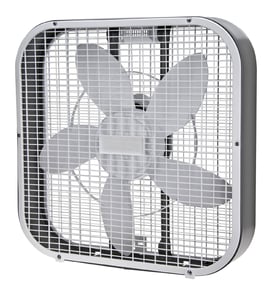

How many watts is a 12 inch fan?
A 12-inch fan typically uses about 30 to 60 watts on high speed, with lower speeds often closer to 15 to 35 watts. For the Lasko HA-12 hassock fan, the exact wattage depends on the motor design and speed setting.
Most 12-inch household fans fall into these ranges:
- Low speed: ~15 to 35 watts
- Medium speed: ~20 to 45 watts
- High speed: ~30 to 60 watts
- Startup surge: briefly higher than running watts (normal for electric motors)
Check the fan’s rating label (usually on the bottom, back, or near the cord entry). Look for:
- Watts (W) listed directly, or
- Amps (A) and Volts (V) so you can calculate watts
- The speed setting used for the rating (some labels show max only)
If the label shows amps, use this:
| If the label shows | Do this | Example |
|---|---|---|
| Volts and amps | Watts = Volts × Amps | 120 V × 0.5 A = 60 W |
| Watts | Use the listed number | 45 W (max) |
Knowing wattage helps us estimate operating cost, choose the right extension cord or power strip, and troubleshoot issues like overheating, a weak motor, or a failing speed switch.
These checks often solve performance and heat issues:
- Unplug the fan and clean lint and dust from the grille and blade area
- Make sure the blade spins freely (no rubbing or wobble)
- Avoid long, undersized extension cords (they can cause voltage drop)
- If the motor hums but won’t start, test the outlet and cord first
- If you’re comfortable testing electrical parts, use a meter to check for opens/shorts
For safe electrical testing basics, use our guide: how to use a multimeter to test electrical parts video.
Last updated: February 2026
What to do when your Lasko fan stops working?
If your Lasko HA-12 hassock fan stops working, start with a full power reset and a quick inspection of the cord, plug, and outlet. Most “dead fan” problems come from a tripped outlet, a loose connection, or a stuck control rather than a failed motor.
- Unplug the fan for 60 seconds to reset the control and discharge stored power.
- Plug the fan directly into a known-good wall outlet (skip power strips and extension cords).
- Try a different speed setting and cycle the power switch from OFF to ON a few times.
- Inspect the power cord and plug for cuts, melted spots, or a loose prong.
- Check for blade obstruction: remove the grille (if accessible) and clear dust buildup or debris.
- Let the fan cool for 20 to 30 minutes if it stopped after running a long time (overheat protection can shut it down).
Unplug the fan before testing. If you have a multimeter, you can narrow the failure to the cord, switch, or motor.
- Test the outlet first (lamp test or meter).
- Check continuity through the cord and switch (with the fan unplugged).
- If the cord and switch test good, the motor or internal thermal fuse is the most common next failure point.
| What you notice | Most likely cause | What to do next |
|---|---|---|
| No lights, no sound | No power to fan | Reset, try different outlet, inspect cord/plug |
| Hums but will not spin | Blade jam or weak start | Clear obstruction, spin blade by hand (unplugged) |
| Runs then stops | Overheating or failing motor | Clean airflow path, cool down, re-test |
Running a fan with a damaged cord, blocked blade, or overheating motor can create repeat shutdowns and can damage internal electrical components. A clean airflow path and solid power connection keep the HA-12 running reliably.
For safe testing steps and tool basics, use our guide: how to use a multimeter to test electrical parts video.
Last updated: February 2026
Can you buy replacement parts for ceiling fans?
Yes. You can buy replacement parts for many ceiling fans, but for the Lasko HA-12 (a hassock household fan), you will shop for portable fan parts instead of ceiling fan parts like downrods or blade arms. Start by matching the exact model number to the correct parts list on Sears PartsDirect.
For most fans, the parts you can replace depend on whether it is a ceiling fan or a portable fan like the Lasko HA-12.
- Ceiling fans: blades, blade brackets, light kits, pull chain switches, capacitors, remotes/receivers, mounting hardware
- Portable fans (like hassock/box fans): knob/switch parts, power cord, motor components, fan blade/propeller, grille pieces, rubber feet
- Electrical items: fuses (when used), thermal protectors, wiring connectors
Use these checks before ordering:
- Confirm the fan type (ceiling fan vs. portable household fan)
- Match the model number exactly (for this page, it is HA-12)
- Compare the failed part by shape, mounting points, and wire connectors
- If the fan has multiple speeds, note whether the issue is on one speed or all speeds
- For electrical parts, test first with a multimeter (unplug the fan before opening it)
| What you are replacing | What must match | Common symptom |
|---|---|---|
| Switch/knob | Shaft style and number of speeds | Fan will not turn on or only runs on one speed |
| Power cord | Plug type and strain relief style | Fan is dead or cuts out when cord moves |
| Motor | Mounting pattern and voltage rating | Hums, overheats, or will not start |
| Blade/propeller | Diameter and hub style | Vibration, noise, poor airflow |
Ceiling fan parts are not interchangeable with portable fan parts. Matching the correct fan category and the exact model number prevents ordering a part that will not mount correctly or handle the right electrical load.
Last updated: February 2026
Why is my Lasko fan making a rattling sound?
A rattling sound in your Lasko HA-12 hassock fan almost always comes from something loose or vibrating: a loose grille, blade, or fastener; debris inside the housing; or the fan sitting unevenly. Tightening, cleaning, and re-seating the blade and covers typically stops the noise.
- Loose front or rear grille: confirm all screws and clips are snug.
- Blade not fully seated: the blade can wobble if it is not pushed onto the shaft correctly.
- Debris in the housing: a small piece of plastic, a twist tie, or dust clump can tap the blade.
- Fan on an uneven surface: vibration can sound like internal rattling.
- Worn motor bushings/bearings: a deeper rattle that changes with speed can indicate motor wear.
- Unplug the fan.
- Remove the grille (keep screws together).
- Clean the blade and grille; remove any debris inside the housing.
- Re-seat the blade on the motor shaft; spin it by hand to confirm it turns freely and does not contact the grille.
- Reinstall the grille and tighten screws evenly (do not overtighten and crack plastic).
- Test on each speed; listen for changes.
| Sound pattern | Most likely cause | Best next step |
|---|---|---|
| Light, fast rattle | Loose grille or screw | Tighten and recheck alignment |
| Tick-tick once per revolution | Blade rubbing grille | Re-seat blade; align grille |
| Deeper rattle that increases with speed | Motor wear or loose internal mount | Inspect mounts; consider motor replacement |
A rattling fan can quickly turn into blade-to-grille contact, which reduces airflow and can damage the blade or motor. Fixing vibration early helps your HA-12 run quieter and last longer.
If you need to inspect wiring or confirm power to the motor after cleaning and tightening, use our guide: how to use a multimeter to test electrical parts video.
Last updated: February 2026
What size fan should I get for a 12x12 room?
For a 12x12 room (144 sq. ft.), choose a fan based on airflow and coverage, not ceiling-fan blade span. A portable floor fan like the Lasko HA-12 works best when it can move air across the room or create a cross-breeze; pick a size that fits your placement and noise needs.
Use these practical checks to match fan size to the room and how you use it:
- Coverage goal: whole-room circulation (air mixing) or spot cooling (aimed at you)
- Fan type: floor fan, box fan, pedestal fan, or air circulator
- Airflow control: multiple speeds so you can run low at night and higher during the day
- Noise level: bedrooms usually need a quieter setting for overnight use
- Placement space: measure the footprint and height so it fits safely away from walkways
Where you put the fan matters as much as the fan size.
- For whole-room circulation: aim the fan across the longest wall to keep air moving
- For faster cooling: point it toward you from several feet away, not right next to you
- For cross-ventilation: place it near a doorway or window to pull fresh air in or push warm air out
| Fan type | Best for a 12x12 room | Typical setup |
|---|---|---|
| Air circulator / hassock fan (like HA-12) | Mixing air evenly | Aim diagonally across the room |
| Box fan | Strong airflow through a window | In a window or facing a doorway |
| Pedestal fan | Adjustable height, spot cooling | Aim at bed/desk area |
In a 144 sq. ft. room, the right fan size and placement improves comfort and helps your HVAC feel more effective because the air stops stratifying (hot up high, cool down low).
For general DIY safety and prep before working on a fan (cleaning, cord checks, basic electrical testing), use are diy appliance repairs safe.
Last updated: February 2026