Owner’s manual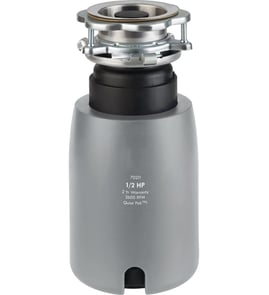





How long should a garbage disposal last?
A garbage disposal typically lasts 8 to 15 years, and many homes replace one around 10 to 12 years. For a GE GFC325V disposal, lifespan depends most on what you grind, how often you run it, and whether leaks or jams are addressed early using the GFC325V owner's manual.
Typical lifespan by usage
- Light use (1 to 2 people): often 12 to 15 years
- Average family use: often 10 to 12 years
- Heavy use (large household, frequent cooking): often 8 to 10 years
- Frequent misuse (fibrous foods, grease): can fail sooner
| Usage pattern | What we commonly see | What shortens life fastest |
|---|---|---|
| Light | Longer service life | Letting small leaks continue |
| Average | Mid-range service life | Grinding fibrous foods often |
| Heavy | Shorter service life | Repeated jams and overheating |
Signs it is near end of life
- Persistent humming, grinding, or repeated tripping of the reset
- Frequent jams even after clearing the grind chamber
- Leaks at the sink flange, outlet, or housing
- Slow draining that returns quickly after cleaning
- Excessive vibration or rattling during normal operation
What to do to make it last longer
- Run cold water before, during, and after grinding (helps move debris through the drain)
- Cut scraps into smaller pieces; feed gradually instead of dumping a full plate
- Avoid fibrous foods (celery, corn husks, onion skins) and starchy peels in large amounts
- Keep grease, oil, and coffee grounds out of the disposal
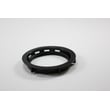
- If you see seepage at the sink opening, inspect sealing parts such as the garbage disposal sink flange gasket WC03X10008
Why it matters
Replacing a disposal early is usually caused by preventable issues: chronic leaks that damage components, repeated jams that overheat the motor, or drain restrictions that make the unit work harder than it should.
Last updated: January 2026
How to reset model gfc325v disposal?
To reset your GE GFC325V garbage disposal, press the red reset button on the bottom (or lower back) of the disposer, then try turning it on again. If it immediately trips again, clear the jam before resetting.
Reset steps (safe, quick checklist)
- Turn the wall switch OFF.
- Unplug the disposer (or turn OFF the circuit breaker).
- Look under the unit and press the red reset button until it clicks.
- Restore power.
- Turn on cold water, then switch the disposer ON.
If the reset button keeps popping
A reset that will not stay in usually means the motor is overloaded from a jam, a hard object, or a wiring issue.
- Check for a jam in the grinding chamber (power disconnected).
- Remove any foreign object with tongs (not your hand).
- If your model has a manual turning feature, free the impellers, then reset again.
- If the disposer hums but will not spin, treat it as a jam first.
- If it is completely dead (no hum), confirm power at the outlet and switch.
Parts that commonly relate to “won’t run” complaints
These parts do not fix a motor overload by themselves, but they are common service items when you are addressing leaks, fitment, or a stopper that is blocking flow.
| Symptom you notice | What to check | Example part for GFC325V |
|---|---|---|
| Water backs up in sink | Stopper position, drain path | Garbage disposal drain stopper WC11X20163 |
| Leak at sink opening | Sink flange gasket and mounting | Garbage disposal sink flange gasket WC03X10008 |
| Intermittent power | Cord/connection condition | Garbage disposal power cord WC12X10002 |
Why it matters
Using the reset button without clearing a jam can keep overheating the motor. Clearing the obstruction first helps the disposer restart normally and reduces nuisance trips.
For model-specific diagrams and service notes, use the GFC325V manual.
Last updated: January 2026
How do I fix a garbage disposal that just hums?
A GE garbage disposal model GFC325V that just hums is almost always jammed or has tripped its overload. We recommend shutting off power, pressing the reset button on the bottom, then manually freeing the impeller before restoring power and testing with cold water; see the GFC325V owner's manual for model-specific steps.
Safety first (before you touch anything)
- Turn off power at the switch; if it is hardwired, turn off the breaker.
- Never put your hand into the disposal grind chamber.
- Remove standing water from the sink if it blocks access.
- Use tongs or pliers to pull out visible debris.
- If you smell burning or the unit is hot, let it cool 10 to 15 minutes before resetting.
Step-by-step: clear a jam that causes humming
- Cut power.
- Press the reset button (typically a small red button on the bottom of the disposer).
- Free the impeller:
- If your disposer has a hex socket underneath, insert the correct Allen wrench and work it back and forth.
- If there is no hex socket, use a wooden spoon handle from above to gently nudge the impeller.
- Remove the object if you can see it (common culprits: bones, fruit pits, utensils).
- Restore power, run cold water, and test in short bursts.
Quick diagnosis guide
| What you notice | Most likely cause | What to do next |
|---|---|---|
| Hums, does not spin | Jammed impeller | Manually free impeller, then reset |
| Completely dead | No power or tripped breaker | Check switch, breaker, outlet, wiring |
| Runs but drains slowly | Partial clog downstream | Check drain line and trap |
| Leaks at sink opening | Worn mounting seal | Inspect sink flange gasket and mounting |
Parts that commonly relate to humming, leaks, or poor performance
A hum is usually a jam, but if you also have leaks or loose mounting, these model-compatible parts are common fixes:
- Garbage disposal sink flange gasket WC03X10008 (helps seal at the sink opening)
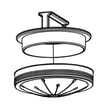
- Garbage disposal sink flange WC15X20161 (mounting kit components if the flange area is damaged)
- Garbage disposal power cord WC12X10002 (for power issues on corded setups)
Why it matters
A disposer that hums is drawing power but not turning; clearing the jam quickly helps prevent repeated overload trips and reduces the chance of motor damage.
Last updated: January 2026